9
Press B
v
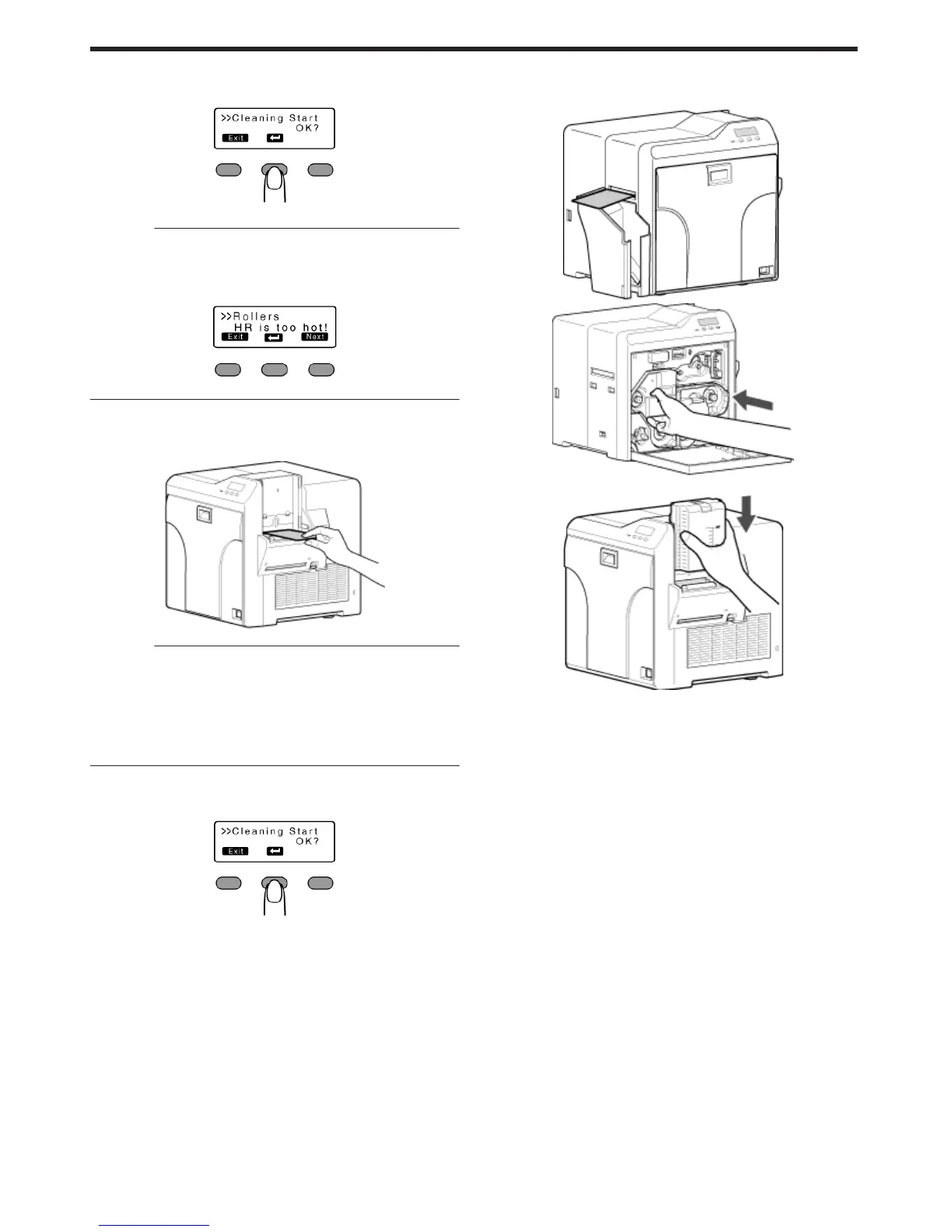
A [Cleaning..] message appears.
.
Cautions:
v
If the retransfer heating roller is hot, a [HR is too hot!] message will
be displayed. Turn off the power, and perform cleaning after the
retransfer heating roller has cooled down completely.
.
10
Insert the cleaning card (sold separately) within 20 seconds
v
The roller draws in the card, and cleaning starts automatically.
v
A [Cleaning Start OK?] message appears after the card is discharged.
.
Cautions:
v
Insert the card within 20 seconds after pressing B.
v
After pressing B, the buzzer sounds upon a lapse of 20 seconds,
and a [Jam(Hopper)] error message appears about 10 seconds later.
Press KNB to cancel the error.
v
When a standard-sized card is inserted, the card is automatically
discharged from the NG card outlet, and a [Cleaning Start OK?]
message appears.
11
Press B, and insert the cleaning card again
v
Reverse the adhesive face, and insert the card.
.
12
After the cleaning card is discharged, turn off the power, install the
retransfer film cassette, close the printer door, and install the card
hopper
.
.
.
v
To turn on the power again, do so after an interval of at least 10 seconds.
Maintenance
38















 To Next Page