3030226 Rev. D 3-14 System Operation
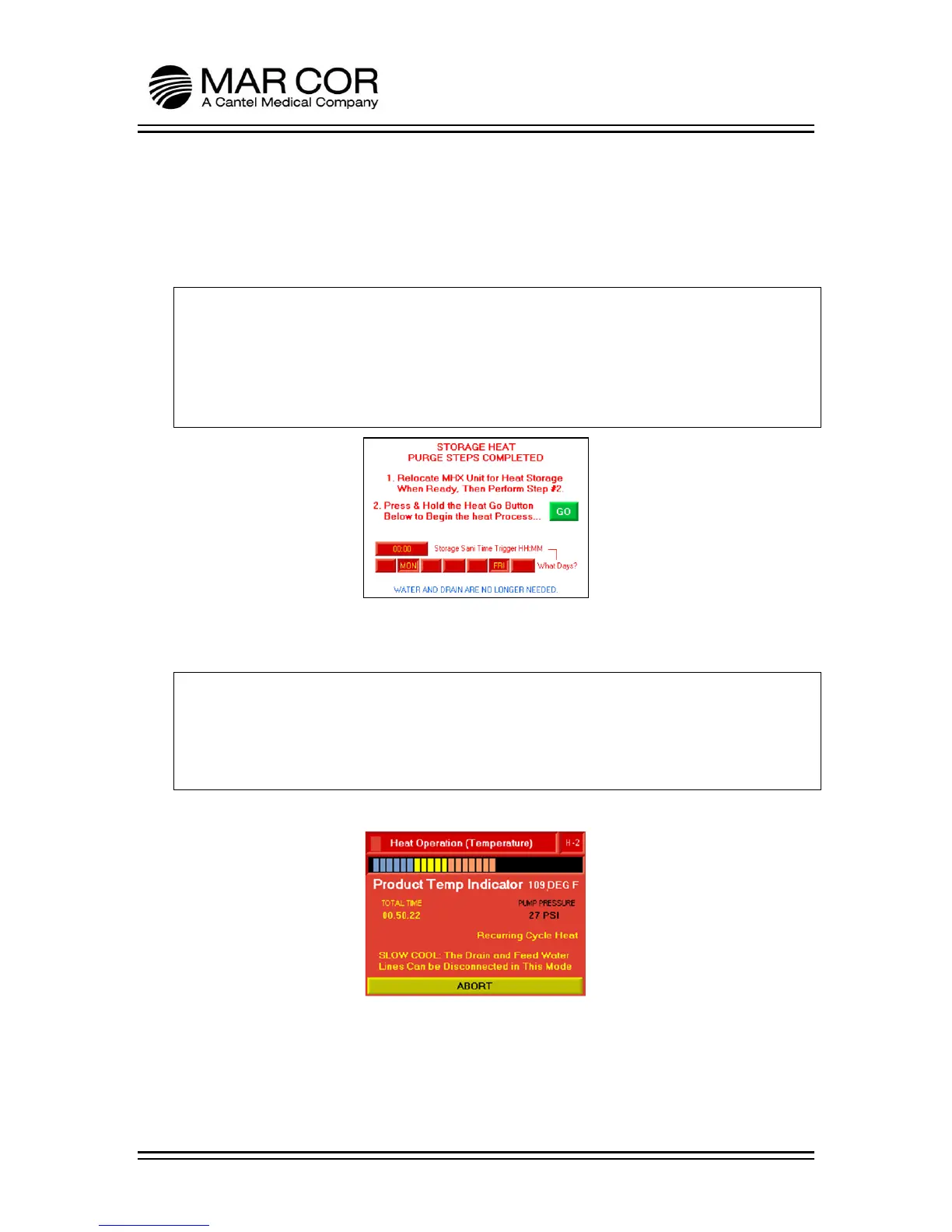
6. Once the purge is complete, the RO will display the screen below. The operator
can adjust the timing of the storage heat. To select the days of the week to
disinfect, touch the appropriate day. If the day of the week is visible, the RO will
heat disinfect on that day. To adjust the time of day the disinfection process
starts, press the Storage Sani Time Trigger. This is a 24 hour clock.
NOTE:
The drain and RO feed water may now be disconnected (will not be needed again
until process is canceled or aborted). If relocating, turn power off using the power
switch and disconnect power cord from outlet. When located in new location,
plug power cord into electrical outlet and turn the power switch on, the RO will
return to the screen below.
7. When GO is pressed the RO will immediately start a heat disinfection regardless
of the current time or day of the week.
NOTE:
If the RO is turned off, unplugged, or power is disrupted at any point after GO is
pressed and before the storage heat process is canceled or aborted, a new heat
disinfection will be started when power is restored and the RO will continue to
operate as described in the steps below.
8. The RO will indicate the product water temp and total heat time.



 To Next Page