123
7.3. Table of distances
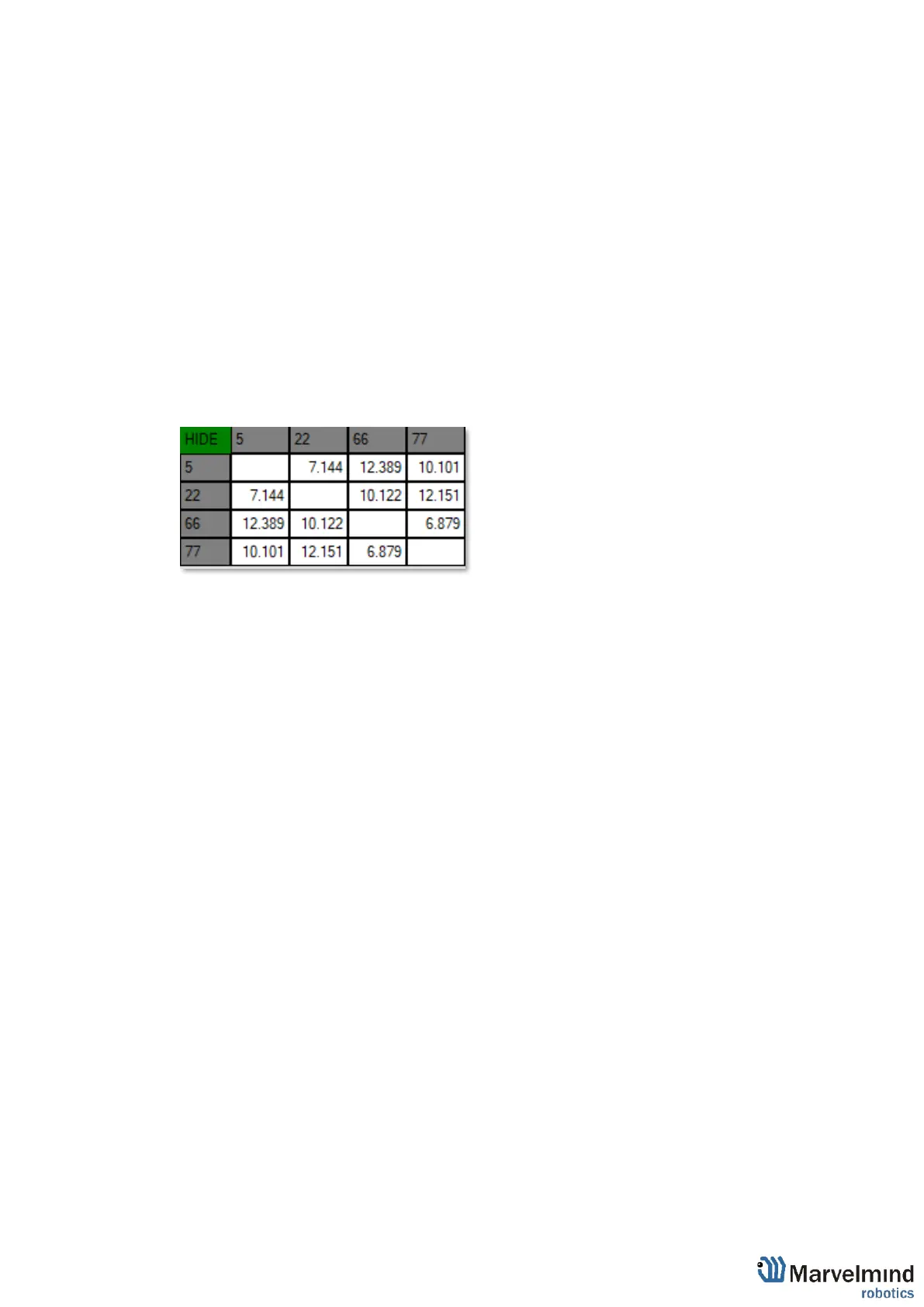
Table of distances shows the measured distance between all beacons. The map and
its graphical visualization depend on distances, which is a very important part of the
system.
There are two ways of measuring:
- Measuring by ultrasound (automatic)
- Measuring by user (manual)
Measuring by ultrasound is impossible for Mini-RX and Industrial-RX beacons
In noisy cases and cases with long distances it is better to use manual input
7.3.1. Measuring by ultrasound:
- In most cases, the system builds the table of distances automatically. If everything is
good, there would be figures in cells, they would be changing a little; the color of each cell
would be white
- If color differs, check the colors’ definitions (next page) and solve the problem
- Freeze the map only if cells are white
7.3.2. Measuring by user (necessary for Mini-RX beacons and noisy cases):
- Use manual input if table of distances didn’t build. It may happen if environment is
very noisy, or distances are very huge
- In that case, cells’ color would be green
- Be careful with figures because a small mistake in the values will cause mistakes in
location
How to freeze/enter distance manually:
7.3.2.1. Open the Dashboard. You will see the table of distances
7.3.2.2. Right click on the cell you want to freeze/enter. Additional menu will
open. There you can control the table of distances. Choose Freeze
distance for pair to freeze it



 To Next Page