Home
Matrox
Extender
Extio 3 Series
Page 40
Matrox Extio 3 Series - Page 40
120 pages
Manual
Save Page as PDF
To Next Page
To Next Page
To Previous Page
To Previous Page
Loading...
40
Matrox Extio 3 Series – User Guide
T
o remov
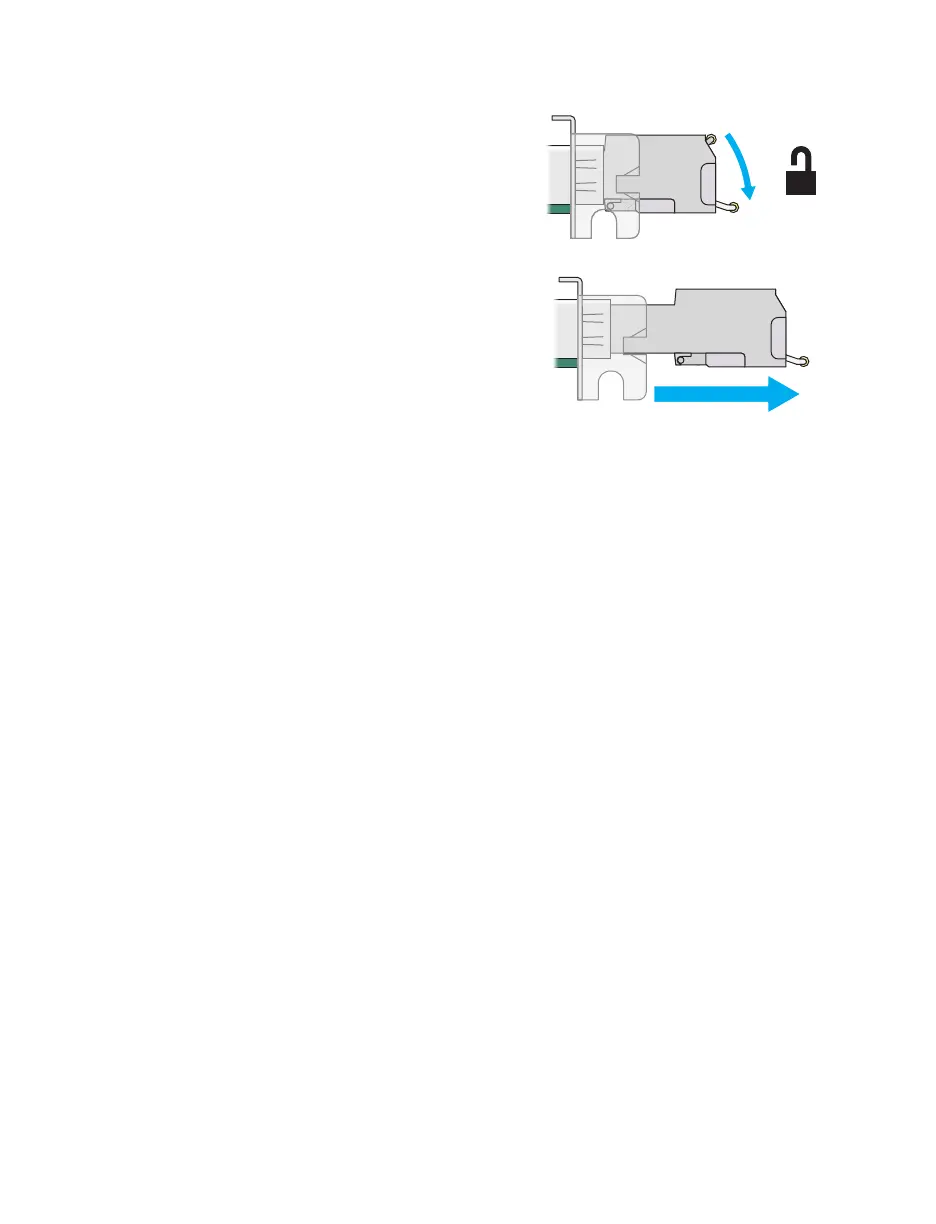
e the SFP module:
1
Pull th
e latch han
dle down t
o unlock
the SFP m
odule from
its housing.
2
Grasp the SFP m
odule by the sid
e walls
and carefully pull the module out of the
housing.
39
41
Table of Contents
Main Page
Table of Contents
2
Matrox Safety Information
6
Installation and Operation
6
If a Power Supply (Internal or External) was Included with Your Product
7
If Your Product Includes Laser-Based Technology
7
If Your Product Includes a Battery
7
Repair
8
Overview
9
Hardware Supplied
9
Software Available
9
Hardware Required (Sold Separately)
10
Optional Hardware (Sold Separately)
10
Mounting Kits
11
More Information
11
Getting Started
12
Point-To-Point Mode
12
Networked Mode
12
Link Redundancy
16
Changing the OSD Keyboard Settings
16
Changing the OSD Language
18
Using OSD Command Shortcuts
19
VPN Configuration
20
Generate the VPN Configuration File (Network Administrator)
20
Import the VPN Configuration File and Connect to VPN (Remote User)
21
Configure the Units (Network Administrator)
24
Set the Required Receiver and Transmitter Settings
24
Troubleshoot
25
Change the VPN Configuration
25
Make Adjustments When Necessary
25
File Structure and Syntax for Swanctl.json
26
File Structure for the VPN Configuration File (Strongswan.zip)
26
Installing Your Extio 3 Transmitter Card
28
Before You Begin
28
Step-By-Step Installation
29
Installing Multiple Cards
30
Connecting Your Extio 3 Devices
31
Before You Begin
31
Extio N3408 or N3208 Transmitter Card
33
Extio N3408 Transmitter or Receiver Unit
34
Extio N3208 Transmitter or Receiver Unit
36
Installing the SFP Module
39
Setting up Link Redundancy
41
Connection Setup Guidelines
41
Enabling Link Redundancy
42
Disabling Link Redundancy
42
Description of Leds
43
Power/Status Leds
43
Network Leds
45
Updating Your Extio 3 Firmware
47
Before You Update Your Firmware
47
Obtaining the Matrox Extio 3 Firmware Updater Package
47
Updating Your Matrox Extio 3 Firmware (Networked-LAN Mode)
48
Updating Your Matrox Extio 3 Firmware (Networked-Internet / WAN with Site-To-Site VPN and Networked-Internet with Ipsec VPN Modes)
52
Updating Your Matrox Extio 3 Firmware (Point-To-Point Mode)
52
Setting up Point-To-Point Mode
54
Before You Begin
54
Accessing the OSD (On-Screen Display)
55
Using the OSD (On-Screen Display)
55
Sources
56
Receiver Settings and Information
57
Setting up Networked Mode (LAN or Internet / WAN with Site-To-Site VPN)
61
Before You Begin
61
Validating Network Discovery
62
Installing Matrox Extio Central Manager Software
62
Accessing the OSD (On-Screen Display)
63
Using the OSD (On-Screen Display)
64
Sources
65
Receiver Information
67
Aggregator Mode
68
Touch-Screen Monitors
71
Setting up Networked Mode (Internet with Ipsec VPN)
74
Before You Begin
74
Installing Matrox Extio Central Manager Software
75
Accessing the OSD (On-Screen Display)
76
Using the OSD (On-Screen Display)
76
Sources
77
Receiver Information
79
VPN Information
80
Aggregator Mode in Networked-Internet with Ipsec VPN
81
Rebooting or Resetting Your Extio 3 Device
82
When to Reboot or Reset Your Device
82
Software Reboot
82
Hardware Reboot or Configuration Reset
83
Changing the Operation Mode of Your Devices
85
Changing from Copper to Fiber Optic
85
Troubleshooting
87
What to Do if You Have a Problem
87
Common Problems and Solutions
87
Product Information
90
Hardware Specifications
90
Product Dimensions
92
Maximum Distance (Point-To-Point Mode)
93
External Power Supply
93
Environmental
94
Notes
94
Fiber Optic Transceiver SFP (Small Form Factor Pluggable) Modules
94
Battery
94
Appendix A - Providing Adequate Airflow to Your Extio 3 Device
96
Appendix B - Firewall Requirements
97
Extio Central Manager Software
97
Firmware Updater
97
Extio 3 Devices
98
Accessing Your Windows Firewall Settings
99
Adding Rules to Your Windows Firewall Settings
100
Appendix C - Mounting Your Devices
102
Mounting Guidelines for Rack Mount Kit
102
Mounting Your Extio 3 Device Using a Rack Mount Kit
102
Mounting Guidelines for under Desk Mount Kit
103
Mounting Your Extio 3 Device Using an under Desk Mount Kit
103
Appendix D - Configuring Your Audio Settings
105
Receiver Output
105
Receiver Input
106
Receiver Audio Destination
107
Appendix E - File Structure for Swanctl.json
108
The "Connections" Section
108
The "Secrets" Sections
111
Customer Support
112
Matrox Web
112
Technical Support
112
View Your Warranty Information
112
View the Third Party Software Notices
112
Register Your Matrox Product
113
Related product manuals
Matrox Extio F2208
65 pages
Matrox Extio N3408
65 pages
Matrox Extio F2408
65 pages
Matrox Avio F125
44 pages



 To Next Page