Matrox Extio 3 Series – User Guide 41
Setting up link redundancy
Link redundancy ensures your Extio 3 devices continue to work in case of a network cable or switch
failure.
Connection setup guidelines
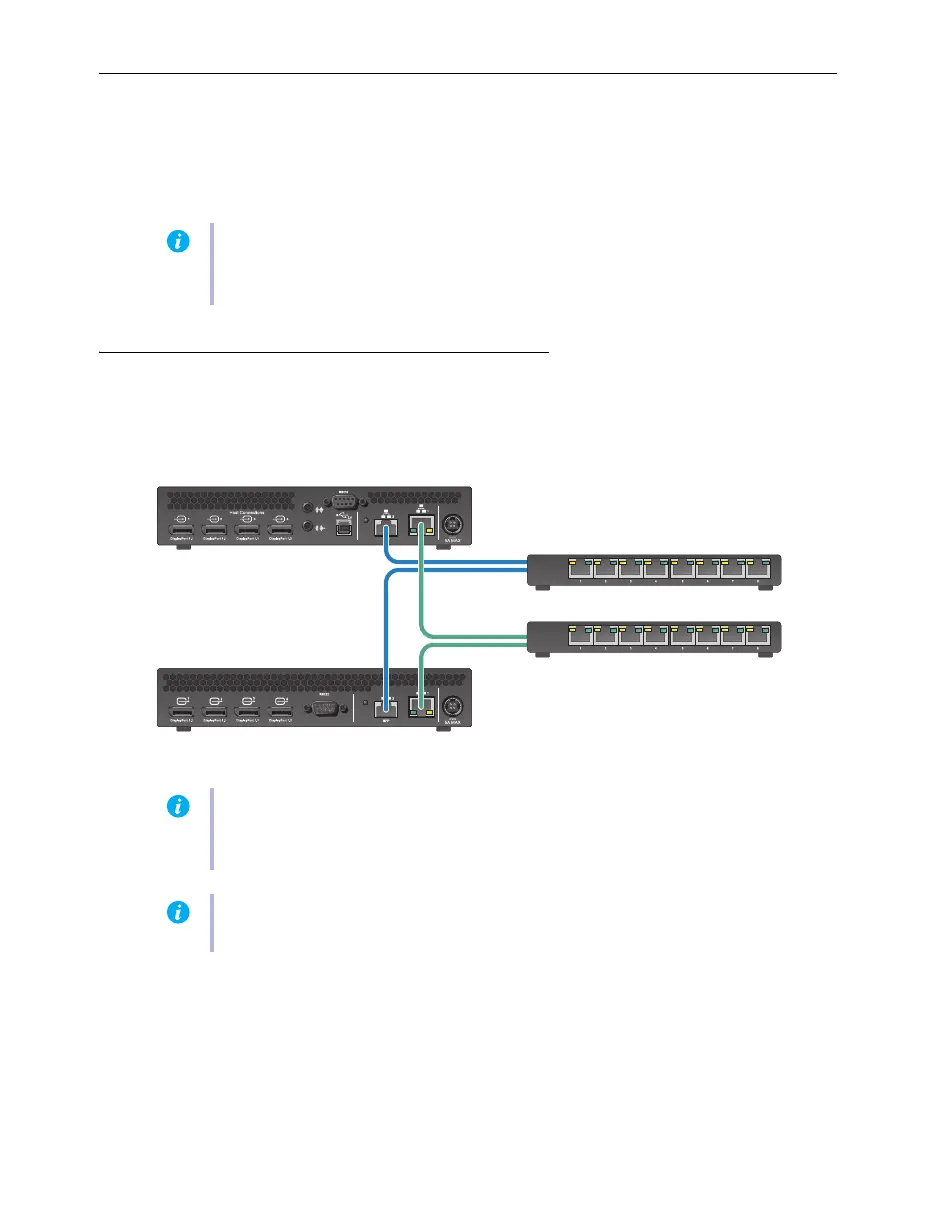
The following provides a basic outline for how to connect your Extio 3 transmitter and receiver to
support link redundancy.
Make sure your Extio 3 units are all on the same subnet.
Connect each Extio 3 transmitter and receiver unit to a managed network switch pair.
Make sure to connect
LAN1
to network switch 1 and connect
LAN2
to network switch 2.
Note:
This feature is supported in Networked-LAN and Point-to-Point operation modes. It
is not supported in Networked-Internet / WAN with Site-to-Site VPN and Networked-
Internet with IPSec VPN operation modes.
Note:
Link redundancy is supported only on the following hardware: Extio N3408
transmitter units, N3208 transmitter units, N3408 receiver units, and N3208 receiver units.
Extio N3408 and N3208 transmitter cards aren’t supported.
Note:
For information on setting up your network infrastructure and configuring your
network switch, contact your network administrator.
Transmitter unit
Receiver unit
Network switch 1
Network switch 2



 To Next Page