EasyManua.ls Logo

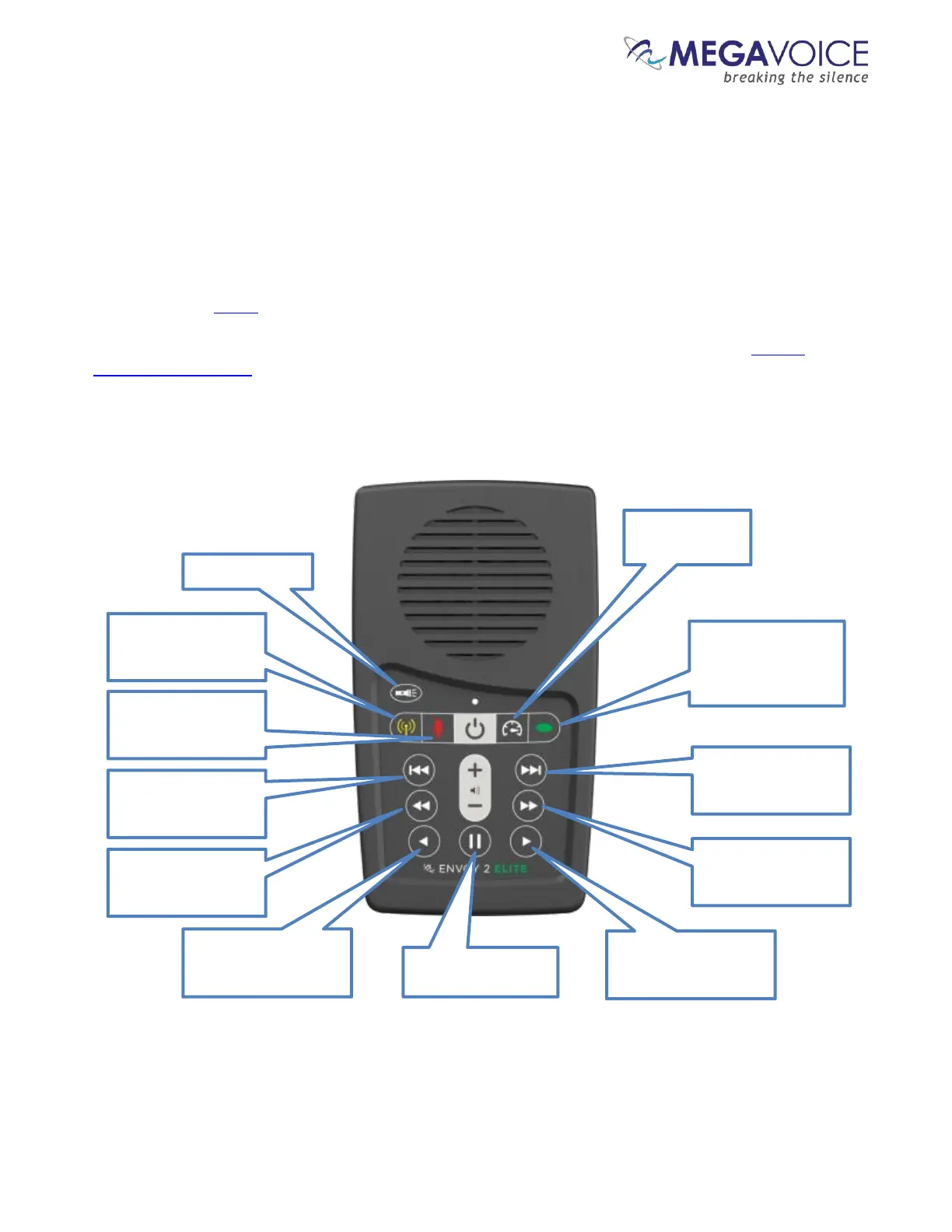
Megavoice Envoy 2 E Series - The Keypad; The Keypad Layout; Figure 6: Envoy 2 Elite Navigation and Function Buttons

Megavoice Envoy 2 E Series
68 pages
Print Icon
To Next Page IconTo Next Page
To Previous Page IconTo Previous Page
Loading...
Envoy 2 E Series User Guide 20190805-30.docx || © 2019 MegaVoice Ltd. || Page 16 of 68
The Keypad
The Envoy 2 E Series comes with an intuitive raised-button keypad, offering four levels of convenient
navigation through hundreds of audio files in multiple Languages.
Let’s get to know the Envoy 2 Elite keypad and how the navigation buttons correlate to the supported
folder structures. Also noted are the different function buttons. The keypads of the Equip, Echo and Ember
models are the same except for the absence of the buttons controlling the functions that are not included
in that particular model.
For details on the functionality of each button from within the different player modes, see the keypad
button cross reference.
The keypad layout
*The actual time may vary slightly.

Figure 6: Envoy 2 Elite Navigation and
Function buttons
Switch to FM Radio
mode (Elite and Equip
only).
Flashlight control
Switch to Recording
mode (Elite and Echo
only).
Switch to Speed
Control mode
Channel button.
Scroll forward
through Sections
and
Channels.
Scroll backwards
through the Books
in
each Section.
Scroll backwards
through the
Chapters
in each Book.
Rewind through a
Chapter (Audio File)
in
20-second* intervals.
Pause audio playback
(enter Pause mode).
Fast-forward through a
Chapter (Audio File)
in
20-second* intervals.
Scroll forward
through the
Chapters
in each Book.
Scroll forward
through the Books
in
each Section.

Table of Contents

Related product manuals