Envoy 2 E Series User Guide 20190805-30.docx || © 2019 MegaVoice Ltd. || Page 44 of 68
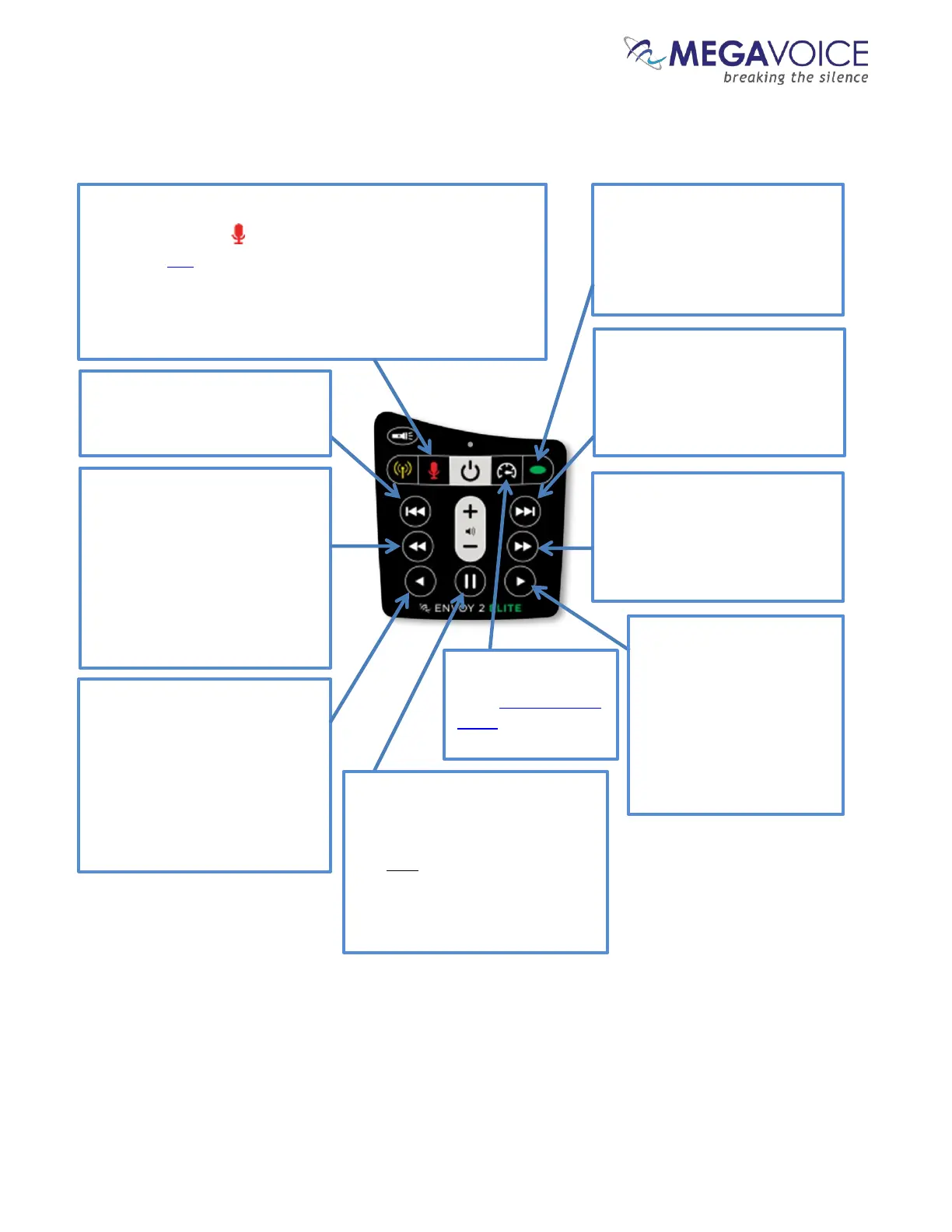
Figure 14: Button functionality while in Recording Mode
Recording controls and features
*The actual time may vary slightly.
To switch to Recording mode, press and hold the red
microphone button until the player beeps. While in this
mode, the LED will be red.
Once in Recording mode, a click on the button will beep and
begin recording a new file. When finished, another click will
end recording, beep and create the new file.
While recording, the LED will blink slowly.
A 2-second press will reset the
file counter to 000 and beep 4
times. It is recommended to do
this after moving files out of the
RECORD folder to other media.
While in recording playback
mode, a click will reverse
approximately 20 seconds* in
the current file. Press and hold
will rewind through the file until
the beginning is reached or the
button is released.
A 2-second press will delete the
current recording file and beep
While in recording playback
mode, a click will skip to the
beginning of the current file. A
subsequent click skips to the
previous file. A 2-second press
will skip backwards 5 files.
Player will beep when first file is
reached.
While in recording playback
mode, a click will skip to the
next file. A 2-second press will
skip forward 5 files. Player will
beep when last file is reached.
A click begins playback of
recorded files, starting with the
most recent. If the RECORD
folder is empty, the player will
While recording, a click will pause
the recording. Another click will
resume recording to the same
file. Only this button can resume
recording. A recording session
may be paused any number of
A 2-second press will
enter Speed Control
mode for recording
While in recording
playback mode, a click will
advance approximately 20
seconds*in the current
file. Press and hold will
fast-forward through the
file until the end is reached
or the button is released.



 To Next Page