knob uses a speed control algorithm to provide fine adjustment, with a slow rotation, and a larger
step adjustment with a faster rotation.
2.2.3 Factory Defaults
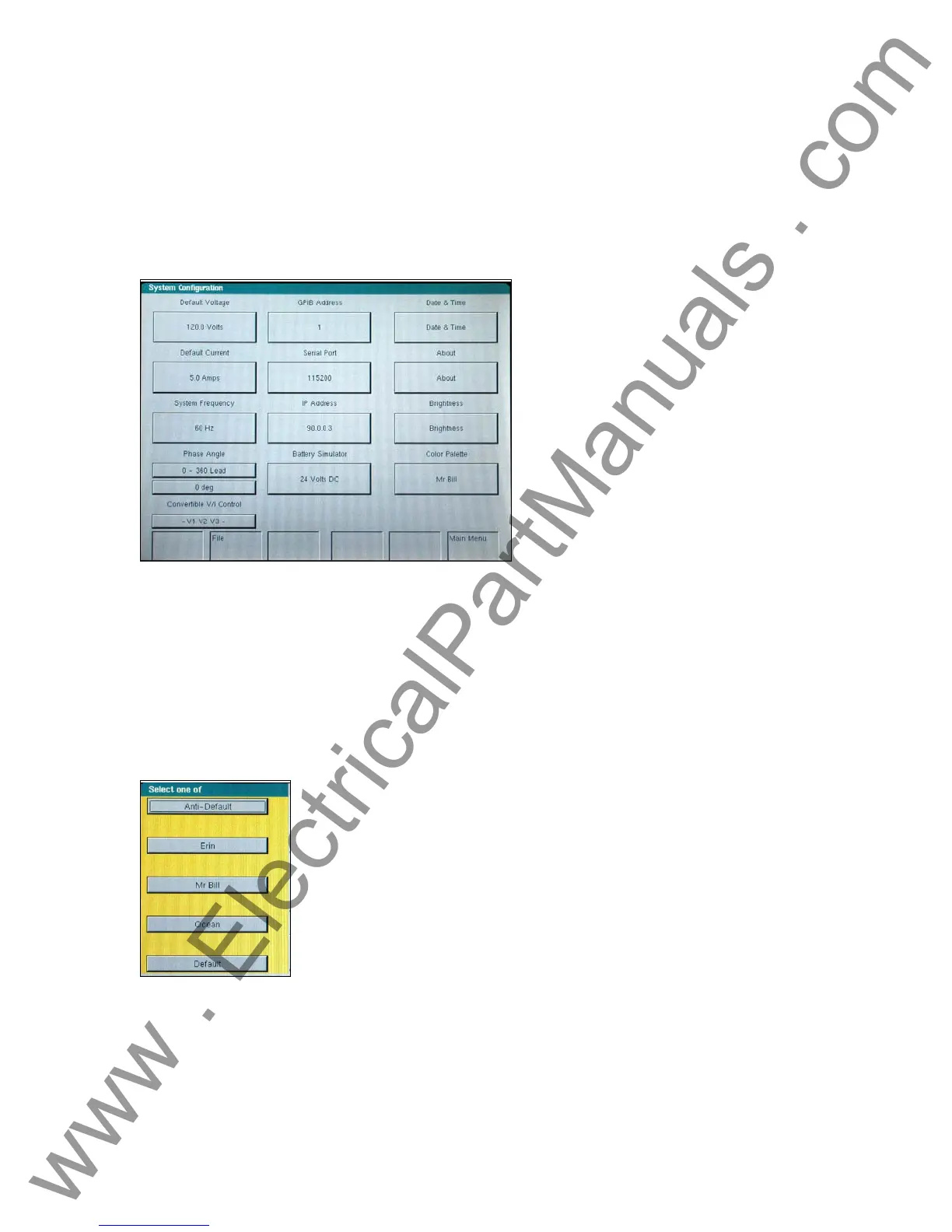
There are several factory default settings including language, system frequency, phase angle
rotation, battery simulator, GPIB address, IP address, brightness and contrast, unit and V/I Gen
serial numbers, and the color palette. Pressing the System Config. button on the Main Menu will
result in the following,
Figure 10 Default System Configuration Screen
2.2.3.1 Language
The factory default is English, but may be changed to French, Spanish, German, Italian, or
Portuguese. Other languages will be added to the list at a later date. To change language, press
the language select button on the Main Menu Screen, see Figure 7.
2.2.3.2 Color Palette
The background and color scheme is adjustable. Press the button to select from a variety of other
color schemes.
Figure 11 Color Palette Selection Screen
2.2.3.3 Brightness
The brightness is adjustable. The display will always be visible since hardware limits the
brightness from becoming too bright or too dark to be seen. Press the brightness + or - buttons to
make adjustments.
23
www . ElectricalPartManuals . com



 To Next Page