2.2.4 File Management
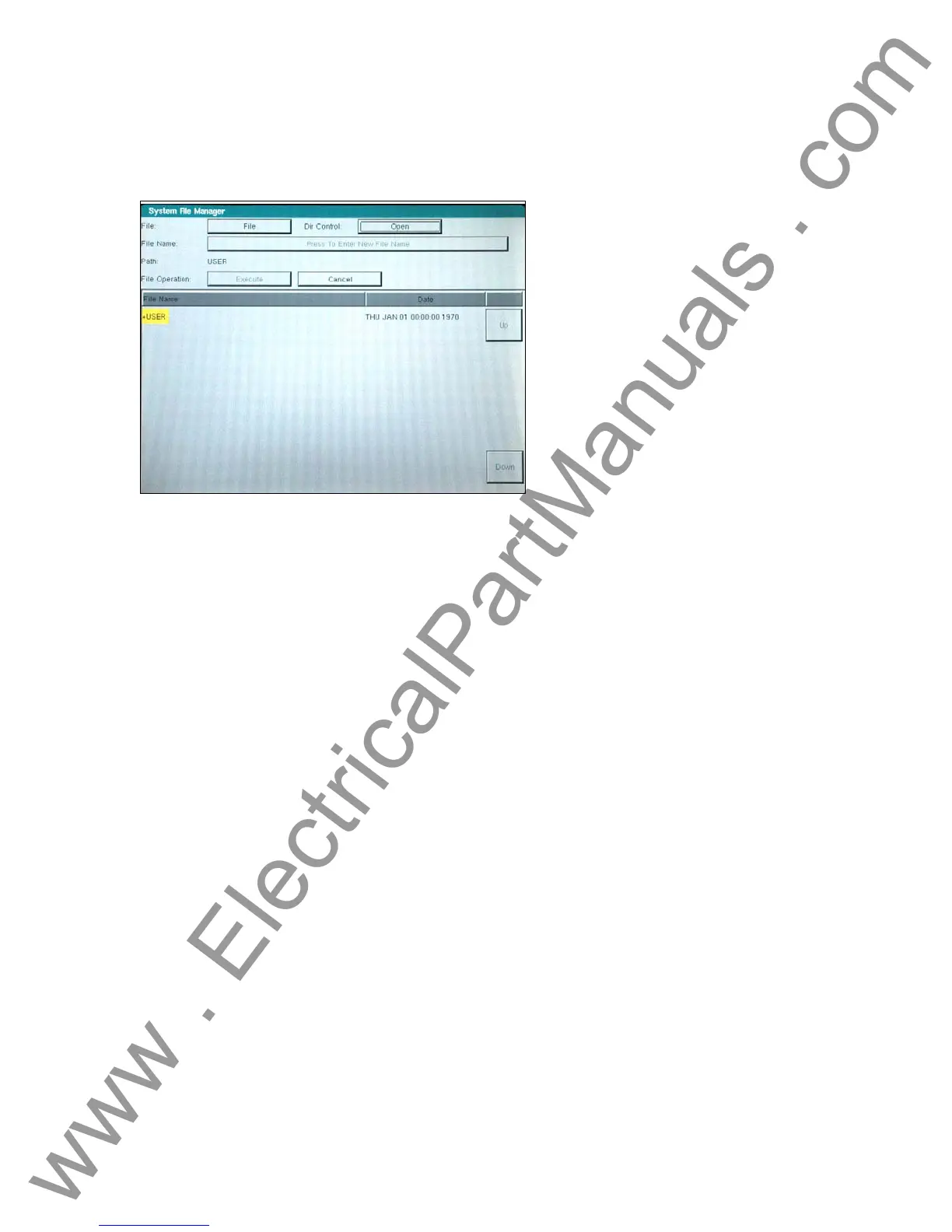
The file management display is used by the TVI to access files stored on the unit’s internal
memory. This display will allow test files to be loaded, make or change directories, rename files
and directories, delete files and directories that were created by the customer.
Figure 18 File Manager Screen
The display is divided into two parts: the upper half is used to define the user action; and the
lower half displays the files and directories. File names are limited to 99 capital letter characters.
The alphanumeric keypad is used to enter file or directory names. In addition, the name of a file
or directory will appear in the name area as the cursor moves (using Up and Down buttons)
through the list of files or directories.
The following list of actions may be used in this display through pull down menus: Save Data,
Read Data, Make Directory, Rename, Delete, Save User Sys Defaults, Read User Sys Defaults,
Read Factory Defaults and Delete Factory Defaults. If files are to be deleted or written over, a
warning message will alert the operator this action is about to take place. This allows the
operator to cancel the action.
2.2.4.1 Test Files
The test files are used to verify the functionality of specific relays. These files typically verify the
functionality of the entire relay to ensure the operational readiness of this unit under test (UUT).
The test files may be provided by Megger or generated by the customer. Default files may be
added to or removed from the database. These files will reside in a specific directory in the
MPRT internal memory.
2.2.4.2 Test Results
The test results may be stored in the MPRT internal memory as a soft copy or downloaded into a
PC for soft and/or hard copy. The test results file must be saved using the file management
display. This is performed using a file naming convention that uniquely identifies the test results.
2.3 Communication Ports
There are several different communication ports. These ports are: Serial, USB, GPIB, Parallel,
and Ethernet. The function of these ports are similar, but are differentiated by their respective
speed at performing a set of operations.
27
www . ElectricalPartManuals . com



 To Next Page