SECTION 6
DISASSEMBLY AND ASSEMBLY
107
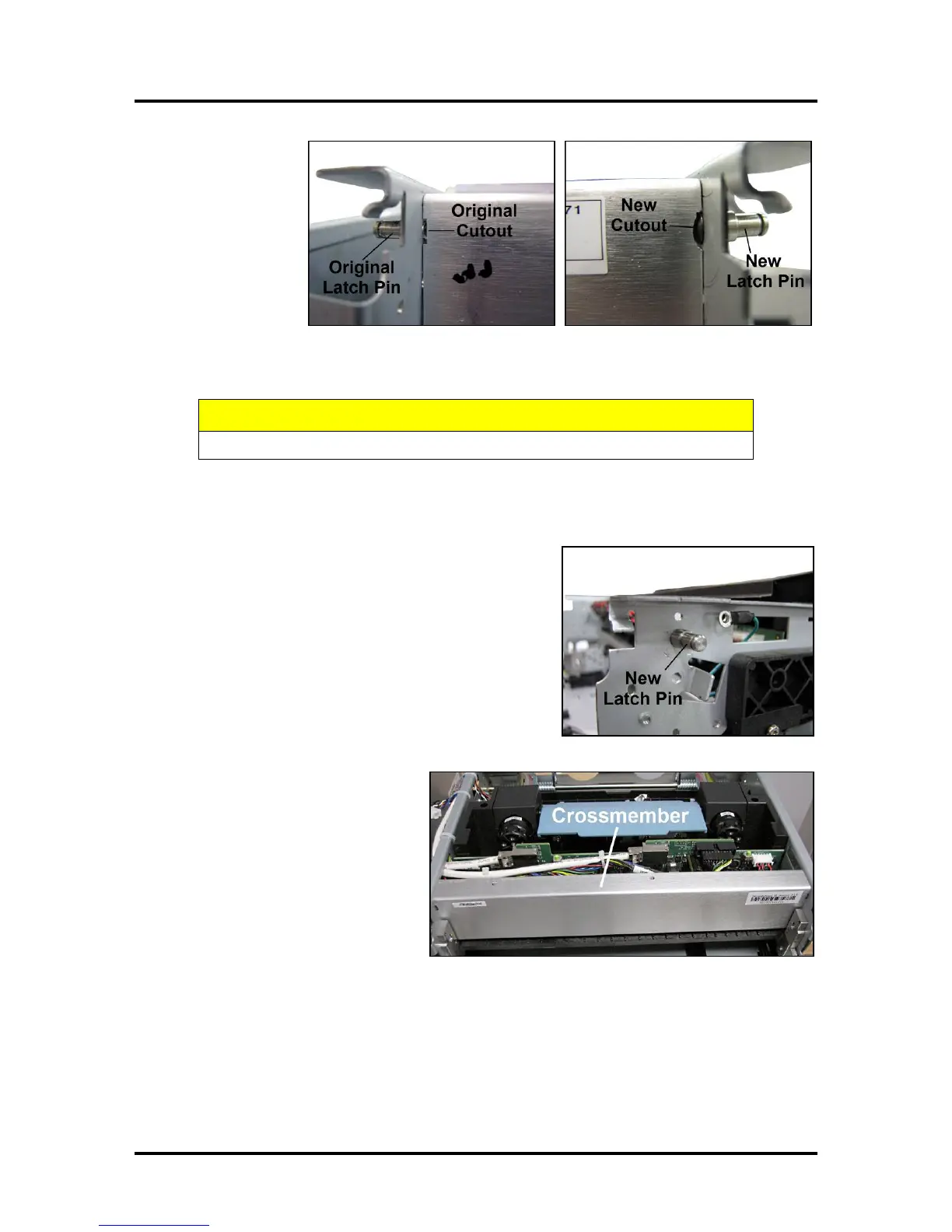
10. Use the small
file to enlarge
and round out
the cutouts
located on
the upper edge
of the
Crossmember.
NOTE: This is done so the Crossmember will fit around the mounting screw for the new
Latch Pin. If you are only replacing one Latch Pin, you only need to modify that side of the
Crossmember.
DO NOT allow any metal filings to fall inside the Print Engine or Printer.
11. If necessary, remove the old Latch Pin with pliers.
12. Install the new Upper Latch Pin using the socket head
screw supplied with the kit. (Make sure the Pin stays
straight as you install it.)
13. Reinstall the Crossmember.
Remember to install the
Crossmember over the upper side
frame pins first, then pivot the
Crossmember down to fit over the
lower side frame pins.
NOTE: If the enlarged cutout(s)
do not fit over the new Latch Pin
screw head(s), remove the
Crossmember and continue
filing as needed.
Once the Crossmember fits correctly, reinstall the (3) mounting screws on each side.


 To Next Page