58
Chapter 4 Congure the Router in Wireless Router Mode
for the router.
Note:
• Before you enable VPN Server, we recommend you configure Dynamic DNS Service (recommended) or assign a static IP
address for router’s WAN port and synchronize your System Time with internet.
• The first time you configure the OpenVPN Server, you may need to Generate a certificate before you enable the VPN Server.
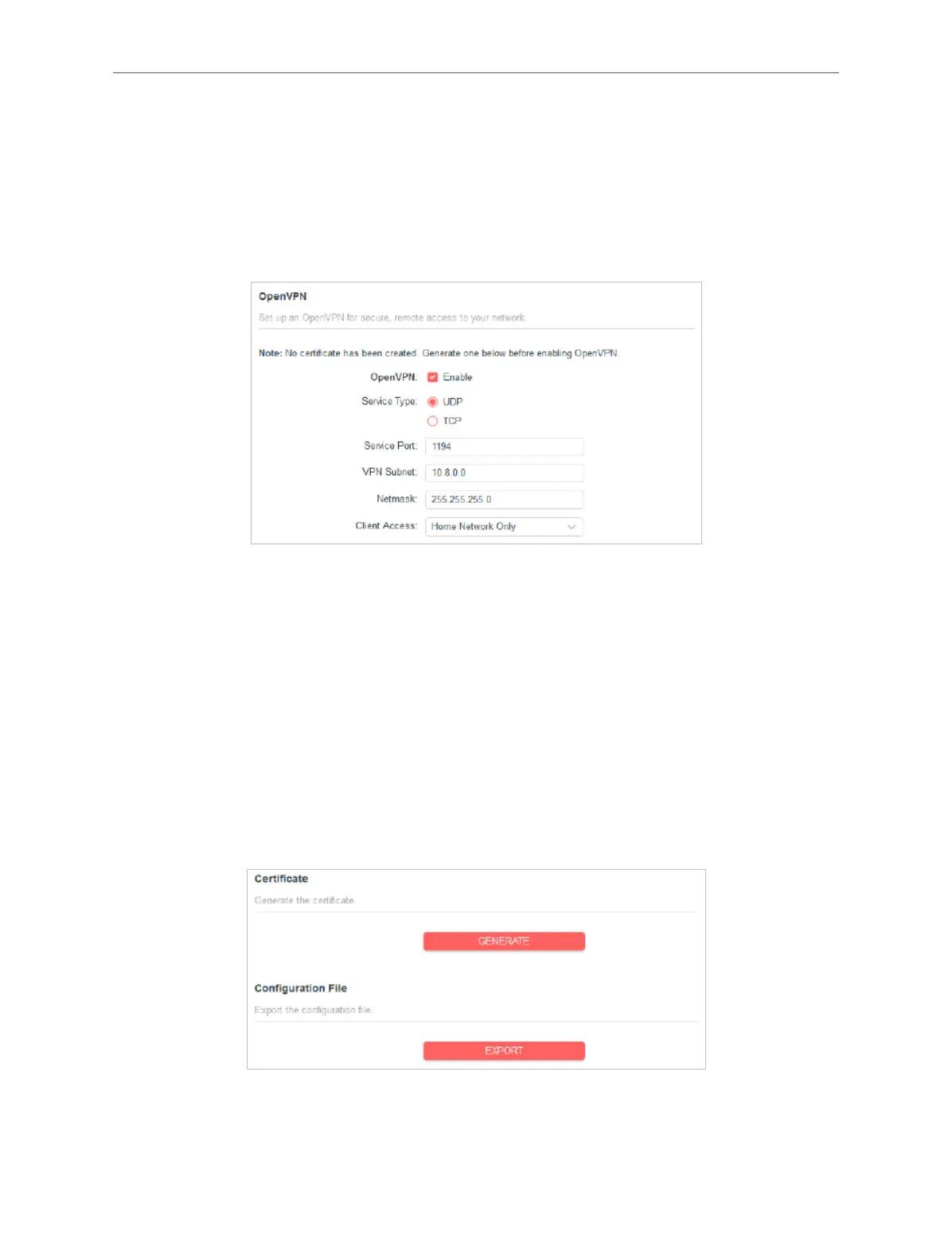
2. Go to Advanced > VPN Server > OpenVPN, and enable VPN Server.
3. Select the Service Type (communication protocol) for OpenVPN Server: UDP, TCP.
4. Enter a Service Port to which a VPN device connects, and the port number should
be between 1024 and 65535.
5. In the VPN Subnet and Netmask elds, enter the range of IP addresses that can be
leased to the device by the OpenVPN server.
6. Select your Client Access type. Select Home Network Only if you only want the
remote device to access your home network; select Internet and Home Network
if you also want the remote device to access internet through the VPN Server.
7. Click SAVE then click GENERATE to get a new certicate.
Note:
If you have already generated one, please skip this step, or click GENERATE to update the certicate.
8. Click EXPORT to save the OpenVPN conguration le which will be used by the



 To Next Page