6-42 Mx100/200 Series Operation Manual
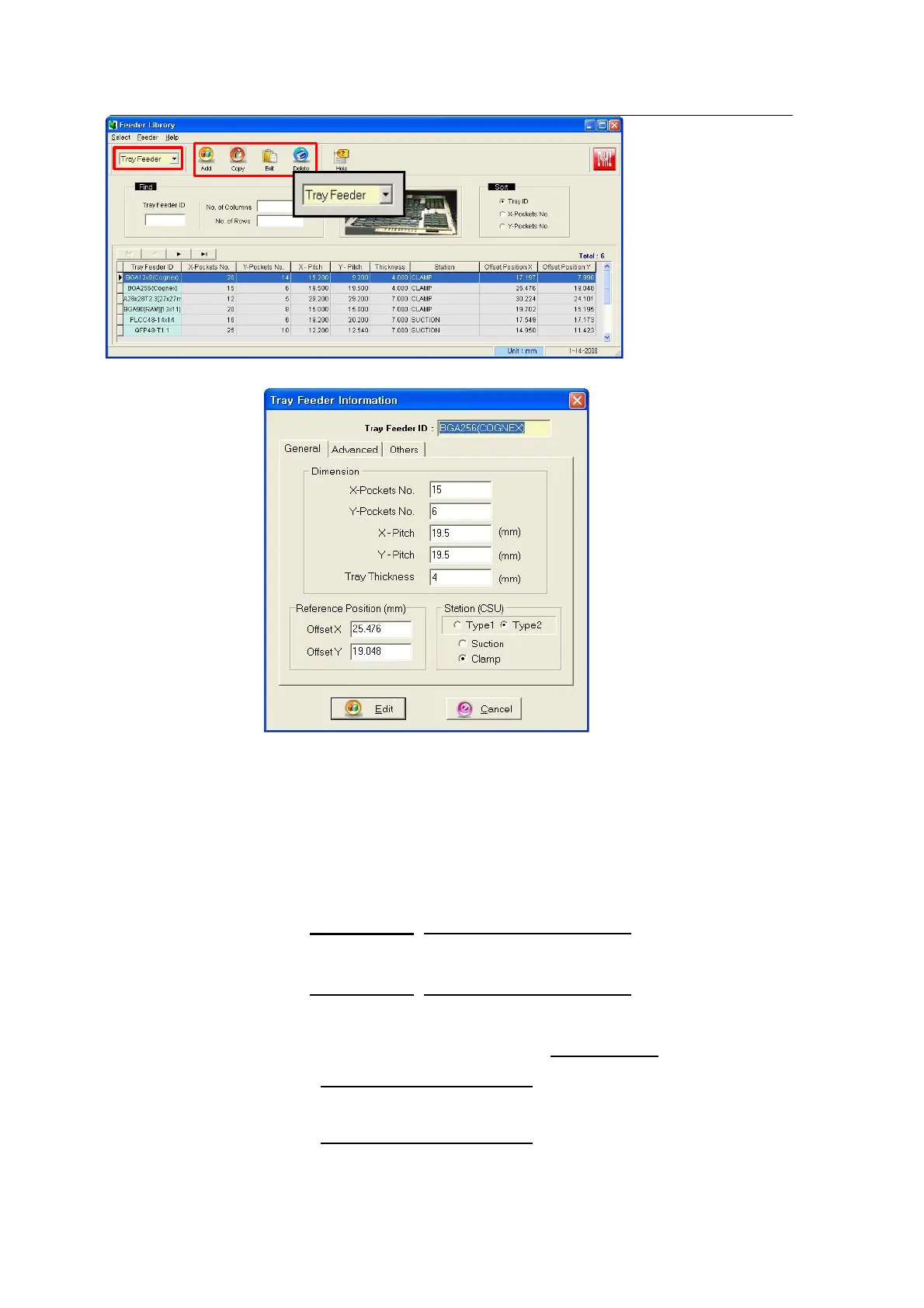
4. Select Tray Feeder in the Tray & Stick selection window.
5.
Tray Feeder ID: Enter tray information (part number)
X-Pocket No: Number of parts in the X direction of parts feeding.
Y-Pocket No: Number of parts in the Y direction of parts feeding.
X-Pitch: Center pitch of parts in the X direction. Enter X-pitch through Teach of
T-box after Optimization (Enter 1 as a tentative value).
Y-Pitch: Center pitch of parts in the Y direction. Enter Y-pitch through Teach of
T-box after Optimization (Enter 1 as a tentative value).
Reference Offset (1,1 pickup position) X: Enter the position of the first part at
the bottom right of tray through T-Box after Optimization.
Enter 2 as a tentative value.
Reference Offset (1,1 pickup position) Y: same the Reference Offset X
Enter 2 as a tentative value.
@ Enter just X-Pocket No and Y-Pocket No (Actual count).



 To Next Page