5330/5340 IP Phones – User Guide
- 93 -
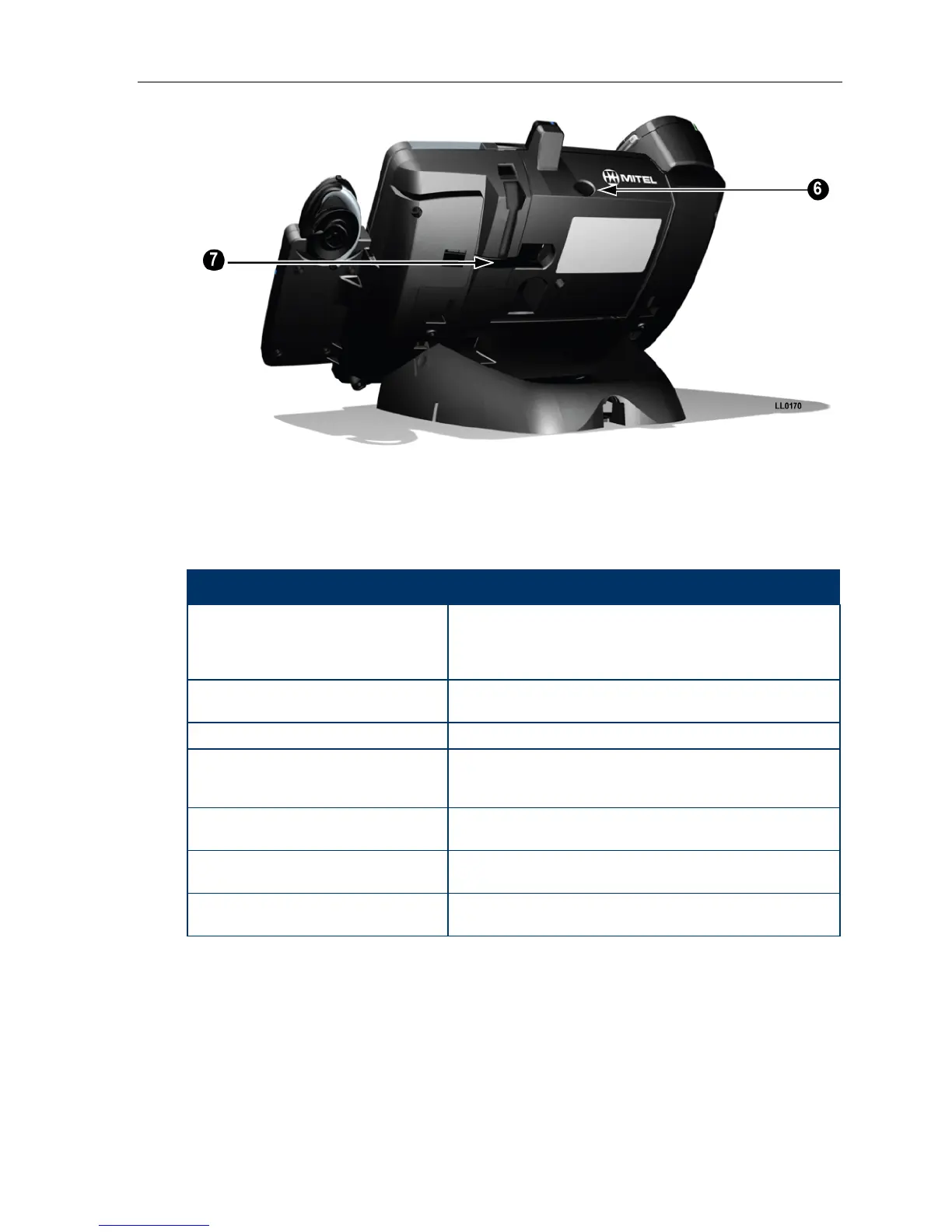
Figure 2. Rear view
Elements of Your Cordless Module and Accessories
Feature Function
1) Cordless Module Attached to the back of the phone, the module contains a
Light Emitting Diode (LED) indicating that a cordless device
is in use; also indicates the state of pairing between the
module and a cordless device.
2) Cordless Headset Cordless hands free operation for calls. If you are using the
cordless headset, you do not need to use the handset.
3) Cordless Headset Charging Cradle Provides power to recharge the cordless headset battery.
4) Cordless Handset Charging Cover Provides power to recharge the cordless handset battery.
Replaces the cover supplied with the phone for corded
handsets.
5) Cordless Handset Cordless operation for handset calls. (You can transfer from
the phone handset to the cordless headset at any time.)
6) Cordless Module pairing button Initiates pairing between the Cordless Module and a
cordless accessory.
7) Cordless Headset Cradle cable Connects to the Cordless Module to provide power to the
charging cradle.
Handset/Headset Combinations
The following combinations of corded and cordless headset and handset are supported on
the 5330/5340 IP Phone:
• Corded handset only
• Corded headset only





 To Next Page