5330/5340 IP Phones – User Guide
- 36 -
Note: The Telephony Toolbar applies the Windows Telephony Location to a dialed
number based on Tapi rules. You can configure additional rules on the “Dialing Rules”
tab (if available)
• Dial Area Code for Local Calls – Allows you to define if a phone numbers area code will
be dialed along with the number.
• Number Preview – If enabled, and you select a number from Corporate Directory or
Outlook search, the number will be displayed in the Text Field. You will have a chance to
edit the number before it is dialled.
The following are available options in the Incoming Call Actions area of the General tab:
• Display Toast Popup With Caller ID – This setting controls whether the toast will pop-up
on an incoming call.
• Lookup Caller in Outlook Contacts – If this setting is on, Telephony Toolbar will
automatically do a lookup in Outlook Contacts of the Caller ID of an incoming call.
• Perform Windows Desktop Search with Caller ID – If this setting is on, Telephony Toolbar
will automatically do a Desktop Search of the Caller ID of an incoming call.
The following are available options in the Presence area of the General tab:
• Change my IM status to “On the Phone” when I use my phone – This setting will cause
your presence in IM to change to “On the Phone” if your phone is off the hook. The IM
status will return to its appropriate state once the phone is hung up.
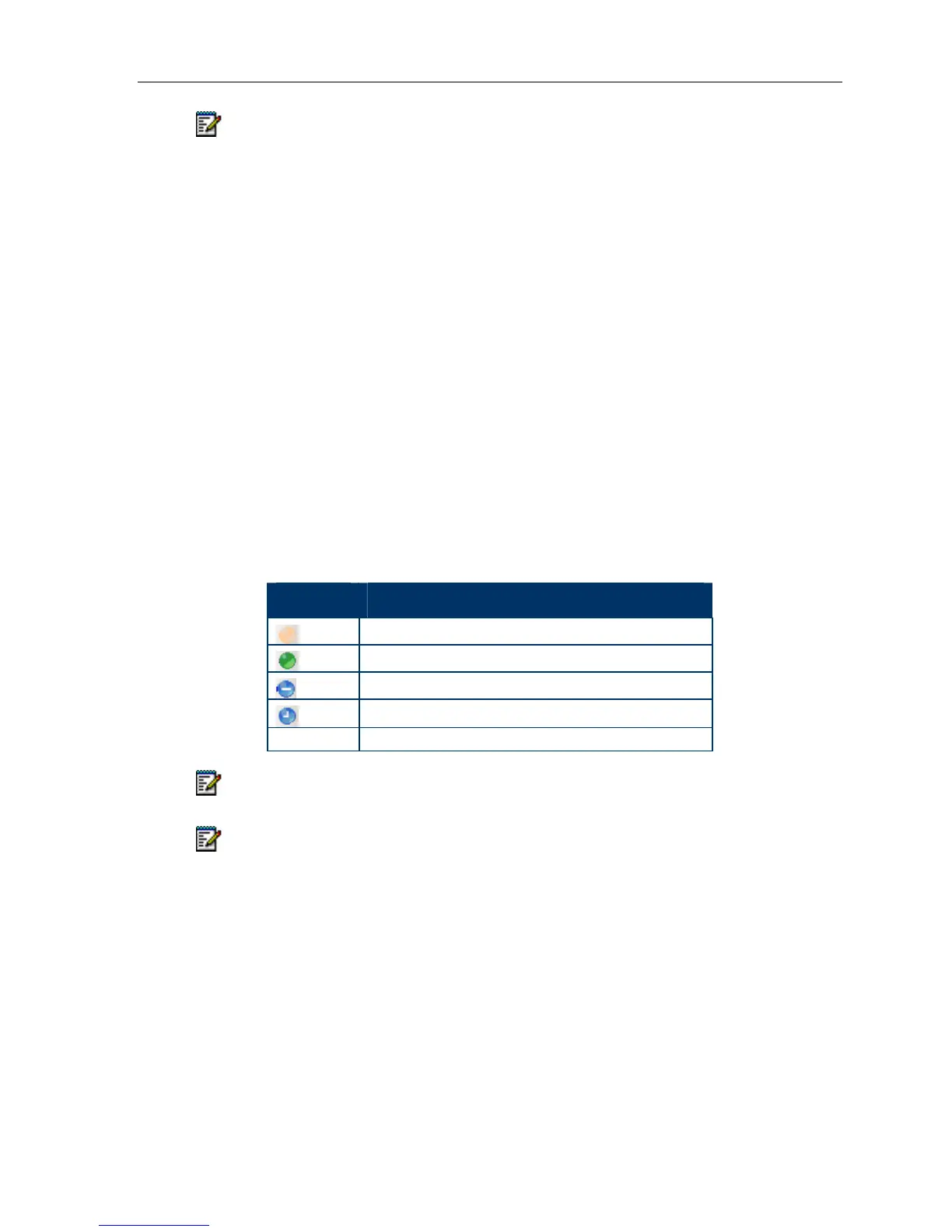
Presence Icons
Icon Description
Offline
Online
Busy, On The Phone
Away, Be Right Back, Out to Lunch
No icon Denotes no presence information reported
Note: Your IM status will remain unchanged if it is set to “Appear Offline”
Note: This function is only supported by Windows Messenger, MSN Messenger and
Windows Live. (This feature is not supported by Office Communicator.)





 To Next Page