This document and the information contained herein, is the exclusive property of MODE. And represents a nonpublic,
confidential and proprietary trade secret that may not be reproduced, disclosed to third parties, or otherwise employed in
any manner. whatsoever without the express written consent of MODE. Copyright © (2016) MODE. Allrights reserved.
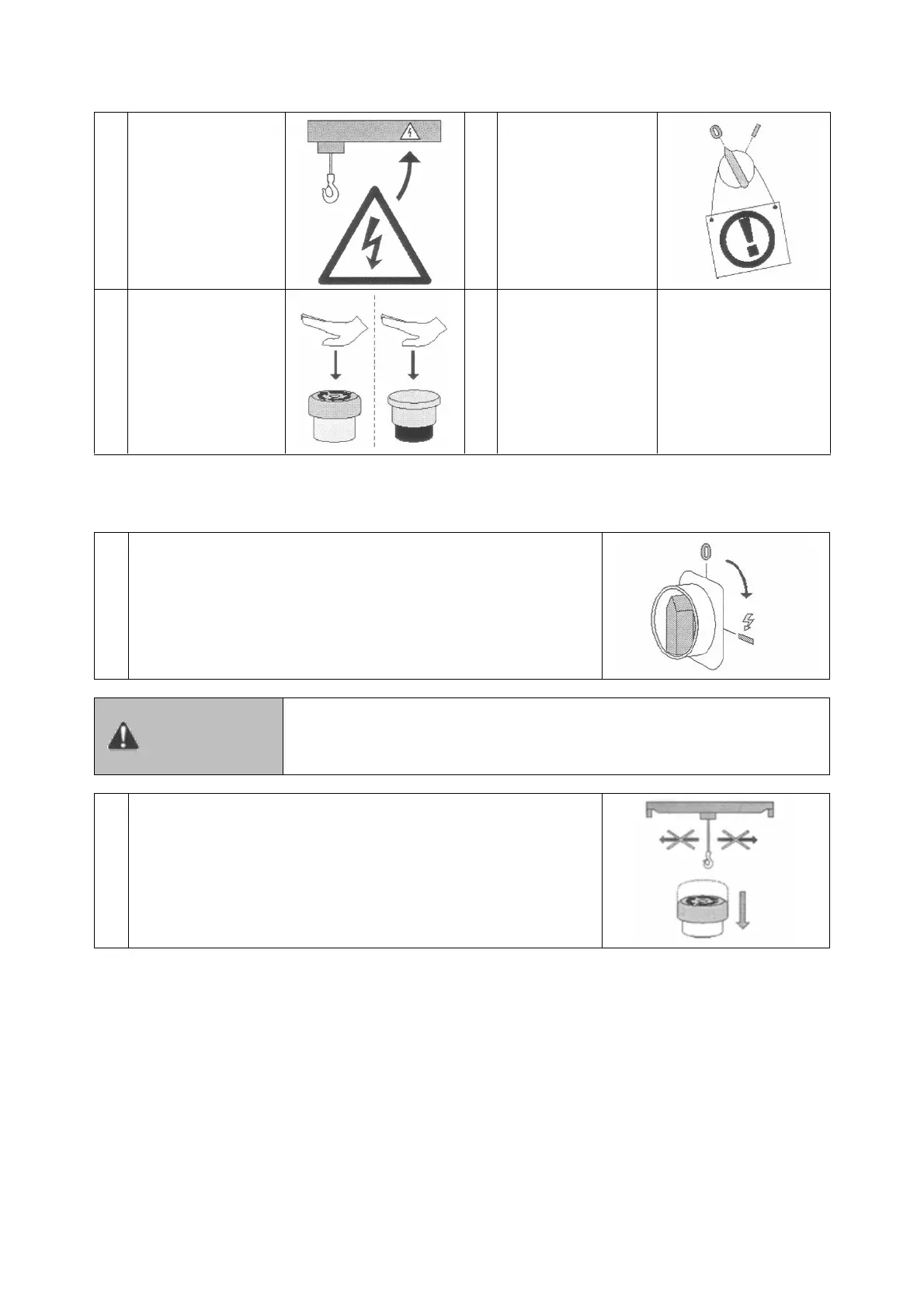
Check that all
warning signs are in
place, in good
condition, and can
be read easily. See
section Signs.
Never operate the
product if it is locked
or tagged out.
Follow local safety
procedures.
Check that the
emergency stop
button is down.
Check the condition
of controller cable.
7.2.2 Operational Checks with the Emergency Stop Button Pushed Down
Turn on the main power isolation switch.
After the main isolation switch has been turned on, the product
becomes operational (energized)
If the emergency stop button is faulty, the product might move
unexpectedly warning during the following checks. Unexpected
movements during checks could result in death or serious injury.
Emergency stop button
With the emergency stop button pushed down, check that the
product does not move when the direction controls are pushed.
This verifies that the emergency stop button is working properly.
7.2.3 Operational Checks with Controller Enabled
Before every working shift, all of these checks must be done with the emergency stop button
released and with the power turned on.


 To Next Page