This document and the information contained herein, is the exclusive property of MODE. And represents a nonpublic,
confidential and proprietary trade secret that may not be reproduced, disclosed to third parties, or otherwise employed in
any manner. whatsoever without the express written consent of MODE. Copyright © (2016) MODE. Allrights reserved.
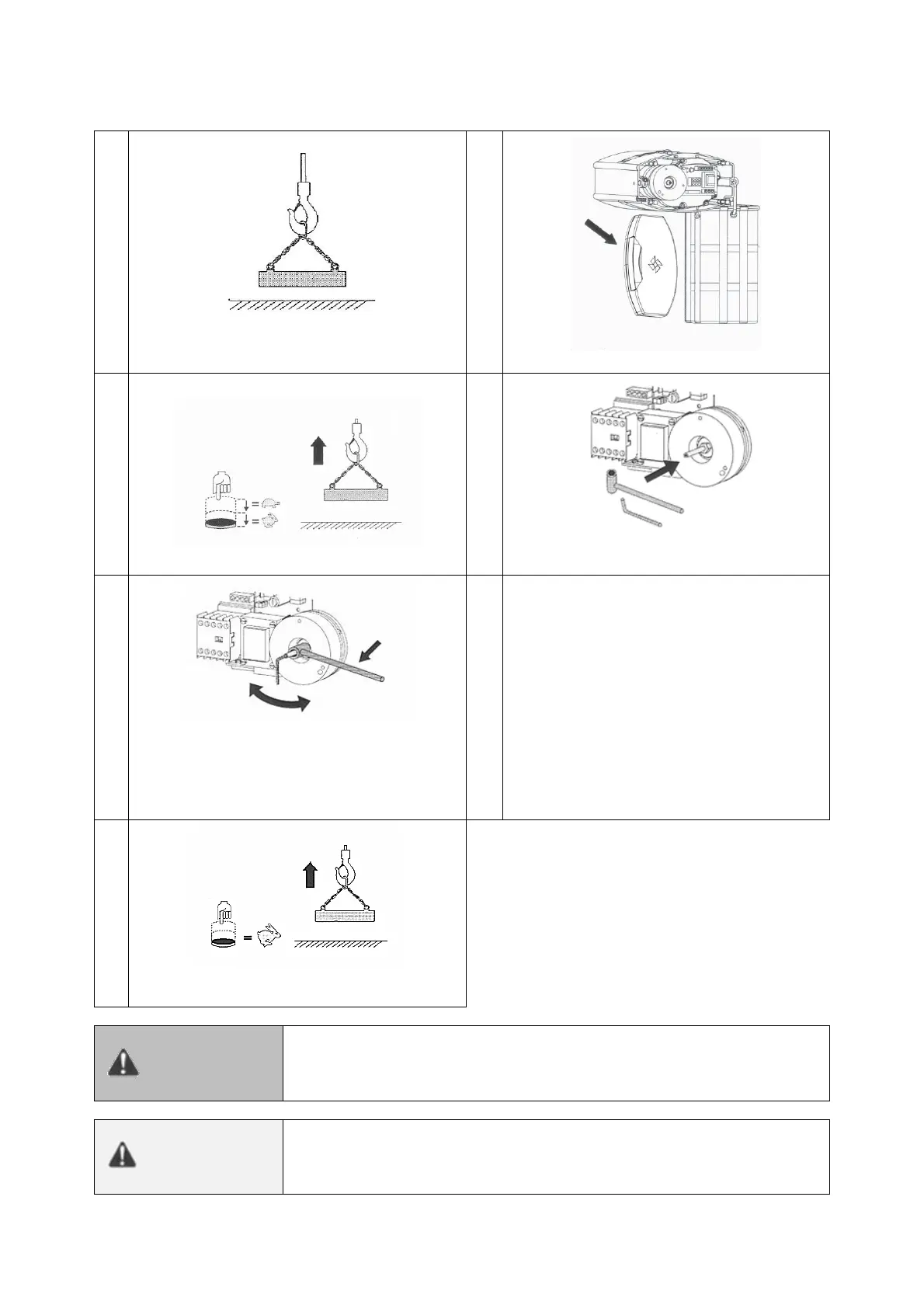
Adjusting the clutch
Hook a load of 1.25times the nominal load into
the hoist.
Raise the load at slow and fast speed.
Use a key to turn the adjusting screw in the
required direction.
Turn the screw clockwise to increase the
torque, counterclockwise to decrease the
torque. Unscrew the nut to adjust the setting
with the screw and tighten the nut to lock the
setting when it’s correct.
Repeat steps 3 and 4 until the load can barely
be lifted at fast speed. The slipping clutch is
now adjusted. Close the cover.
Check, at fast speed, the lifting of a nominal
load.
Do no touch the moving components. Before pressing the "lift"
button on the control box, check that there is nothing in contact with
the adjusting nut (key, for example).
When the slipping clutch is adjusted the motor must not be running.


 To Next Page