membraPure GmbH
Wolfgang-Küntscher-Str.14
16761 Hennigsdorf
Germany
Tel.: +49 (0) 3302/201-20 0
Fax.: +49 (0) 03302/201-20 21
E-Mail: info@membrapure.de
Internet: www.membrapure.de
- This tool is used to reset the operation hours of the
UV submersible lamp inside of the tank.
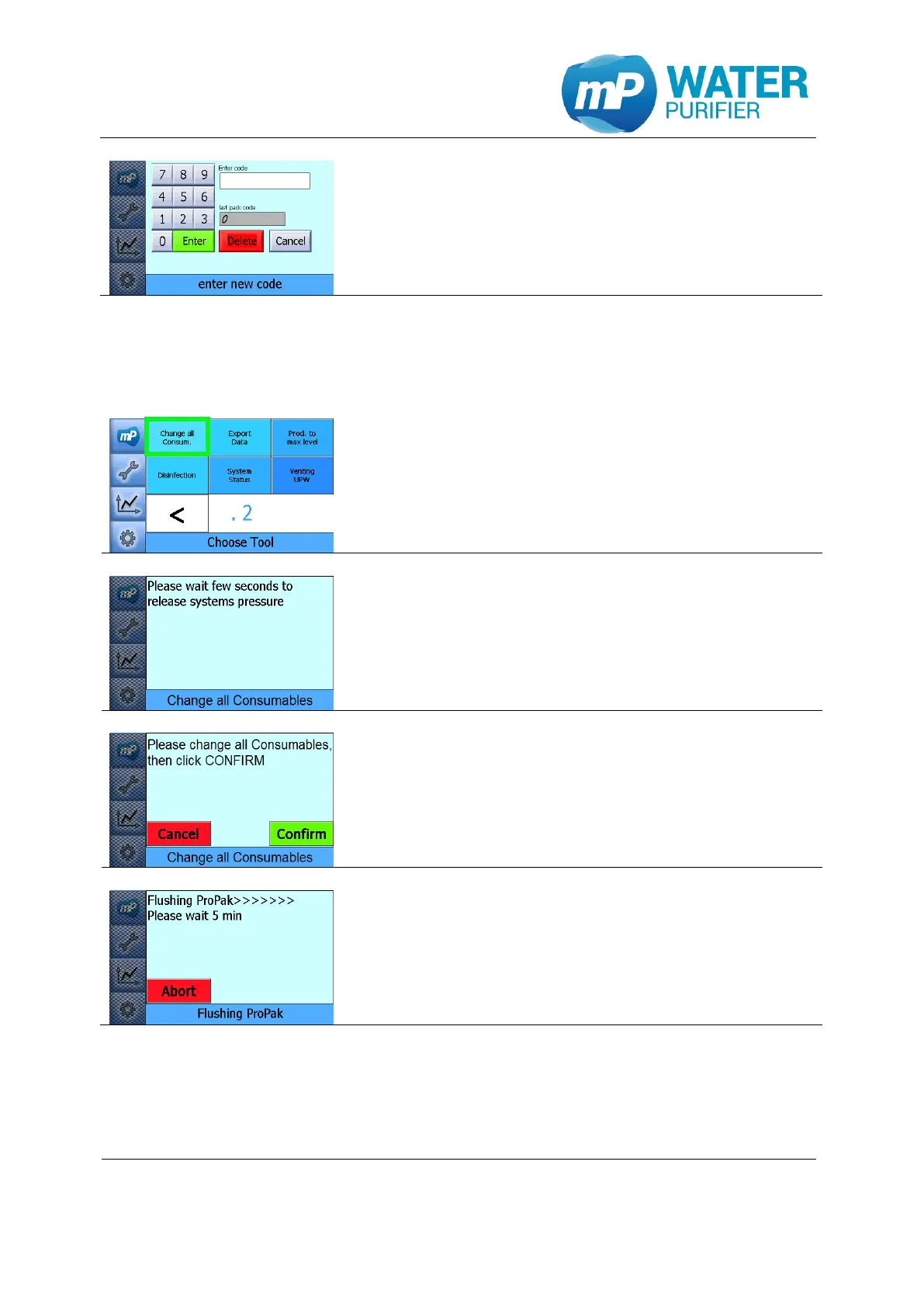
- To reset the operation hours please enter the code
which is provided by membraPure GmbH
5.2.4 Change all consumables
This tool is used to change all consumables consecutively.
- Press the button ”Change all Consum.”
- Waiting few seconds to release system pressure
- Exchange all available consumables now, then click
“Confirm”
RE-System: ProPak, C.Modul, UPW-Pak
AL-System: ProPak, C.Modul, UPW-Pak, UV-lamp
LS-System: ProPak, C.Modul, UPW-Pak, UV-lamp, UF-Modul
- This tool will flush all consumables automatically
- When this tool is over, the operating hours of each
consumables could be set to zero manually (see
chapter 5.4.3)
5.2.5 Exporting Data
This tool is used to save the actual charts, configuration file, calibration file and the
operating hours of the components into a USB-stick.


 To Next Page