membraPure GmbH
Wolfgang-Küntscher-Str.14
16761 Hennigsdorf
Germany
Tel.: +49 (0) 3302/201-20 0
Fax.: +49 (0) 03302/201-20 21
E-Mail: info@membrapure.de
Internet: www.membrapure.de
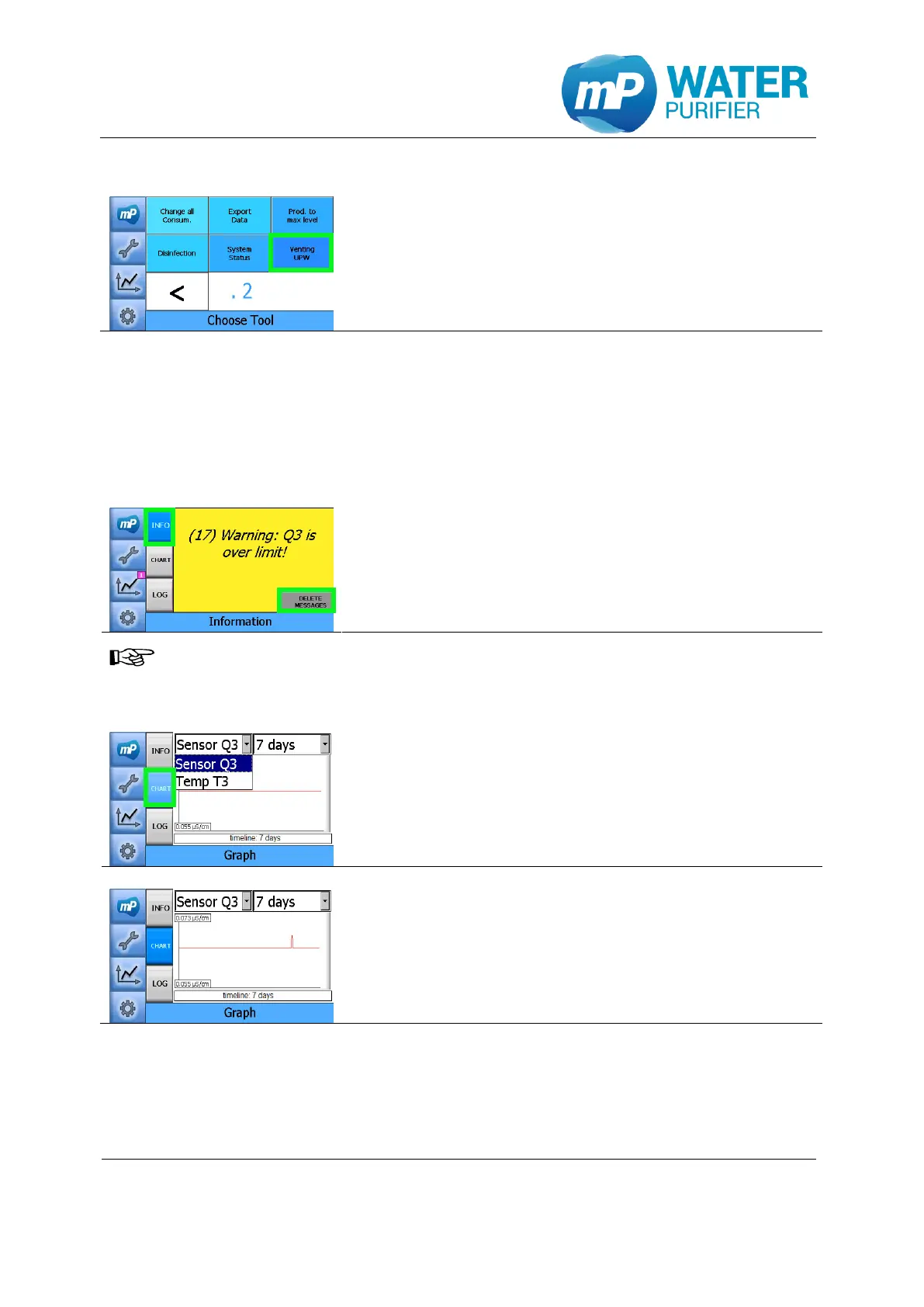
5.2.9 Venting UPW
- Press the button “Venting UPW”
This is needed to vent the ultra pure water section
from unwanted air in the system
5.3 History
The Aquinity² E and Aquinity² P have a recording function which stores values of the
conductivity graphically or error messages.
5.3.1 Warning messages
- Press the button „INFO“
- The history of active warning- / error messages is
displayed
- Press the button “DELETE MESSAGES” to delete the
active warning- / error messages
All warning- / error messages are still traceable in logfile
(see chapter 5.3.3).
5.3.2 Graphical values
- Press the button „CHART“
- Define the time period at the scroll down menu which
is located at the top right corner
- Select the conductivity sensor Q3 or temperature T3
- The chart of the selected sensor will be shown.


 To Next Page