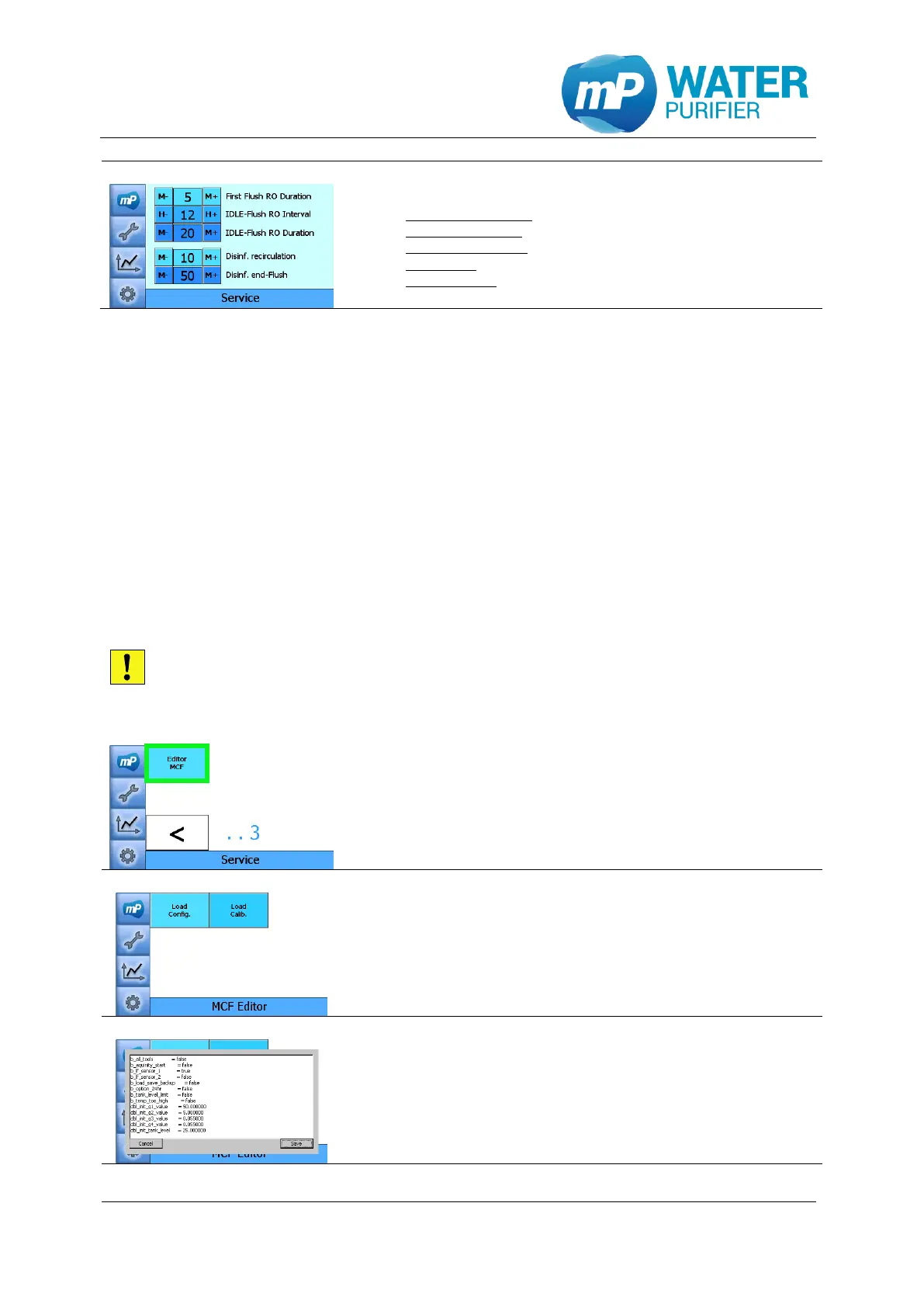
- This page shows the time-setting of:
First flush RO duration: duration of flushing RO
Idle-flush RO interval: interval of flushing RO (idle)
Idle-flush RO duration: duration of flushing RO (idle)
Disinf. recirc: duration of recirculation in disinfection
Disinf. end-flush: duration of flushing after disinfection
9.1.13 Editor .mcf-file
This tool is used to view and edit the configuration file (config.mcf) and calibration file
(calib.mcf) in a simple text editor. There are several buttons to work with the editor:
Load Config. : show the configuration settings from config.mcf in the text editor
Save : close and save the configuration settings into config.mcf
Cancel : close the settings without saving any changes
Load Calib. : show the calibration settings from calib.mcf in the text editor
Save : close and save the calibration settings into calib.mcf
Cancel : close the settings without saving any changes
This settings is only configurable for trained service technicians. Improper
operation or incorrectly stored configuration settings may lead to malfunction or
damage to the device
- Press the button „Editor MCF”
- This page shows the editor of .mcf file.
There are two .mcf files;
config.mcf (Load Config.) & calib.mcf (Load Calib.)
- This is the preview of configuration file (config.mcf)


 To Next Page