membraPure GmbH
Wolfgang-Küntscher-Str.14
16761 Hennigsdorf
Germany
Tel.: +49 (0) 3302/201-20 0
Fax.: +49 (0) 03302/201-20 21
E-Mail: info@membrapure.de
Internet: www.membrapure.de
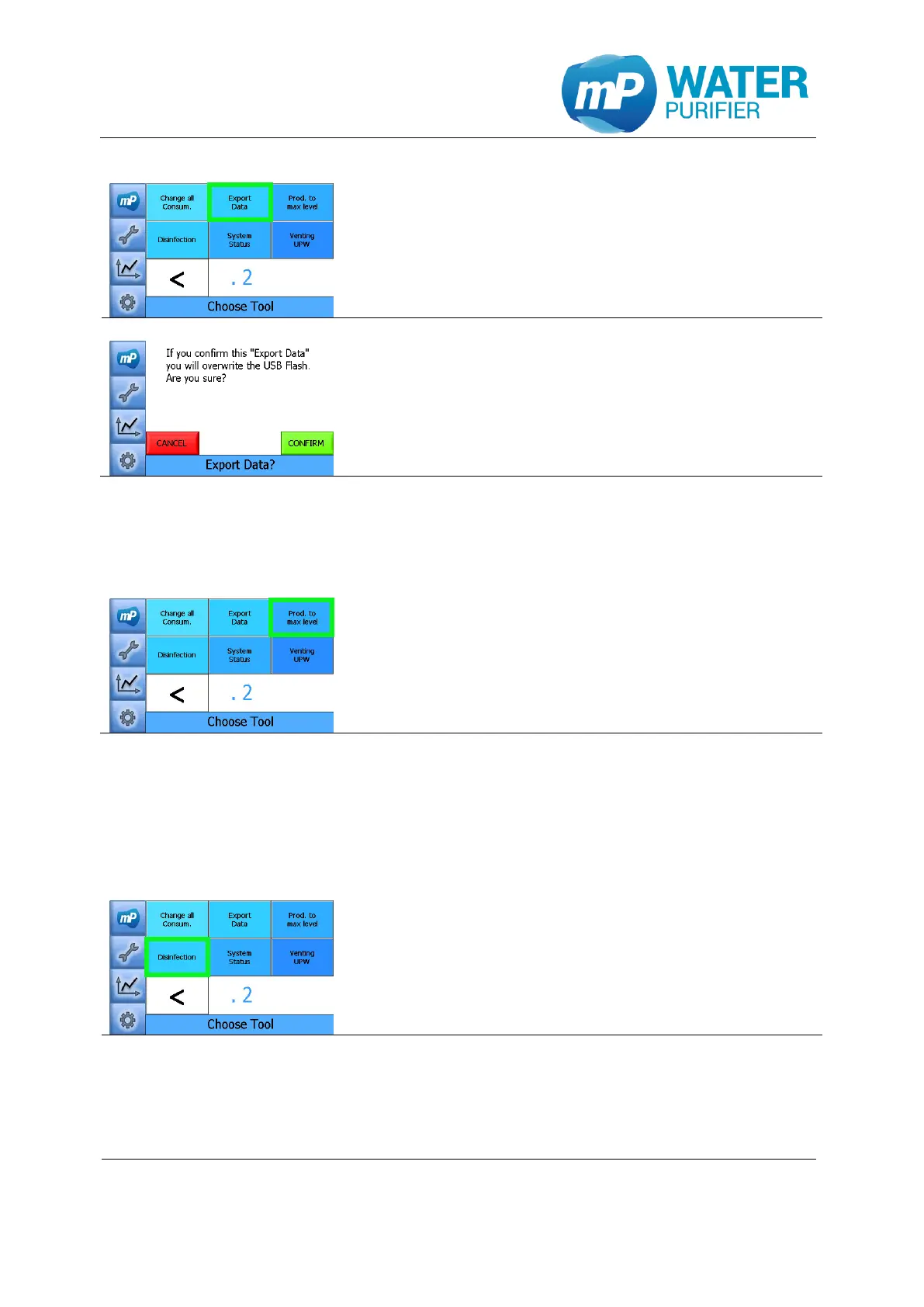
- Press the button ”Export Data”*
* Please make sure that there is a USB-stick
(max. 4 GB, in FAT-format) connected to the USB-Port!
-> copy files from \Nandflash\... into \Hard Disk\…
- Then click “CONFIRM” to save data (from Nandflash
to USB-Stick):
o chart data
o configuration file (config.mcf)
o calibration file (calib.mcf)
o operating hours of components
5.2.6 Prod. to max level
This tool is used to fill up the tank to the max level, which has been set in the settings. This
function is available only for any system with a tank.
- Press the button „Prod. to max level”
The system will produce water until the tank is filled
up to 100%
5.2.7 Disinfection
This tool is available only for the system which has UF-Modul installed. This tool should
have the at least 70% water in the tank before starting.
- Press “Disinfection” to start the tool.


 To Next Page