membraPure GmbH
Wolfgang-Küntscher-Str.14
16761 Hennigsdorf
Germany
Tel.: +49 (0) 3302/201-20 0
Fax.: +49 (0) 03302/201-20 21
E-Mail: info@membrapure.de
Internet: www.membrapure.de
5.3.3 Logfile
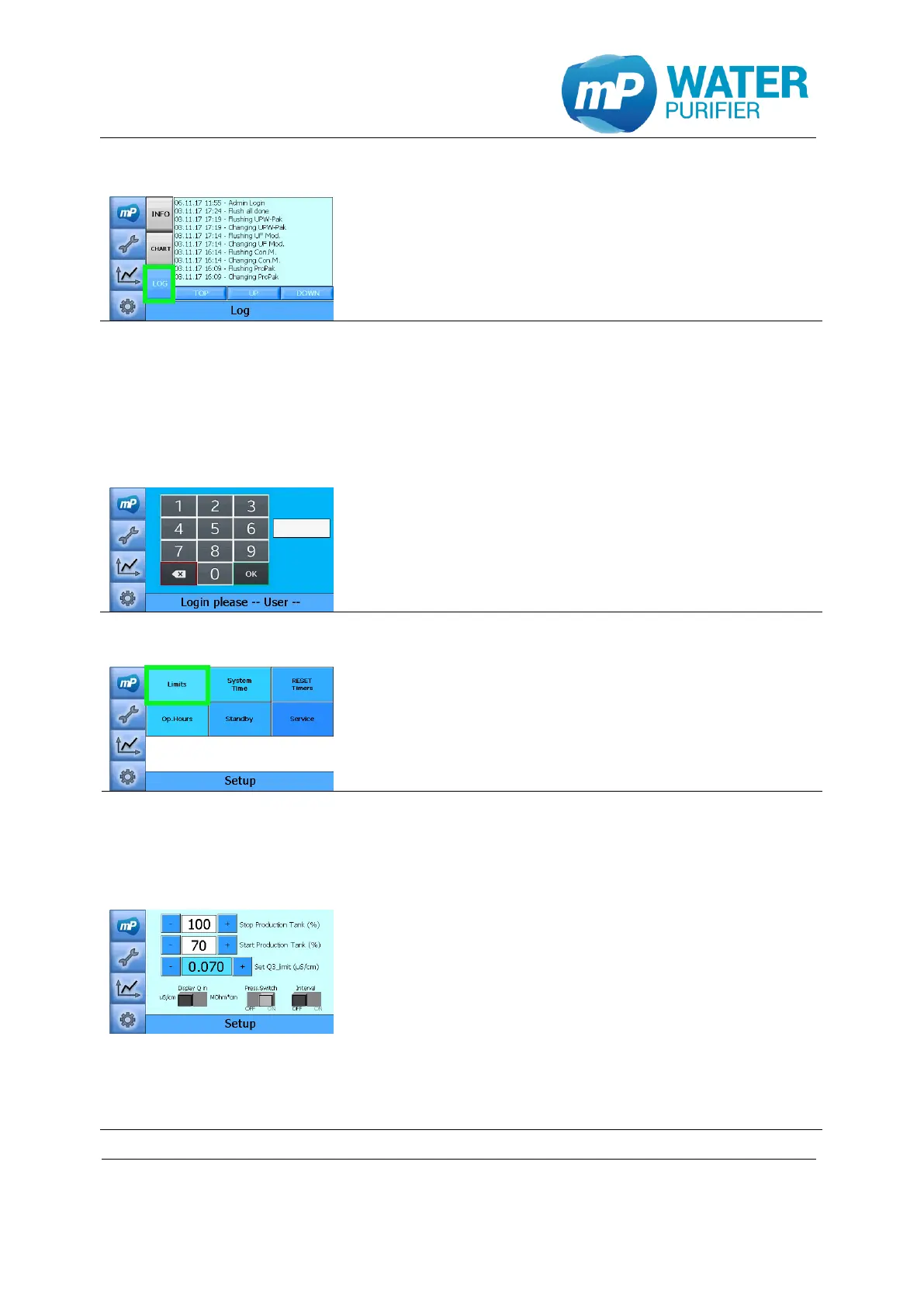
- Press the button „LOG“
- The logfile will be displayed
5.4 User setup
In the user setup values such as limitations for the conductivity sensors, tank sensor or
system time setting can be adjusted.
- To enter the user setup please enter the password
9999 and confirm entry with “OK”
5.4.1 Limits setup
- Press the button „Limits”
- Change the value of “Stop Production Tank” to adjust
upper tank level (stop production)
- Change the value of “Start Production Tank”to adjust
the lower tank level (switch on production)
- Set Q3-limit: max. value of conductivity Q3 without
showing any warning
- Conductivity can be displayed in two different ways
(µS/cm or MΩ*cm)
- Press.Switch ON/OFF is to activate the monitoring of
pressure sensor switch from feed water
- Interval ON/OFF is to define how the system works
when the tank is already full
Interval ON: system recirculates every 3 hours
Interval OFF: system recirculates permanently


 To Next Page