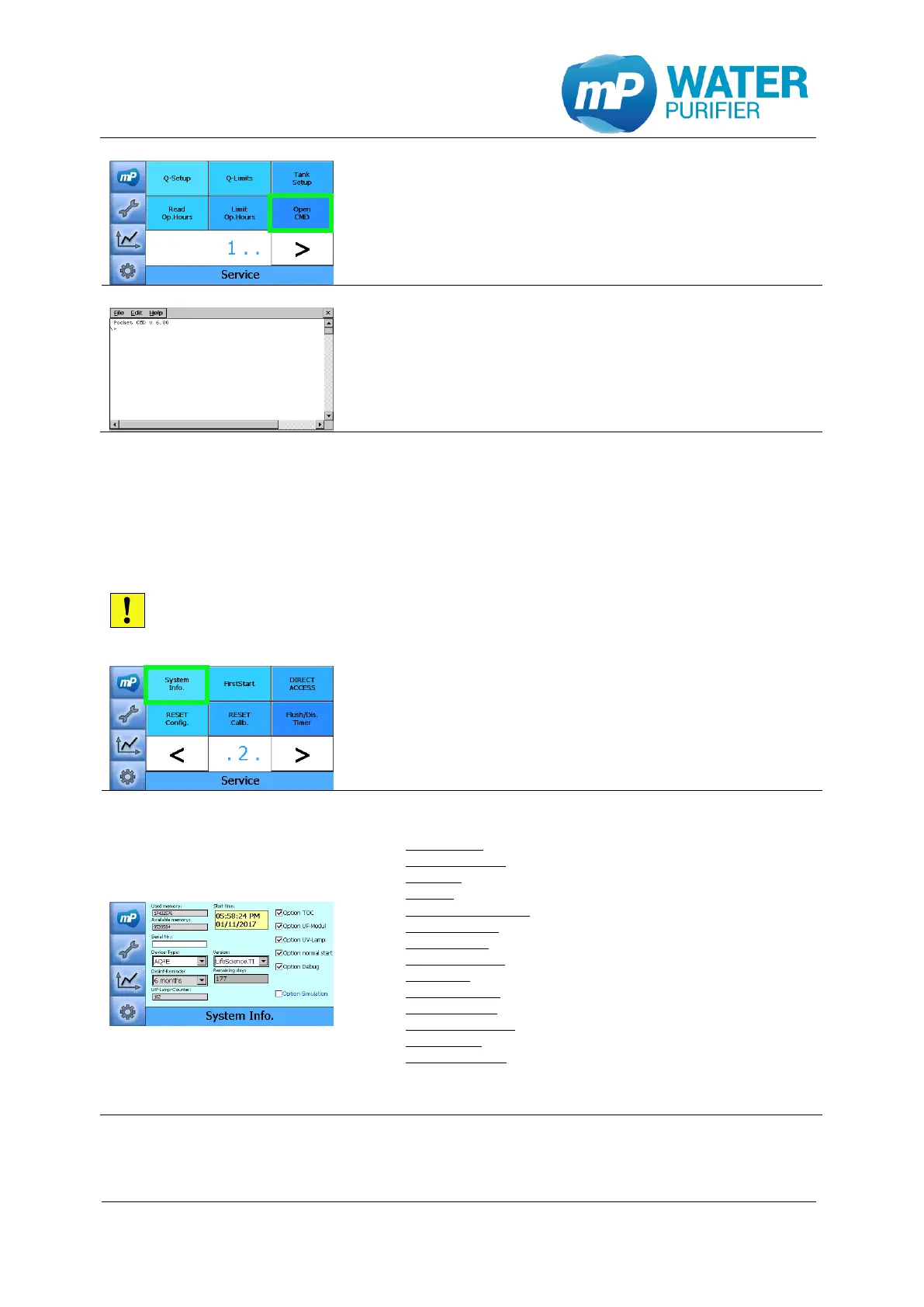
- This is the command line for the operating-system. It
can be used to interact with the system. Type “exit”
or click the sign “x” on the top-right side of the
display to go back to the service setup
- This is where the options can be adjusted
Used memory: total memory used (in bytes)
Available memory: total memory available (in bytes)
Start time: time and dates of the system start working
Serial Nr: serial number of the system (should be set once)
Device-Type & Version: device system type (should be set once)*
Desinf-Reminder: total time to remind user of system disinfection
Remainig days: total days until the next disinfection notification
UV-Lamp-Counter: how many times the UVPW has been activated
Option TOC: display TOC in the main screen (TI-System)
Option UF-Modul: activate the counter of UF-Modul (LS-System)
Option UV-Lamp: activate the counter of UV-lamp (AL-System)
Option normal start: if disabled, the next restart will show first start**
Option Debug: for system debugging with docklight
Option Simulation: to simulate system with constant values
*changing Device-Type will restart the system, so it is recommended to change the
Version before the Device-Type
**this option should be disabled, if the system should be restarted into FirstStart


 To Next Page