membraPure GmbH
Wolfgang-Küntscher-Str.14
16761 Hennigsdorf
Germany
Tel.: +49 (0) 3302/201-20 0
Fax.: +49 (0) 03302/201-20 21
E-Mail: info@membrapure.de
Internet: www.membrapure.de
5 System Control Panel
5.1 Normal operation mode
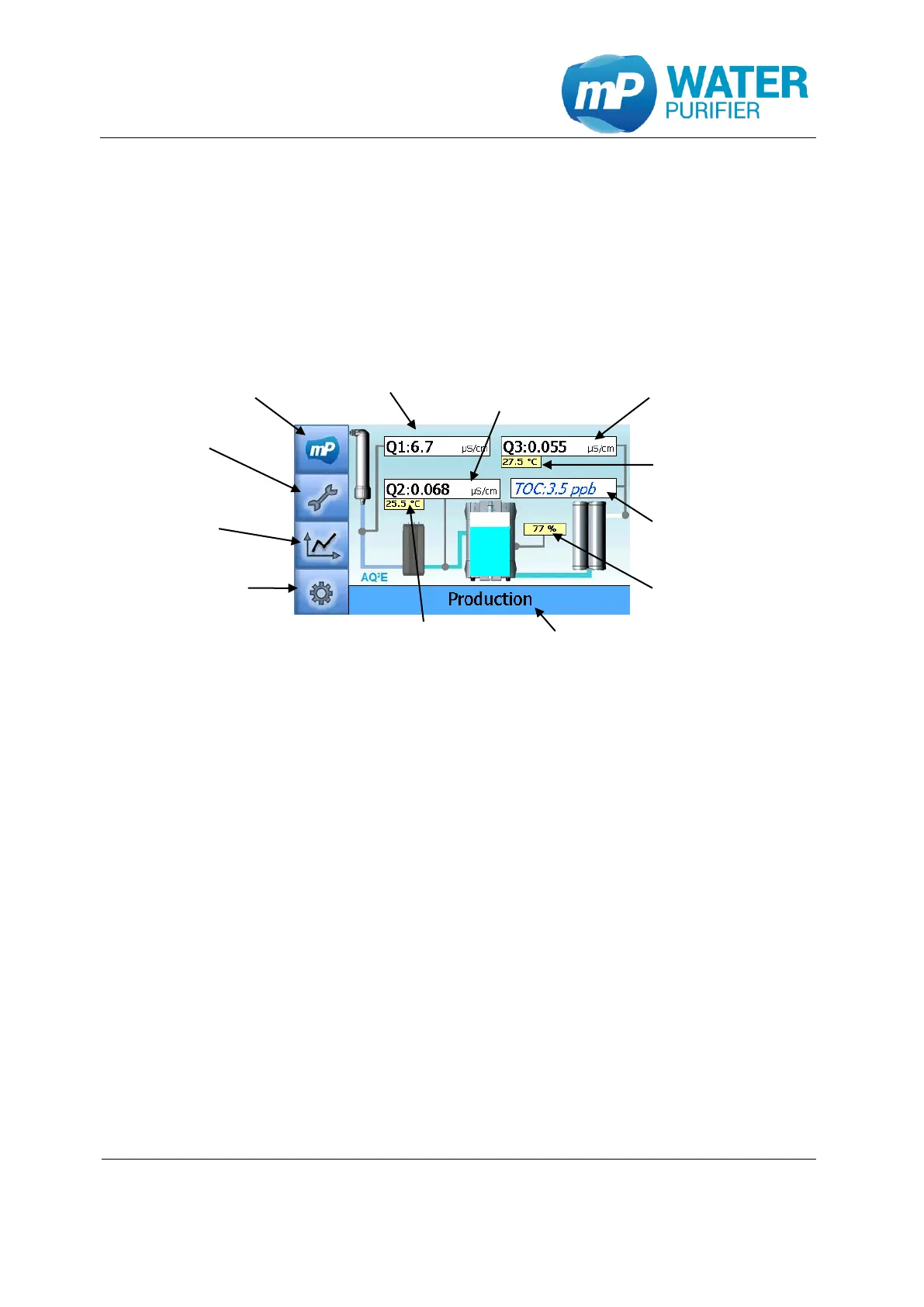
If the Aquinity² E is connected to power supply, the system jumps in normal operation mode
automatically. By default, the main information screen is displayed. The entire process is
fully automatic controlled.
Figure 14: main information screen Aquinity² E
5.2 Tools
In „Tools“ it is able to use these following functions:
exchanging consumables
exchanging UV-Lamps
exporting data
prod. to max level
disinfection
process visualization (System Status)
venting UPW
5.2.1 Exchanging consumables
These following steps are used to change one of consumables: ProPak, Conditioning
Modul, UPW-Pak and UF-Modul. The steps are similar for all consumables. But they have
differences flushing time.
Main information screen
Tools
History
User setup
Conductivity Conductivity
Permeat EDI-deionized
permeate
Temperature
EDI-deionized
permeate
Tank level in %
Status bar
Conductivity
ultra pure water
Temperature
ultra pure water
TOC-value
ultra pure water


 To Next Page