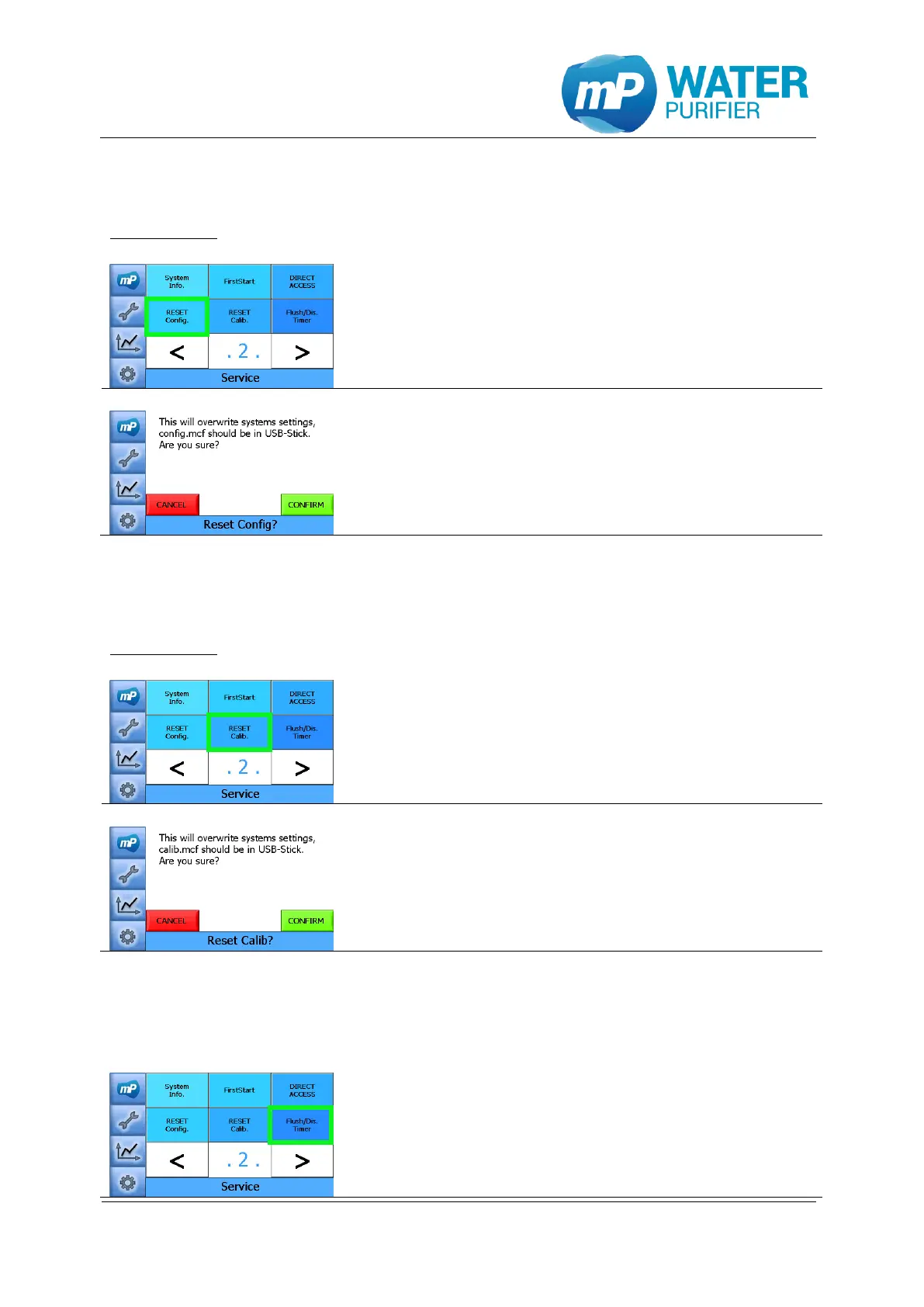
9.1.10 Reset configuration
This tool is used to restore the initial configuration settings of the device.
Requirements: USB-stick with the config.mcf is plugged in the USB-port.
- Press the button „Reset Config.”
* Please make sure that there is a USB-stick
(max. 4 GB, in FAT-format) connected to the USB-port!
-> copy files from \Hard Disk\... into \Nandflash\…
- This is a tool to load configuration settings of the
device (all configuration-parameters are not
adjustable directly in the software)
See chapter 5.2.5 about exporting data
9.1.11 Reset calibration
This tool is used to restore the initial calibration settings of the device.
Requirements: USB-stick with the calib.mcf is plugged in the USB-port
- Press the button „Reset Calib.”
* Please make sure that there is a USB-stick
(max. 4 GB, in FAT-format) connected to the USB-port!
-> copy files from \Hard Disk\... into \Nandflash\…
- This is a tool to load calibration settings of the
device (most calibration-parameters are adjustable
in the software)
See chapter 5.2.5 about exporting data
9.1.12 Flushing, disinfection timer
This tool is used to change the time of flushing and disinfection.
- Press the button „Flush/Dis. Timer”


 To Next Page