EasyManua.ls Logo

MPI 40 Series - Front Panel Bezel and Activity LED

Default Icon
102 pages
Print Icon
To Next Page IconTo Next Page
To Previous Page IconTo Previous Page
Loading...
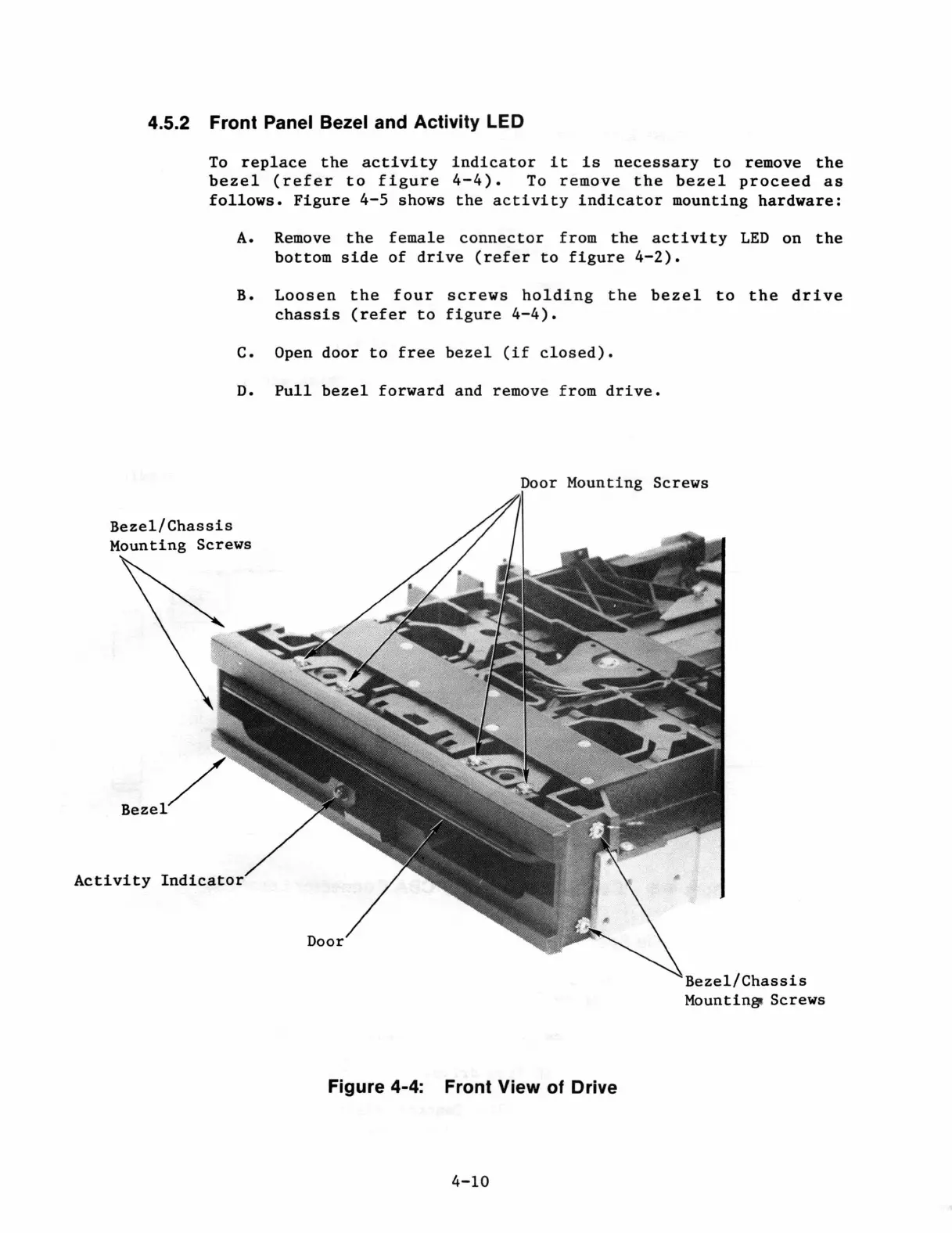
4.5.2 Front Panel Bezel and Activity LED
To
replace
the
activity
indicator
it
is
necessary
to
remove
the
bezel
(refer
to
figure
4-4).
To
remove
the
bezel
proceed
as
follows.
Figure
4-5
shows
the
activity
indicator
mounting
hardware:
A.
Remove
the
female
connector
from
the
activity
LED
on
the
bottom
side
of
drive
(refer
to
figure
4-2).
B.
Loosen
the
four
screws
holding
the
bezel
to
the
drive
chassis
(refer
to
figure
4-4).
c. Open
door
to
free
bezel
(if
closed).
D.
Pull
bezel
forward
and remove from
drive.
Door
Mounting
Screws
Bezel/Chassis
Bezel
/
Activity
Indicator
Figure 4-4: Front View
of
Drive
4-10
Bezel/Chassis
Mountingt Screws

Table of Contents