XR21S59 CHU 182
1/2018
113813003
Hooklift Multilift XR21S59 CHU
Service Manual
Exit /
O 1
OK /
O 2
OK
1.
2,
3.
>>>
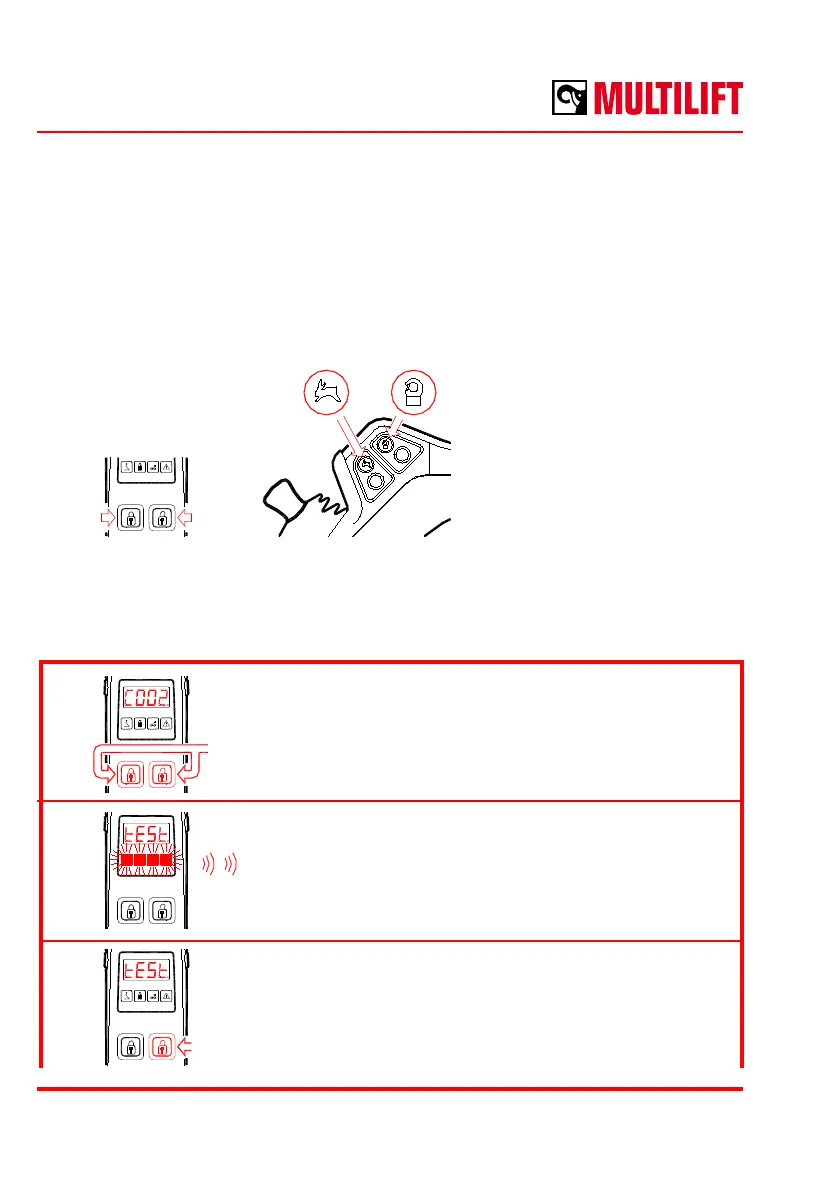
How to change the backlight setting of the buttons
The illumination strength of the backlight is set in the cab controller software. The buttons
to access the software and operations in the menu are as follows:
Note: The rst two buttons on
top of the cab controller are
the access buttons to the
software.
Normally these buttons are
identied as body locks
closed and body locks open.
The procedure of setting the illumination strength of the backlight is the following:
Press the rst row buttons simultaneously for 10
seconds.
“C002” can be seen in the display while pressing the
buttons.
System will make 2 short beeps and all red LEDs will
be shortly lit.
A text “tESt” is shown in the display.
Press the top button on right (locks open button).
Sub menu up
(fast speed)
Sub menu down
(hook safety lock)
Press
10 s



 To Next Page