Performing spirometry
Operator’s Manual V1.1 • EasyOne Air • EasyOne Connect
© ndd Medizintechnik AG • Technoparkstrasse 1, 8005 Zurich, Switzerland • www.ndd.ch 66/144
74
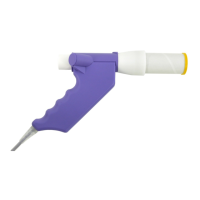
2 Fully insert the EasyOne Flow Tube into the EasyOne Flow Tube holder as
depicted below, but keep the partly unwrapped wrapper on the mouthpiece
of the EasyOne Flow Tube.
The shape of the EasyOne Flow Tube and the EasyOne Flow Tube holder
guide the orientation of the EasyOne Flow Tube. You can only insert the
EasyOne Flow Tube fully if it is positioned correctly.
When you insert the EasyOne Flow Tube, avoid direct sunlight as it can
interfere with the automatic recognition of the EasyOne Flow Tube.
3 On the main menu of EasyOne Connect, choose Patients.
4 Select the patient that you want to test.
5 At the bottom of the screen, choose Test.
6 Choose the test that you want to perform.
7 If the environment conditions screen is displayed, enter the current values
and choose Confirm >>.
For the FVL test, the MVV test, and the SVC test, you must enter the
environment temperature within 1°C or 1.8°F accuracy.
If the patient has already performed a test on the same day, a selection
window is displayed. Proceed with step 8.
If the patient has not performed a test on the same day, the screen of
the selected test is displayed with a pop-up window that asks you to block
the EasyOne Flow Tube. Proceed with step 9.


 To Next Page