User Manual MX Series Voice Gateway
6 New Rock Technologies, Inc.
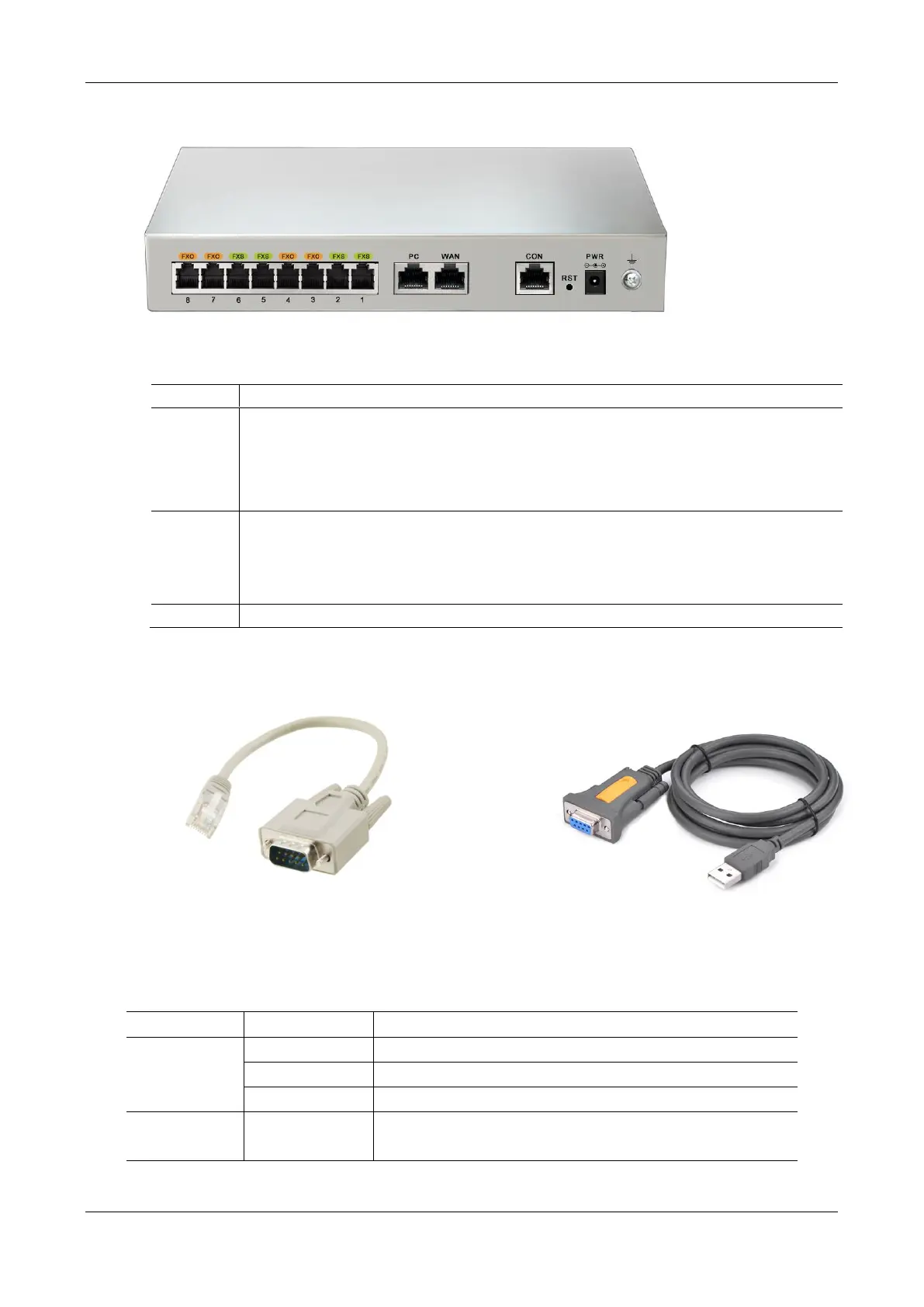
Figure 1-4 MX8A Back Panel
Table 1-9 Description of MX8A Back Panel
The console port is used for local management and testing. PCs can be connected to device by linking
the RS232 port to CON port.
Connecting cables need to be produced or purchased.
If the connection is established between the device and the mobile PC with no RS232 ports, please use
the cable together with a USB to an RS232 converter cable.
Cables are shown below in Figure 1-5 and Figure 1-6.
The PC port is used to connect a computer.
The WAN port is used to connect the uplink network.
Both are 10/100 Mbps Ethernet ports (RJ45). They share one IP address, which, by default, is obtained
through DHCP. If no IP address is obtained, 192.168.2.218 is used by default, and you can change it on
Basic > Network page.
Figure 1-5 RJ45 to RS232 Serial Cable
Figure 1-6 USB to RS232 Converter Cable
Table 1-10 Indicator Status of MX8A
The device is powered off or a power supply fault occurred.
The WAN interface failed to acquire the IP address. Possibly the WAN
interface is not connected to a network cable, the WAN interface



 To Next Page