48
Reference section 2 — Position coordinates
Using loran
Northstar 6000i
Setting the loran GRI
The 6000i can convert the loran’s TDs to
latitude/longitude position fixes, if you set
the four-digit loran Group Repetition
Interval (GRI) shown on the screen to
match the GRI being used by your loran
receiver. To change the GRI, press Set GRI
on the LORAN POSITION screen and press the
cursor pad to display the available GRIs
one at a time. When the displayed GRI is
correct, press ENTER.
Checking GPS status
To display GPS coordinates and signal
status, press Check GPS. The 6000i
continues to navigate using loran, and will
display loran data the next time you
display the LORAN POSITION screen.
Viewing loran status
To check the quality of signals being
received by your loran, press Loran info on
the LORAN POSITION screen. The
Signal-to-Noise ratio (SNR) for each loran
transmitting station is displayed graphi-
cally on the LORAN INFO screen.
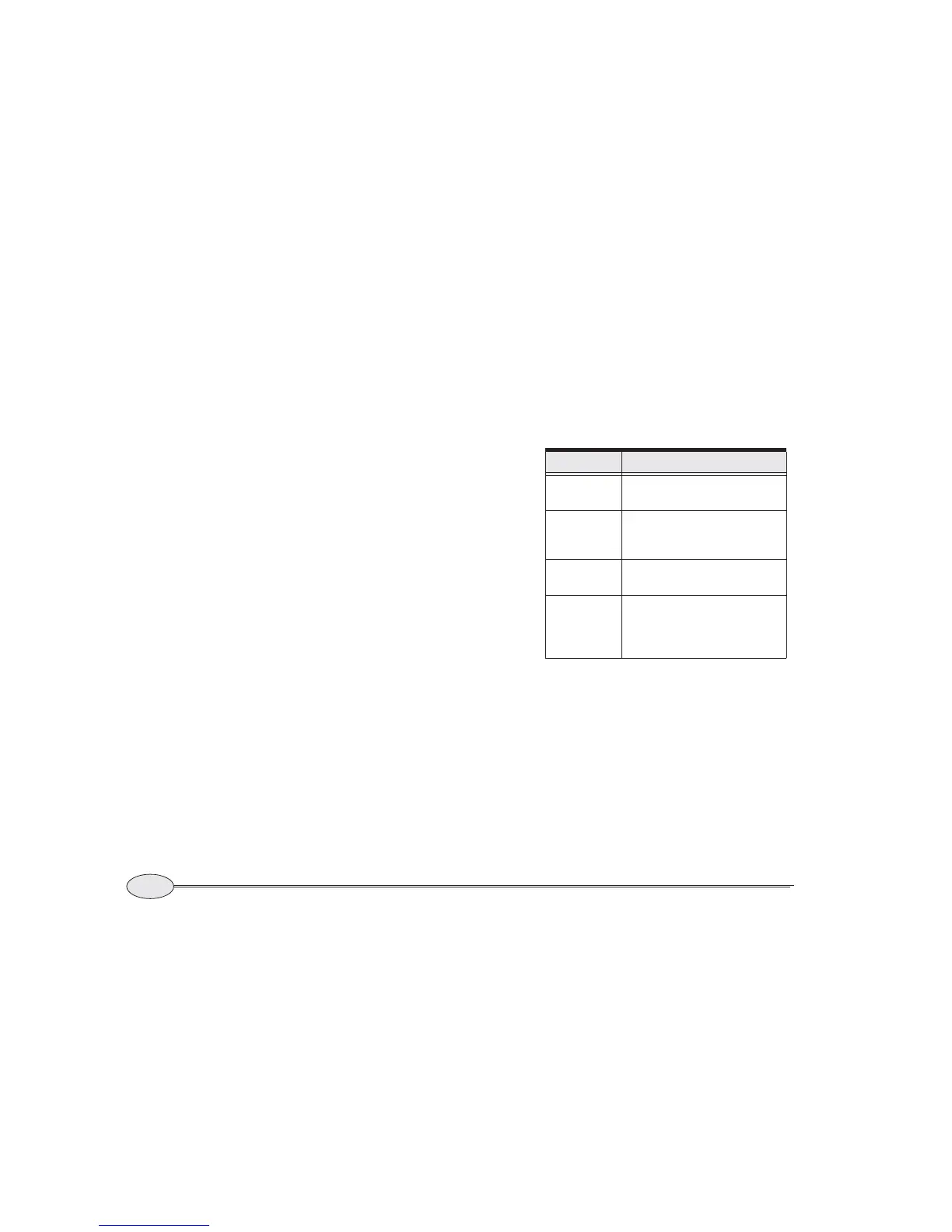
Viewing loran warning indicators
Table 2 shows the loran warning indica-
tors obtained from any Northstar 800 loran
receiver. They are displayed to the right of
each TD. (These indicators are available
only from Northstar 800 series lorans.)
The L/L indicators to the left of the TDs
designate the two TDs that the loran
receiver has chosen for calculating latitude
and longitude.
The F/L indicator to the left of a TD indi-
cates that the user has forced that TD to be
used for calculating latitude and longitude.
Table 2: Northstar 800 series loran
warning indicators
Indicator Meaning
SNR
Signal-to-Noise Ratio is
low—use caution.
BLNK
The Coast Guard is transmitting
a blink signal, indicating a prob-
able transmitter problem.
CYC
The receiver has detected a
possible cycle slip.
LOCK
The loran has locked onto the
loran track point (this isn’t a
warning indicator, but an indica-
tion of normal performance).



 To Next Page