59
Reference section 3 — Navigating to Waypoints
Restarting the track line
Reference Manual Revision D
Restarting the track line
When travelling from one waypoint to
another, you may find you’ve gone off
your planned track line. Maybe you
avoided an obstacle or drifted slightly
off-course. Whenever you’re off-track, you
can get back by one of two methods:
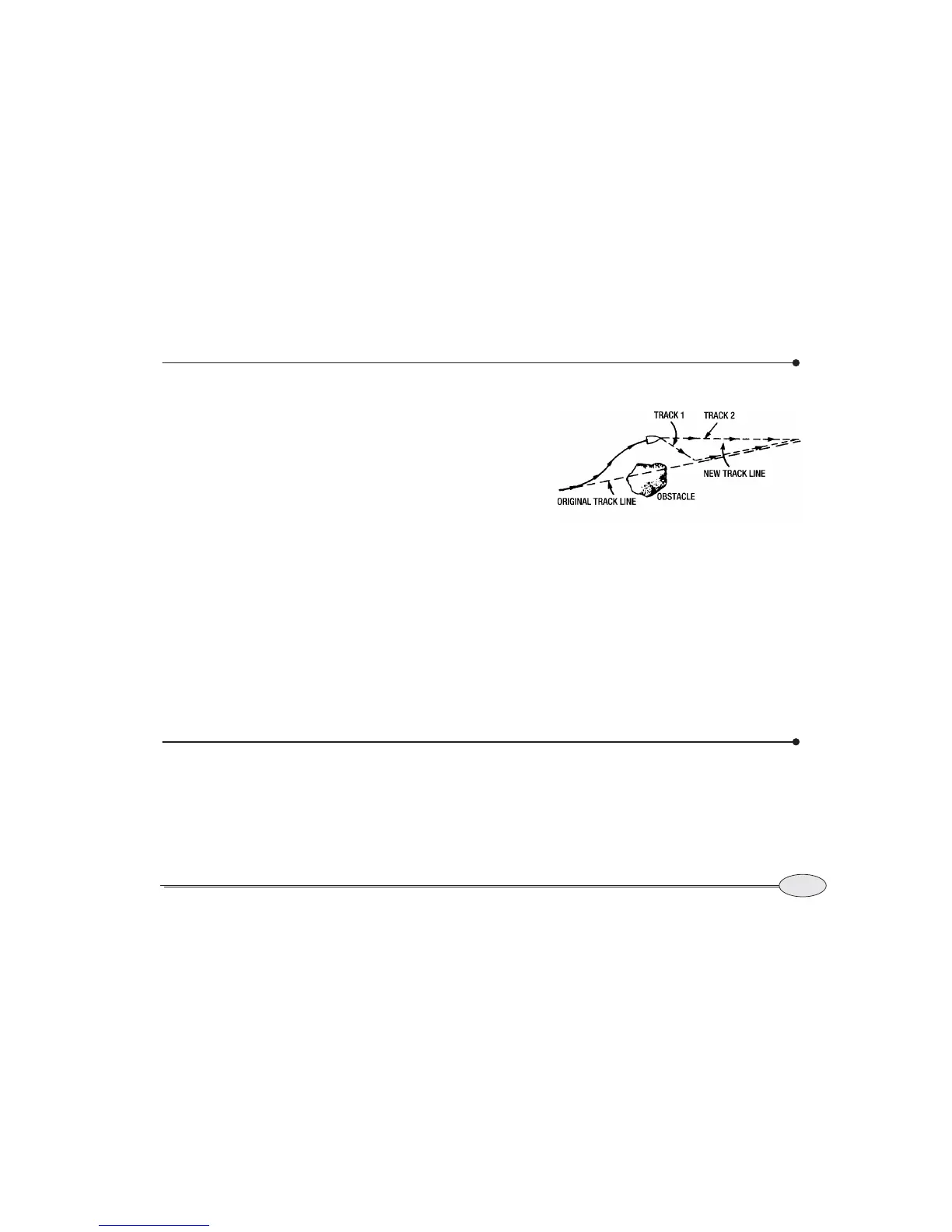
• after passing the obstacle, you can steer
your vessel back to the original track
line by using the cross-track error
display, and simply continue to the
waypoint (Track 1 in Figure 3)
• after passing the obstacle, if you don’t
need to return to your original track
line, you can go directly to the next
waypoint by using the 6000i’s restart
function (Track 2 in Figure 3)
To restart your track line from your
present position, press Restart and ENTER.
Restart is found on the CHART screen (in
vessel mode only), on the STEER screen,
and on the NAVLOG screen.
The 6000i calculates a new track line from
your present position directly to the next
waypoint, and resets your cross-track error
to zero.
The NAV LOG screen
The NAV LOG screen displays the waypoints
in your current trip and lets you easily
make changes to them. To access the
screen, press the Navlog key on the STEER
screen.
The navlog helps you plan and log your
trip, using three main functions:
• displaying your progress along your
trip
Figure 3: Restarting the course line


 To Next Page