104
SWITCHING GAS MIXES (NORM only)
During NORM Dives, the VT3 can be manually switched from GAS 1 to GAS 2 to GAS 3,
changing FO2 displays and calculations from the FO2 value set for GAS 1 to the FO2
value set for GAS 2 to the FO2 value set for GAS 3, and if TMTs are used, changing
Pressure related displays and calculations from TMT 1 (Transmitter 1) to TMT 2 to TMT 3.
NOTE: Switching the VT3 from one GAS to another cannot be per-
formed while on the surface, during dives when TMT 2-3 USE is set for
Buddy Pressure Check, or when operating in GAUG Mode.
Every dive begins with GAS 1. 10 minutes after surfacing from a
multiple gas dive, the VT3's operation defaults to the GAS 1 FO2.
Access to NORM DIVE Gas Switching screens can only be accomplished during the time
that a NORM DIVE MAIN screen is being displayed and cannot be performed during the
time that an Alarm is sounding.
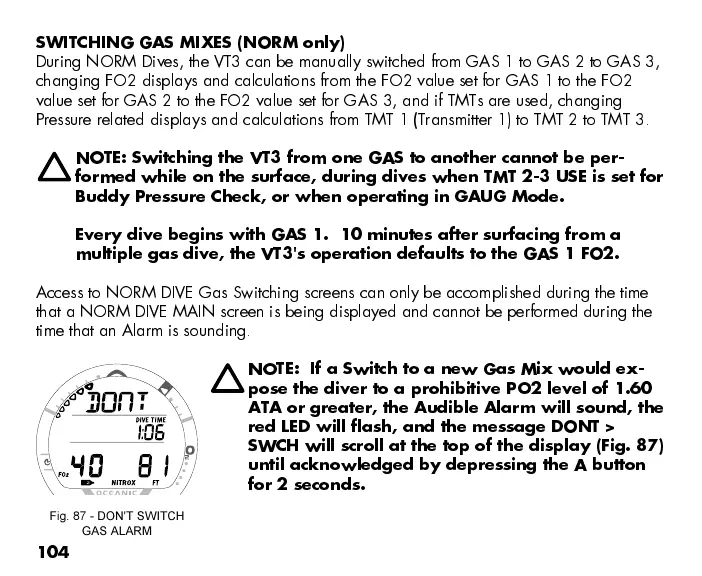
NOTE: If a Switch to a new Gas Mix would ex-
pose the diver to a prohibitive PO2 level of 1.60
ATA or greater, the Audible Alarm will sound, the
red LED will flash, and the message DONT >
SWCH will scroll at the top of the display (Fig. 87)
until acknowledged by depressing the A button
for 2 seconds.
Fig. 87 - DON'T SWITCH
GAS ALARM



 To Next Page