118
GAUGE MODE
When Gauge Mode (GAUG) is selected as the Operating Mode, the VT3 will operate as
a Digital Depth Gauge/Timer without performing nitrogen and oxygen calculations.
To access the GAUG SURF MAIN screen while NORM SURF MAIN is displayed,
press the M button for 2 seconds.
To select GAUG as the Operating Mode to be used, press/release the M button while
the graphic GAUG is flashing. GAUG stops flashing and GAUG Mode is selected.
If no GAUG dive has be conducted, press the M button for 2 seconds to access FREE
SURF MAIN.
NORM SURF MAIN > GAUG SURF MAIN > FREE SURF MAIN
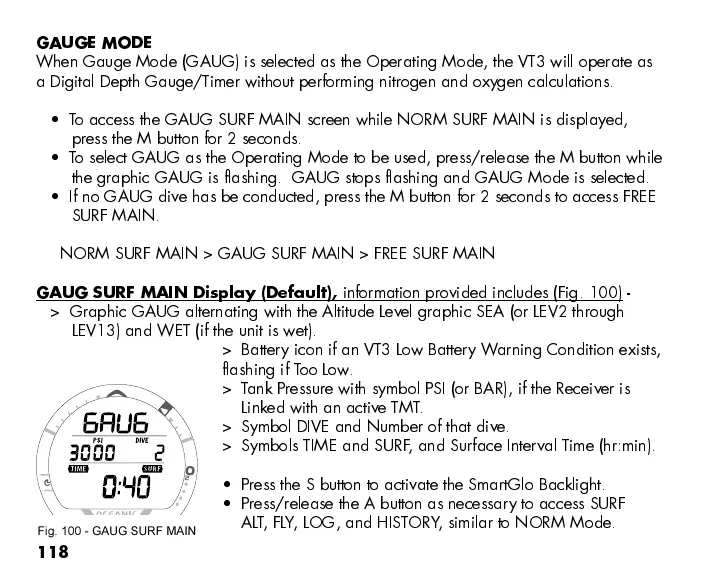
GAUG SURF MAIN Display (Default),
information provided includes (Fig. 100) -
> Graphic GAUG alternating with the Altitude Level graphic SEA (or LEV2 through
LEV13) and WET (if the unit is wet).
> Battery icon if an VT3 Low Battery Warning Condition exists,
flashing if Too Low.
> Tank Pressure with symbol PSI (or BAR), if the Receiver is
Linked with an active TMT.
> Symbol DIVE and Number of that dive.
> Symbols TIME and SURF, and Surface Interval Time (hr:min).
Press the S button to activate the SmartGlo Backlight.
Press/release the A button as necessary to access SURF
ALT, FLY, LOG, and HISTORY, similar to NORM Mode.
Fig. 100 - GAUG SURF MAIN



 To Next Page