132
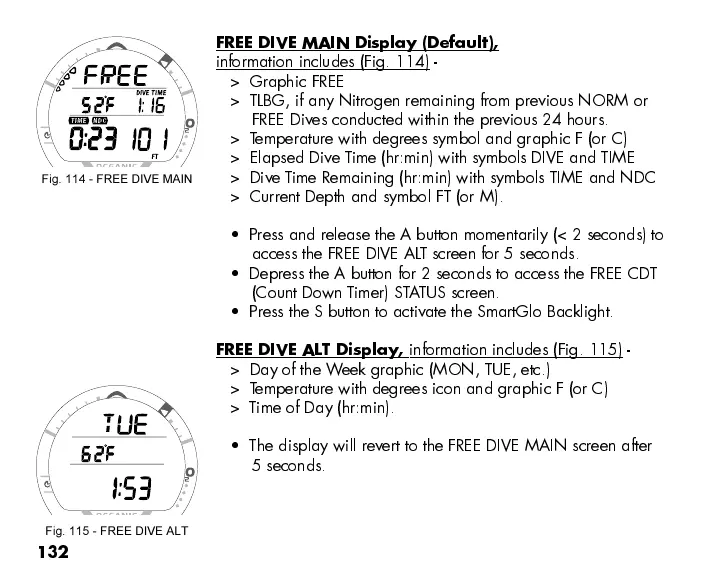
FREE DIVE MAIN Display (Default),
information includes (Fig. 114) -
> Graphic FREE
> TLBG, if any Nitrogen remaining from previous NORM or
FREE Dives conducted within the previous 24 hours.
> Temperature with degrees symbol and graphic F (or C)
> Elapsed Dive T ime (hr:min) with symbols DIVE and TIME
> Dive T ime Remaining (hr:min) with symbols TIME and NDC
> Current Depth and symbol FT (or M).
Press and release the A button momentarily (< 2 seconds) to
access the FREE DIVE ALT screen for 5 seconds.
Depress the A button for 2 seconds to access the FREE CDT
(Count Down T imer) STATUS screen.
Press the S button to activate the SmartGlo Backlight.
FREE DIVE ALT Display,
information includes (Fig. 115) -
> Day of the Week graphic (MON, TUE, etc.)
> Temperature with degrees icon and graphic F (or C)
> T ime of Day (hr:min).
The display will revert to the FREE DIVE MAIN screen after
5 seconds.
Fig. 114 - FREE DIVE MAIN
Fig. 115 - FREE DIVE ALT



 To Next Page