63
If FO2 for GAS1 is set for a numerical value (21 to 50%), the NITROX graphic and Maxi-
mum Operating Depth defined by the PO2 ALARM Set Point will be displayed.
If the limiting time factor is Oxygen controlled, the symbols TIME and O2 will be dis-
played. If the limiting time factor is Nitrogen controlled, the symbols TIME and NDC will
be displayed.
Prior to a first dive of a series, pressing and releasing the A
button momentarily (< 2 seconds) will advance to LOG
MODE.
After a dive is made, it will advance to FLY MODE.
Depressing the M button for 2 seconds, or if no button is
pressed during a 2 minute period, operation will revert to
the NORM SURF MAIN screen.
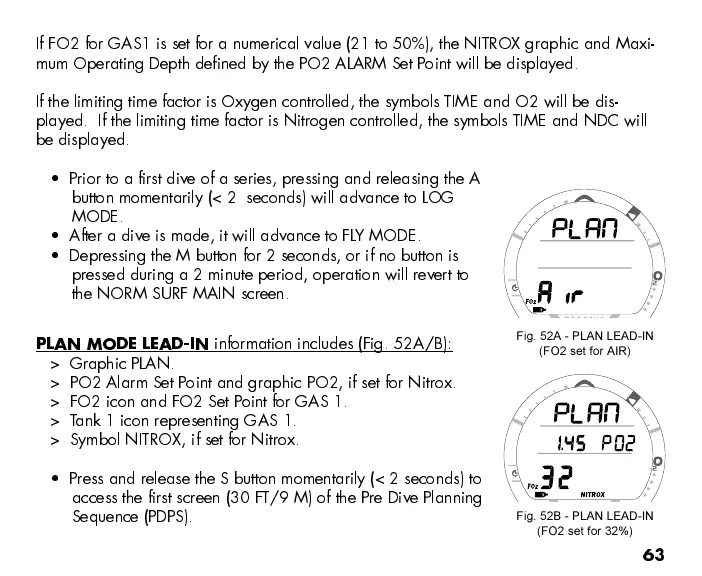
PLAN MODE LEAD-IN
information includes (Fig. 52A/B):
> Graphic PLAN.
> PO2 Alarm Set Point and graphic PO2, if set for Nitrox.
> FO2 icon and FO2 Set Point for GAS 1.
> Tank 1 icon representing GAS 1.
> Symbol NITROX, if set for Nitrox.
Press and release the S button momentarily (< 2 seconds) to
access the first screen (30 FT/9 M) of the Pre Dive Planning
Sequence (PDPS).
Fig. 52B - PLAN LEAD-IN
(FO2 set for 32%)
Fig. 52A - PLAN LEAD-IN
(FO2 set for AIR)



 To Next Page