5.3
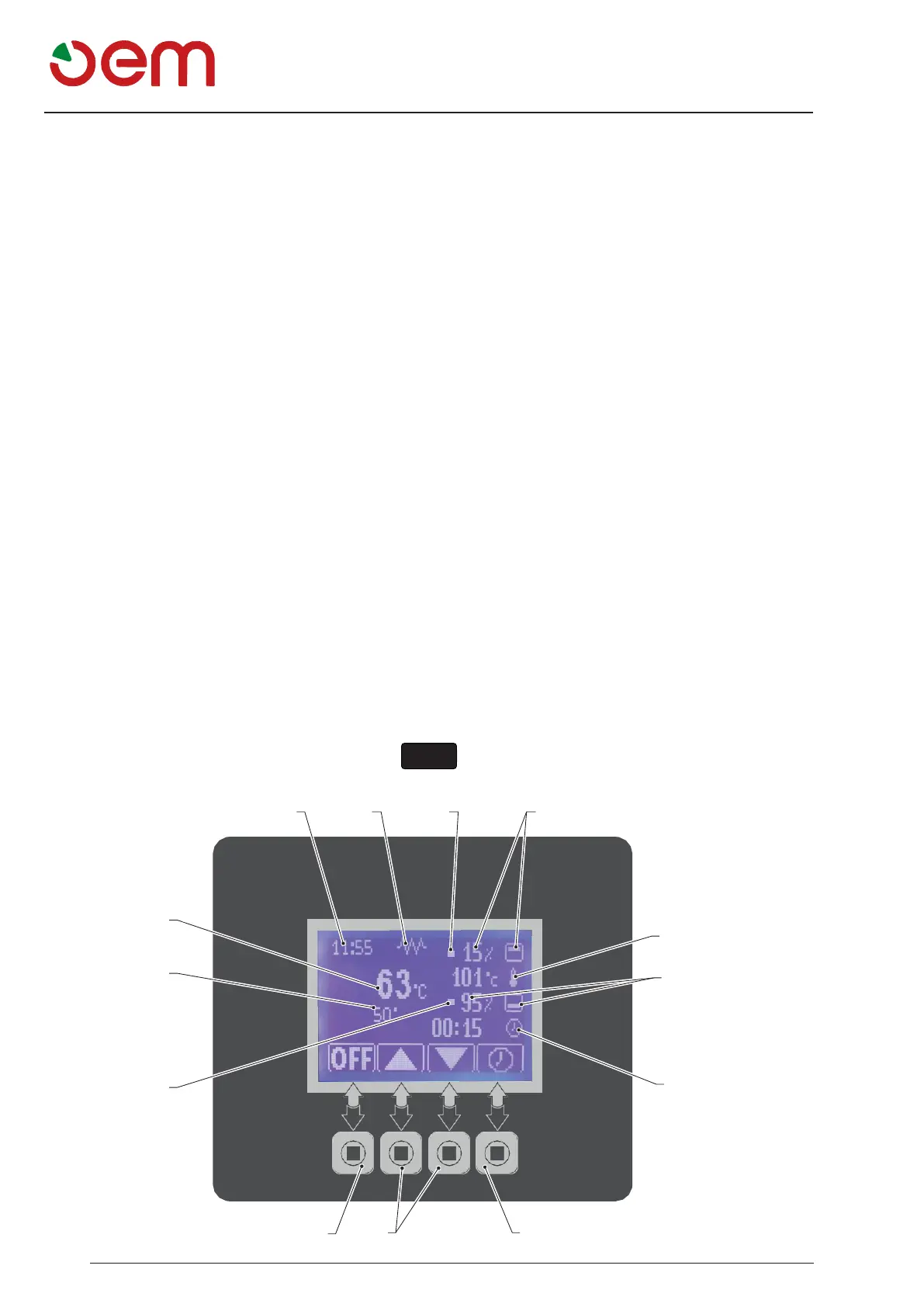
- MAIN SCREEN (Fig. 3)
After starting the oven, the main screen used by the
user is as follows:
1. Time
2. Mouth heating elements
When the symbol is fixed, it indicates that the mouth
heating elements are in operation;
When the symbol flashes, it indicates that the mouth
heating elements are off.
3. Ceiling heating elements
This displays the set percentage of the Ceiling heat-
ing elements, if the heating element is operating, LED
(3a) will light up.
4. Backing Temperature
This shows the temperature set by the user.
5. Floor heating elements
This displays the set percentage of the Floor heating
elements, if the heating element is operating, LED
(5a) will light up.
6. Timer
This shows the set baking time of the selected pro-
gram.
Setting time : 0,1 30 min
7. Timer icon
Pressing the icon the timer starts, when it arrives at
“0” makes a sound alarm, press again the icon 7 to
silence the sound alarm.
8. Function icons
Acting on these icons you highlight the various modifi-
able functions.
9. OFF icon
Pressing this icon you turn off the oven.
10. Chamber temperature
It indicates the actual temperature inside the backing
chamber.
11. It indicates the temperature of the floor.
1 2 3a 3
10
4
11
5
5a
6
9
8 7


 To Next Page