46
Operating your Moisture Analyzer - Section 6
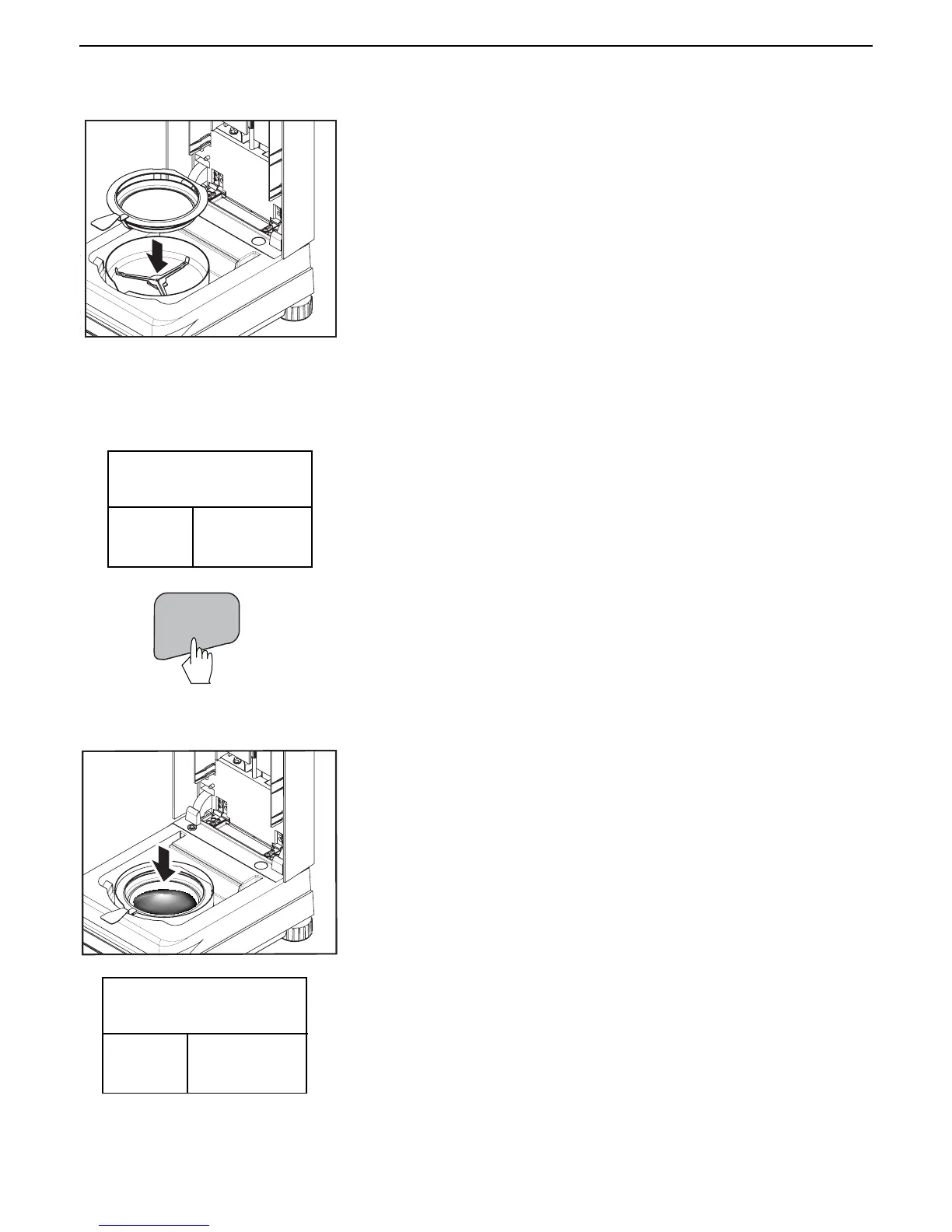
The display indicates instructions to process the sample. Clear the pan.
Follow the instructions on the lower left side of the screen.
Place the empty sample pan in the pan handler (this is possible without
tilting the sample pan if you insert this in the pan handler from the side
directly below the round flange). Place the pan handler in the sample
chamber. Ensure that the tongue of the pan handler fits exactly in the slot of
the draft shield element. The sample pan must lie flat in the pan handler.
Note: It is advisable for you to work with the pan handler at all times. The
pan handler is ergonomic, safe and provides protection against possible
burns due to a hot sample pan.
TARE
Press the Tare button. This sets the Moisture Analyzer to zero. A new display
now appears with instructions.
Add the sample and process as shown in the illustrations.
Place the specimen sample in the sample pan.
TEST ID: 071000 B
TEMP/TIME: 130C/AFREE
TARG. WGT: 5 GRAMS
CLEAR
PAN
PRESS
TARE
*
GRAMS
0.000
TEST ID: 071000 B
TEMP/TIME: 130C/AFREE
TARG. WGT: 5 GRAMS
ADD
SAMPLE
CLOSE
COVER
*
GRAMS
0.000



 To Next Page