6
108
1
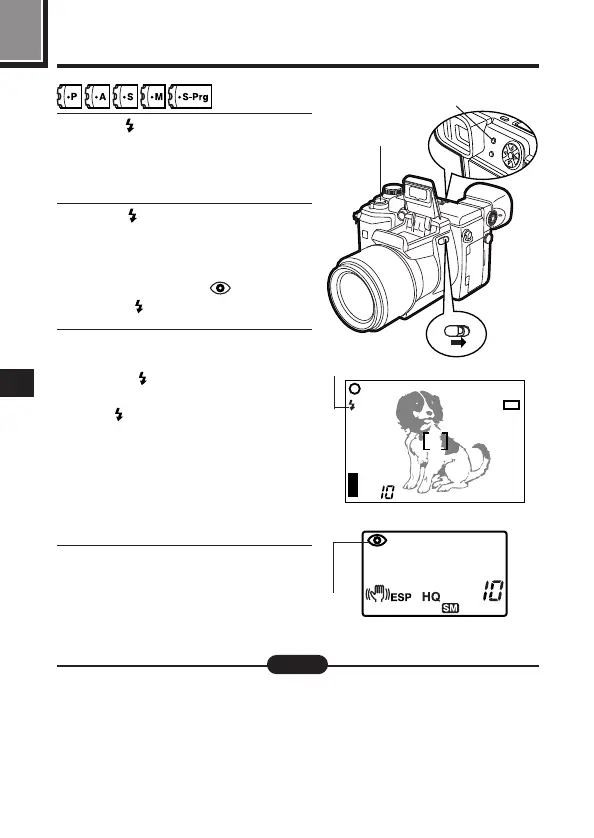
Slide (flash switch) to pop up
the flash.
● The flash may not fire even when
the flash is up.
2
Press (flash mode button) until
the desired flash mode appears on
the control panel (see below).
● Auto-flash (no display) [ Red-eye
reduction flash ( ) [ Fill-in
flash ( ).
3
Press the Shutter button halfway
down.
● When lights on the display, the
flash is ready to fire.
● If is blinking, the flash is
charging. In this case, release the
Shutter button and wait until the
flash mark lights steadily before
taking the picture.
● Pay attention to the “Notes” for
each mode (p.106/107).
4
Press the Shutter button all the
way down.
How to use the flash
3, 4
2
1
● The flash may not give you the results you want in the Macro mode,
especially with wide-angle shooting. Check your results on the Monitor. If a
conversion lens is attached to the lens, it may reduce the output of the
flash.
● Unless OFF is selected in All Reset, the setting will be canceled and reset
to Auto-Flash when the power is turned off (p.148).
Note:
Flash stand-by/charge mark
Control panel
Flash mode






 To Next Page