45
1
Setting the date and time
You can adjust and include the date and time, and put them on recorded
pictures.
1
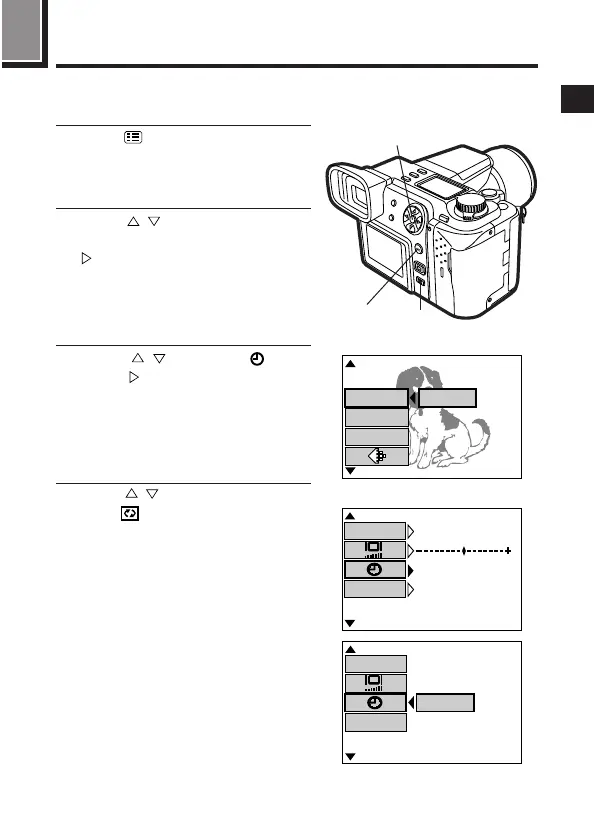
Press (Menu button). (P.45)
● Menu will be displayed on the
monitor.
2
Press on the Arrow pad to
select MODE SETUP, then press
to select SETUP. Finally, press
the OK button.
● Mode setting screen will be
displayed on the monitor.
3
Press to select , then
press . When SETUP appears
on the monitor, press the OK
button.
● Date/time setup screen will be
displayed on the monitor.
4
Press to set the date format
when is selected.
● You can choose any one of the
following formats:
DMY (Day/Month/Year)
MDY (Month/Day/Year)
YMD (Year/Month/Day)
2, 3, 4
2, 3
1
SETUP
[
5 / 5
]
F2.8 1/800 0.0
P
ISO
[
SM
]
S-Prg
MODE SETUP
m/ f t
m
OFF
SHOT CANCEL
’ 0 0 . 1 2 . 2 3
1 2 : 3 4
[
3 / 3
]
[
SM
]
Mode setting screen
SETUP
m/ f t
SHOT CANCEL
[
3 / 3
]
[
SM
]
Still picture record menu







 To Next Page