165
9
4
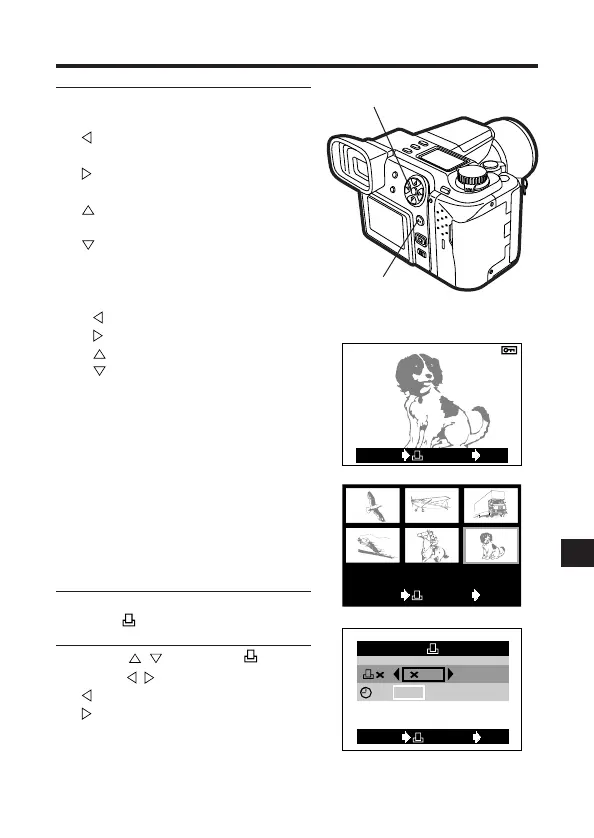
Press the Arrow pad to select the
picture you wish to print.
: Displays the picture in the
previous frame.
: Displays the picture in the next
frame.
: Displays the picture 10 frames
back.
: Displays the picture 10 frames
forward.
● To display an index of pictures,
press the Zoom lever to W.
: Moves to the previous frame.
: Moves to the next frame.
: Displays the previous page.
: Displays the next page.
● The number of pictures shown in
the Index-Display mode depends
on the Index-Display mode setting
(P. 165).
4-frame setting: 2 frames, 9-frame
setting: 6 frames, 16-frame setting:
12 frames
● When the number of prints has
already been set for the selected
pictures, the previously set number
is displayed.
5
Press the OK button.
● The setting menu is displayed.
6
Press to select x, then
press to enter the number.
: Decreases the number.
: Increases the number.
4, 6
5
1234 1235 1236
1237 1238
1239
CANCEL SET
OK
[
SM
]
CANCEL SET
OK
: 1
:
DATE TIME NO
[
SM
]
Print order setting screen







 To Next Page