177
10
● These settings will remain in effect until they are changed.
Note:
4
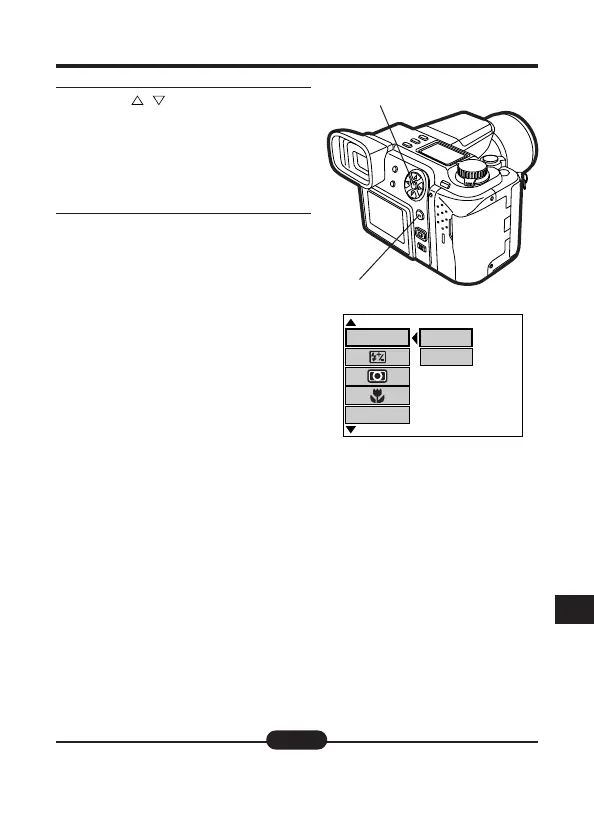
Press to select “RESET
ON” or “RESET OFF”, then press
the OK button.
● Repeat steps 2, 3, and 4 if there
are other settings you want to
change.
5
Press the OK button repeatedly
until the menu disappears.
● The settings in "CUSTOM" will be
saved even if you select settings
other than "CUSTOM" in "ALL
RESET".
Items that can be selected in
“CUSTOM”
●Flash
●Flash intensity
control
●Metering mode
●Macro mode
●Multi metering
●Drive
●BKT setting
●Stabilization
system
●Zoom
●Super tele
●Aperture
●Shutter speed
●Exposure compen-
sation
●White balance
●ISO sensitivity
●Slow shutter syn-
chronization flash
●AF mode
●Full-time AF
●AF/MF
●INFO
●Function
●S-Prg mode
●Pre-capture
●Still sound record
mode
●Movie sound
record mode
●Still image mode
●Movie image mode
..
When setting “RESET ON”
Restores the initial default settings as
shown on the chart on p.149 .
4
4, 5
MULTI
METERING
[
1 / 6
]
FLASH MODE
RESET ON
RESET OFF
[
SM
]







 To Next Page