27
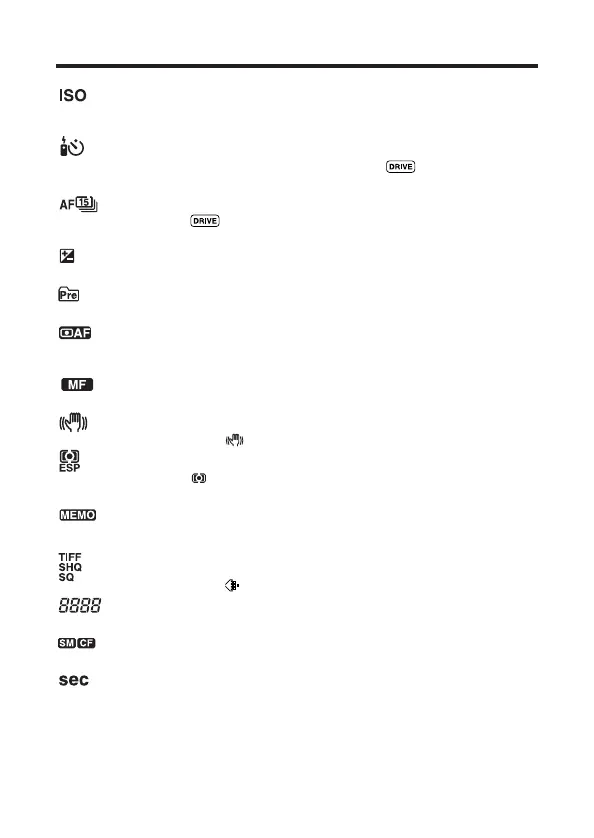
: ISO (P. 101)
● Displayed when the ISO is set to any mode except AUTO. When the ISO is
increased automatically in the AUTO mode, this indication blinks.
: Self-timer/Remote control (P. 119/120)
● To use the Self-timer/remote control, press the button repeatedly until
this indication appears.
: Sequential shooting (P. 118)
● Press the button repeatedly until the indication for the desired mode
appears.
: Exposure compensation (P. 99)
● Displayed during exposure compensation.
: Pre-capture (P. 00)
● Displayed when Pre-capture is set on the menu.
: AF system (P. 96)
● Displayed when AF MODE is set. If SPOT is selected, this indication does
not appear.
: Manual focus (P. 94)
● Displayed when the focus is adjusted manually.
: Stabilization system (P. 97)
● Displayed when is set.
: Metering mode (P. 100)
● Press the button repeatedly until the indication for the desired mode
appears.
: AE memory (P. 130)
● Displayed when the memorized exposure (AE lock) is maintained after
recording.
: Record mode (P. 104)
● Displayed when is set.
: Number of storable still pictures (P. 63)
● Displays the number of still pictures you can record.
: Card (P. 00)
● Displays the card type in use.
: Seconds remaining in Movie mode (P. 63)
● Displays the longest continuous recording time per movie frame.







 To Next Page