67
Checking Programs Section 2-3
2-3 Checking Programs
CS/CJ-series programs can be checked at the following stages.
• Input check during Programming Console input operations
• Program check by CX-Programmer
• Instruction check during execution
• Fatal error check (program errors) during execution
2-3-1 Errors during Programming Device Input
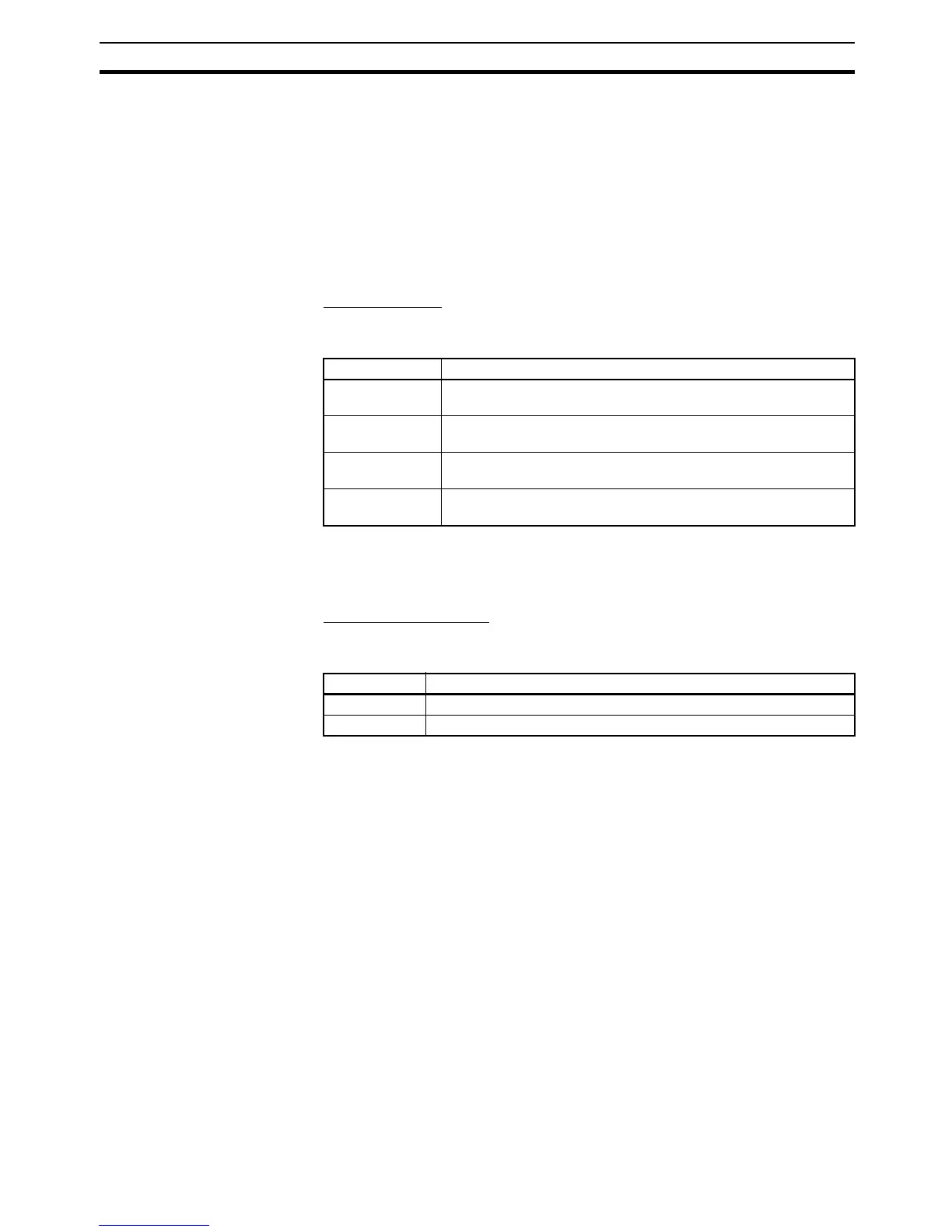
CX-Programmer
The program will be automatically checked by the CX-Programmer at the fol-
lowing times.
The results of checking are output to the text tab of the Output Window. Also,
the left bus bar of illegal program sections will be displayed in red in ladder
view.
Programming Console
Errors at the following points will be displayed on the Programming Console
during input.
2-3-2 Program Checks with the CX-Programmer
The user program can be checked in the CX-Programmer. When the program
is checked, the user can specify program check in any of four levels: A, B, or C
(in order of the seriousness of the errors) or a custom check level.
The CX-Programmer does not check range errors for indirectly addressed
operands in instructions. If an instruction's operand data is invalid, the ER
Flag will be turned ON during the program execution check, which is
described in the next section. For details, refer to the CS/CJ-series Program-
mable Controllers Instructions Reference Manual (W340).
For details on the CX-Programmer's checks, refer to the CX-Programmer
Operation Manual (W446).
2-3-3 Program Execution Check
Operand and instruction location checks are performed on instructions during
input from Programming Devices (including Programming Consoles) as well
as during program checks from Programming Devices (excluding Program-
ming Consoles). However, these are not final checks.
Timing Checked contents
When inputting
ladder diagrams
Instruction inputs, operand inputs, programming patterns
When loading
files
All operands for all instructions and all programming patterns
When download-
ing files
Models supported by the CS/CJ Series and all operands for all
instructions
During online
editing
Capacity, etc.
Error display Cause
CHK MEM Pin 1 on the DIP switch on the CPU Unit is set to ON (write-protect).
IO No. ERR An illegal I/O input has been attempted.










 To Next Page