241
Manipulating Files Section 5-2
Precautions when
Comparing Automatic
Transfer at Startup
Parameter Files
Verification errors may occur at the Programming Console when comparing
parameter data between files before transfer and the data after transfer when
creating automatic transfer at startup parameter files (AUTOEXEC.STD) and
executing automatic transfer at startup for combinations of pre-Ver. 2.0, unit
version 2.0, and unit version 3.0 CJ-series CPU Units.
5-2-6 Simple Backup Function
This function is not supported by CS-series CS1 CPU Units that are pre-EV1.
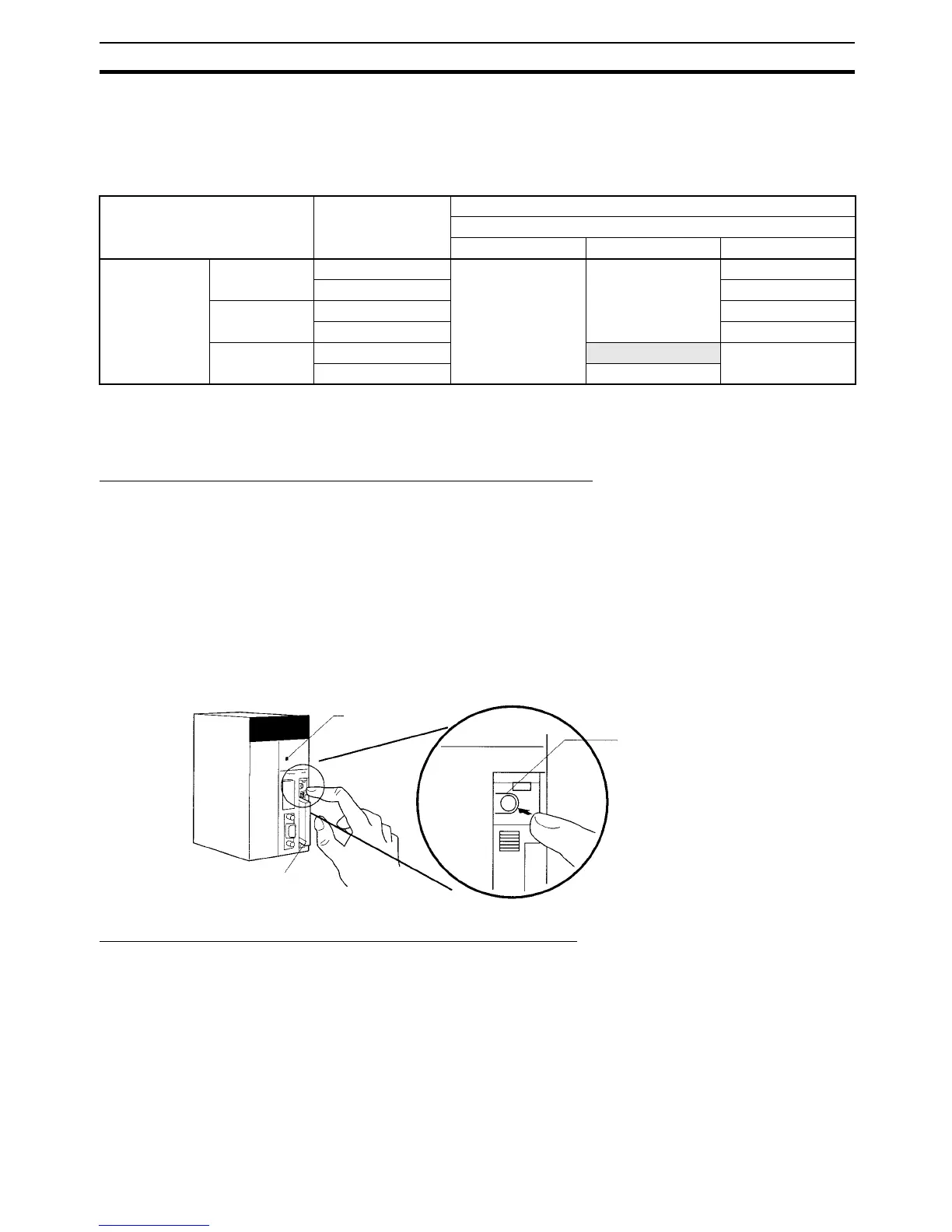
Backing Up Data from the CPU Unit to the Memory Card
To backup data, turn ON pin 7 on the CPU Unit’s DIP switch, press and hold
the Memory Card Power Supply Switch for three seconds. The backup func-
tion will automatically create backup files with fixed file names and extensions,
and write them to the Memory Card. The backup files contain the program,
parameter area data, I/O memory data, symbol tables (see note), comment
files (see note), and program index files (see note). This function can be exe-
cuted in any operating mode.
Note This data is supported by CS/CJ-series CPU Units with unit version 3.0 or
later only. The backup files are created automatically from files in either the
Memory Card, EM file memory, or comment memory.
Restoring Data from the Memory Card to the CPU Unit
To restore the backup files to the CPU Unit, check that pin 7 is ON and turn
the PLC’s power OFF and then ON again. The backup files containing the
program, parameter area data, I/O memory data, symbol tables (see note),
comment files (see note), and program index files (see note) will be read from
the Memory Card to the CPU Unit all at the same time.
*1 This data is supported by CS/CJ-series CPU Units with unit version 3.0 or
later only. The backup files are read to either the Memory Card, EM file
memory, or comment memory.
Source CPU Unit Original I/O
allocation status
Destination CPU Unit
Unit version of CPU Unit at backup/restore destination
Pre-Ver. 2.0 Unit Ver. 2.0 or later Unit Ver. 3.0 or later
Unit version of
CPU Unit at
backup source
Pre-Ver. 2.0 Automatic allocation Verification possible Verification possible Verification possible
User-specified Verification possible
Unit Ver. 2.0 or
later
Automatic allocation Verification possible
User-specified Verification possible
Unit Ver. 3.0 or
later
Automatic allocation
Verification error Verification possible
User-specified Verification possible
Pin 7: ON
Memory Card
Press and hold the
Memory Card Power
Switch for three seconds.
(This example shows a
CS-series CPU Unit.)










 To Next Page