227
Manipulating Files Section 5-2
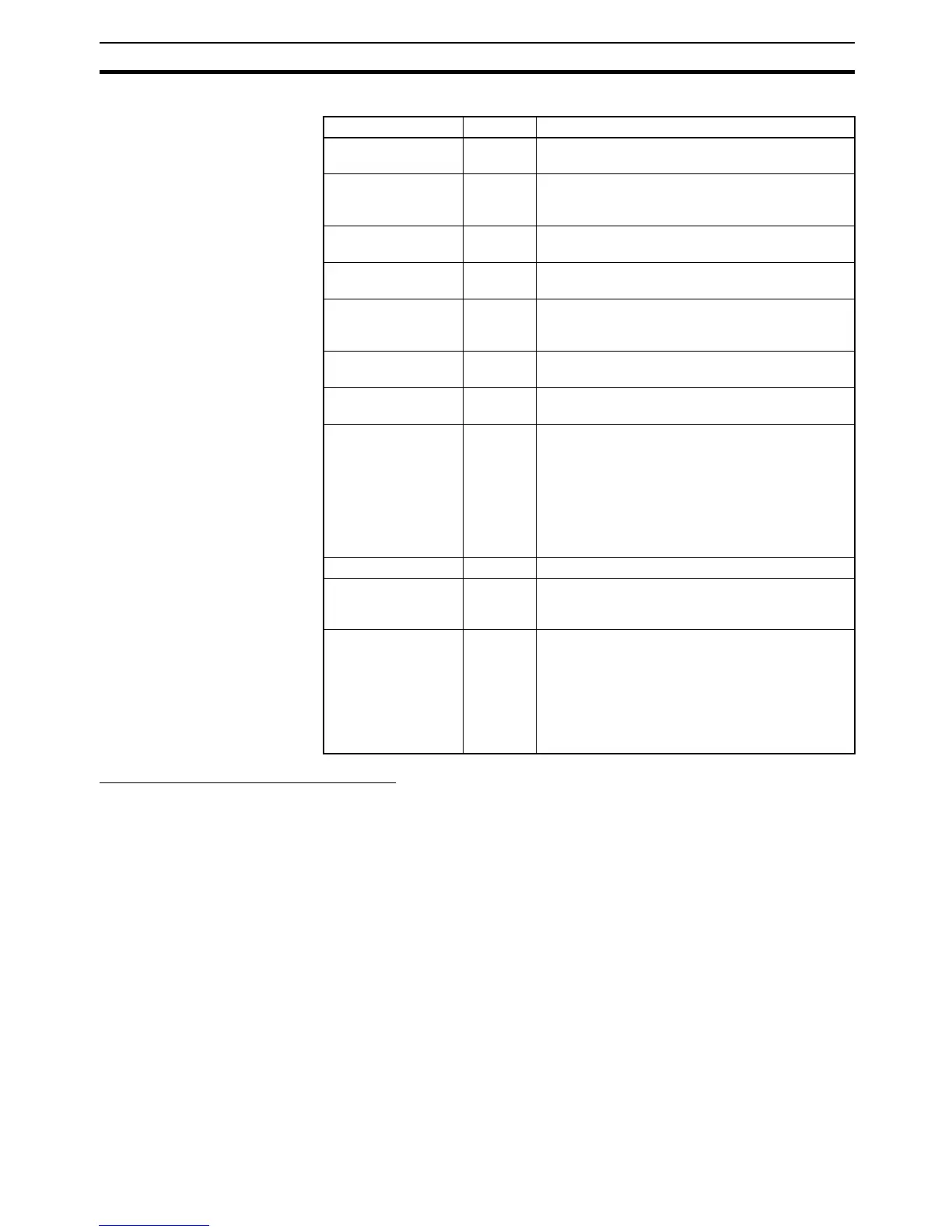
Related Auxiliary Bits/Words
CMND(490): DELIVER COMMAND
CMND(490) can be used to issue a FINS command to the local CPU Unit
itself to perform file memory operations such as formatting or deleting files.
Make the following settings in CMND(490)’s control words when issuing a file-
memory FINS command to the local PLC:
1,2,3... 1. Set the destination network address to 00 (local network) in C+2.
2. Set the destination unit address to 00 (PLC’s CPU Unit) and the destination
node to 00 (within local node) in C+3.
3. Set the number of retries to 0 in C+4. (The number of retries setting is in-
valid, so set it to 0.)
FINS Commands Related
to File Memory
Refer to 5-2-2 FINS Commands for information on FINS commands.
Note There are other FINS commands related to file memory that are not shown in
the following table that can be executed. Refer to the Communications Com-
mand Reference Manual (W342) for details on FINS commands.
CMND(490) cannot be executed to the local CPU Unit if another CMND(490)
or file memory instruction is being executed to another CPU Unit, A File Mem-
Name Address Operation
Memory Card Type A34300 to
A34302
Indicates the type of Memory Card, if any, that is
installed.
EM File Memory For-
mat Error Flag
A34306 ON when a format error occurs in the first EM
bank allocated for file memory. OFF when format-
ting is completed normally.
Memory Card For-
mat Error Flag
A34307 ON when the Memory Card is not formatted or a
formatting error has occurred.
File Write Error Flag A34308 ON when an error occurred when writing to the
file.
File Write Impossi-
ble Flag
A34309 ON when the data couldn’t be written because the
file was write-protected or there was insufficient
free memory.
File Read Error Flag A34310 ON when a file could not be read because its data
was corrupted or if it contains the wrong data type.
No File Flag A34311 ON when data could not be read because the
specified file doesn’t exist.
File Memory Opera-
tion Flag
A34313 ON for any of the following:
The CPU Unit is processing a FINS command
sent to itself using CMND(490).
FREAD(700) or FWRIT(701) is being executed.
The program is being overwritten using an Auxil-
iary Area control bit.
A simple backup operation is being performed.
Accessing File Flag A34314 ON when file data is actually being accessed.
Memory Card
Detected Flag
A34315 ON when a Memory Card has been detected.
(Not supported by CS-series CS1 CPU Units that
are pre-EV1)
Number of Items to
Transfer
A346 to
A347
These words indicate the number of words or
fields remaining to be transferred (32 bits).
When a binary (.IOM) file is being transferred, this
number is decremented each time a word is read.
When a text or CSV file is being transferred, this
number is decremented each time a field is trans-
ferred.










 To Next Page