316
Changing the Timer/Counter PV Refresh Mode Section 6-4
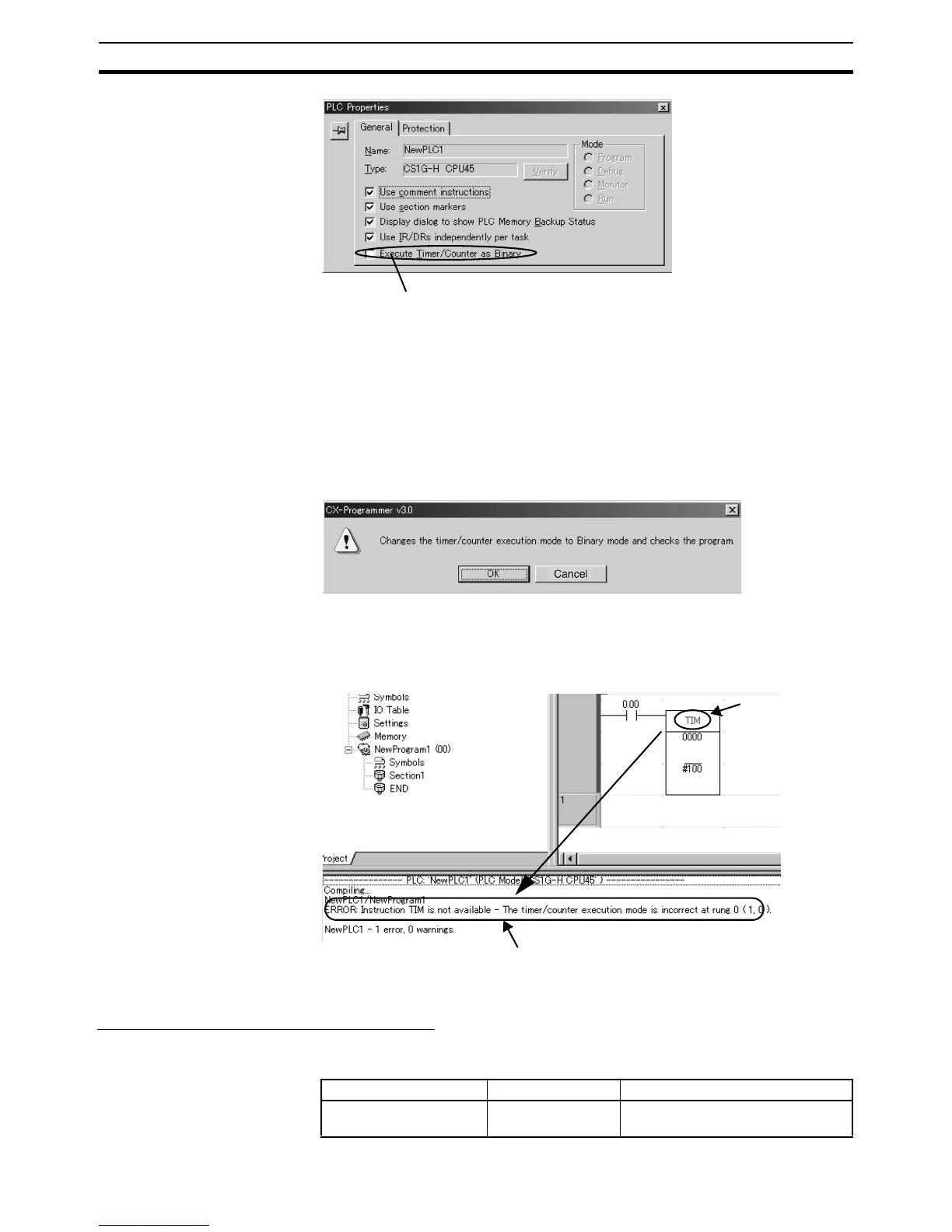
2. Click the General Tab, and select Execute Timers/Counters as Binary.
• Not selected (default): BCD mode
• Selected: Binary mode
The timer/counter PV refresh mode set value set under the PLC properties
will be stored in the CPU Unit’s user memory when the user program is
transferred from the CX-Programmer to the CPU Unit.
When the setting is changed, the following dialog box will be displayed au-
tomatically.
Click the OK Button to execute the program check. The program check results
will be displayed in the output window.
Example: The TIM instruction has been used even though the mode has been
changed to binary mode.
BCD Mode/ Binary Mode Confirmation
A09915 in the Auxiliary Area (Timer/Counter PV Refresh Mode Flag) can be
used to check whether a CPU Unit is operating in BCD mode or binary mode.
Select this check box to enable the setting.
Cancel
TIM is displayed in
red.
The program check results are displayed in the output window.
Example: The timer/counter operation mode is different, so TIM
cannot be used.
Name Address Details
Timer/Counter PV
Refresh Mode Flag
A09915 0: BCD mode
1: Binary mode










 To Next Page