Omron TM Collaborative Robot: Conveyor Tracking User’s Manual 30
5. Quick Walk-Through
Sensor Mode
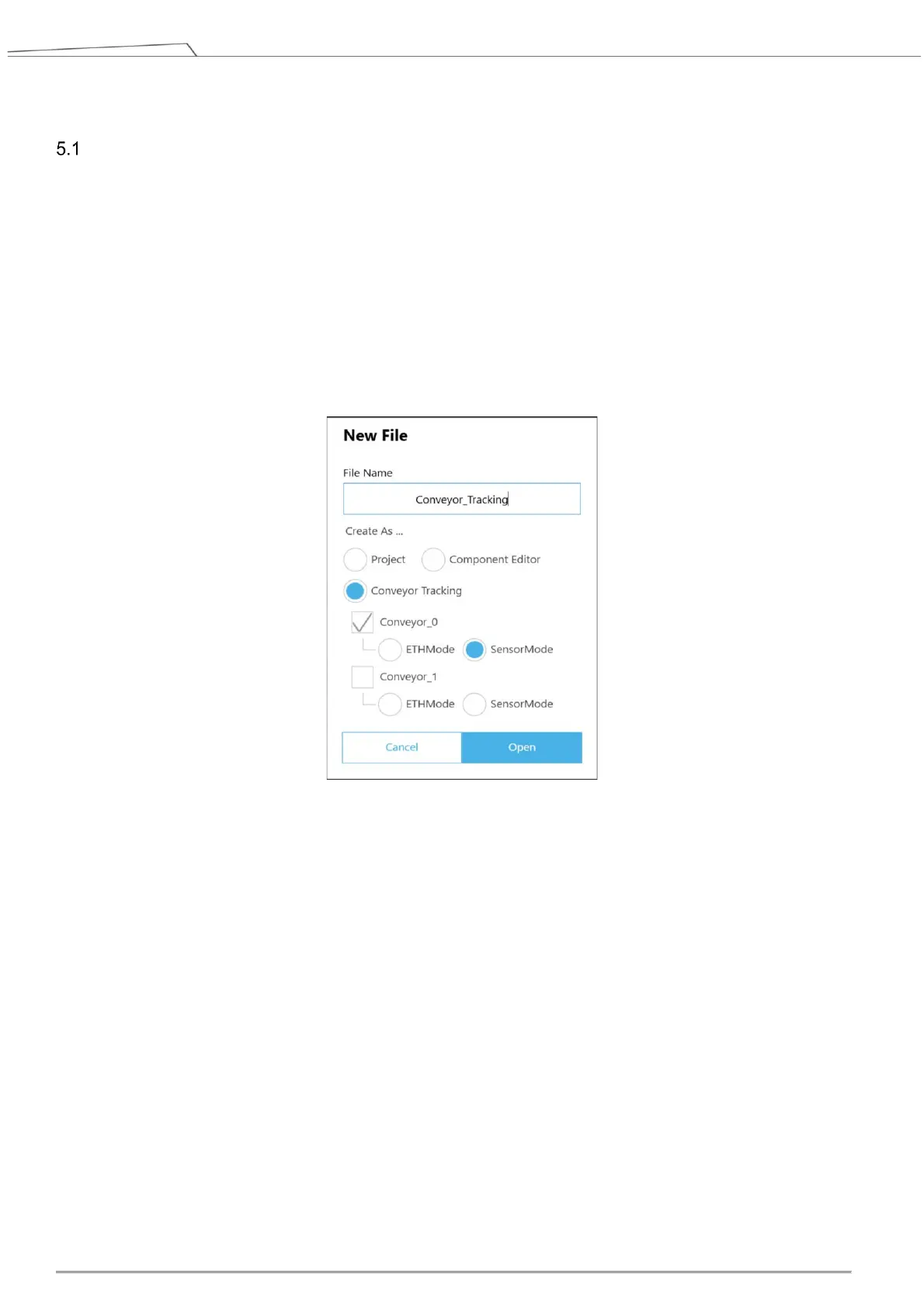
1. Create new Conveyor Tracking project
A. Start a new project by clicking New > New Flow from the Project page in TMflow
B. Check the Conveyor Tracking box
C. Select the conveyor
Choose Conveyor_0 if 1 conveyor is used
Choose both Conveyor_0 and Conveyor_1 if 2 conveyors are used
D. Select Sensor Mode.
E. Enter project name and click Open.
Figure 17: Create new project
2. Conveyor Tracking project appears
A. Two threads appear
B. One is the main thread to edit the movement procedure of the robot (the name of this thread shall
appear identical to the project name you entered in Step 1)
C. Another is the sub-thread, which is Conveyor_0 in Figure 18. This thread is configuration-only
and cannot add any node.
D. The sub-thread must be edited before the main thread can be edited.









 To Next Page