Omron TM Collaborative Robot: Conveyor Tracking User’s Manual 24
Main Thread Nodes
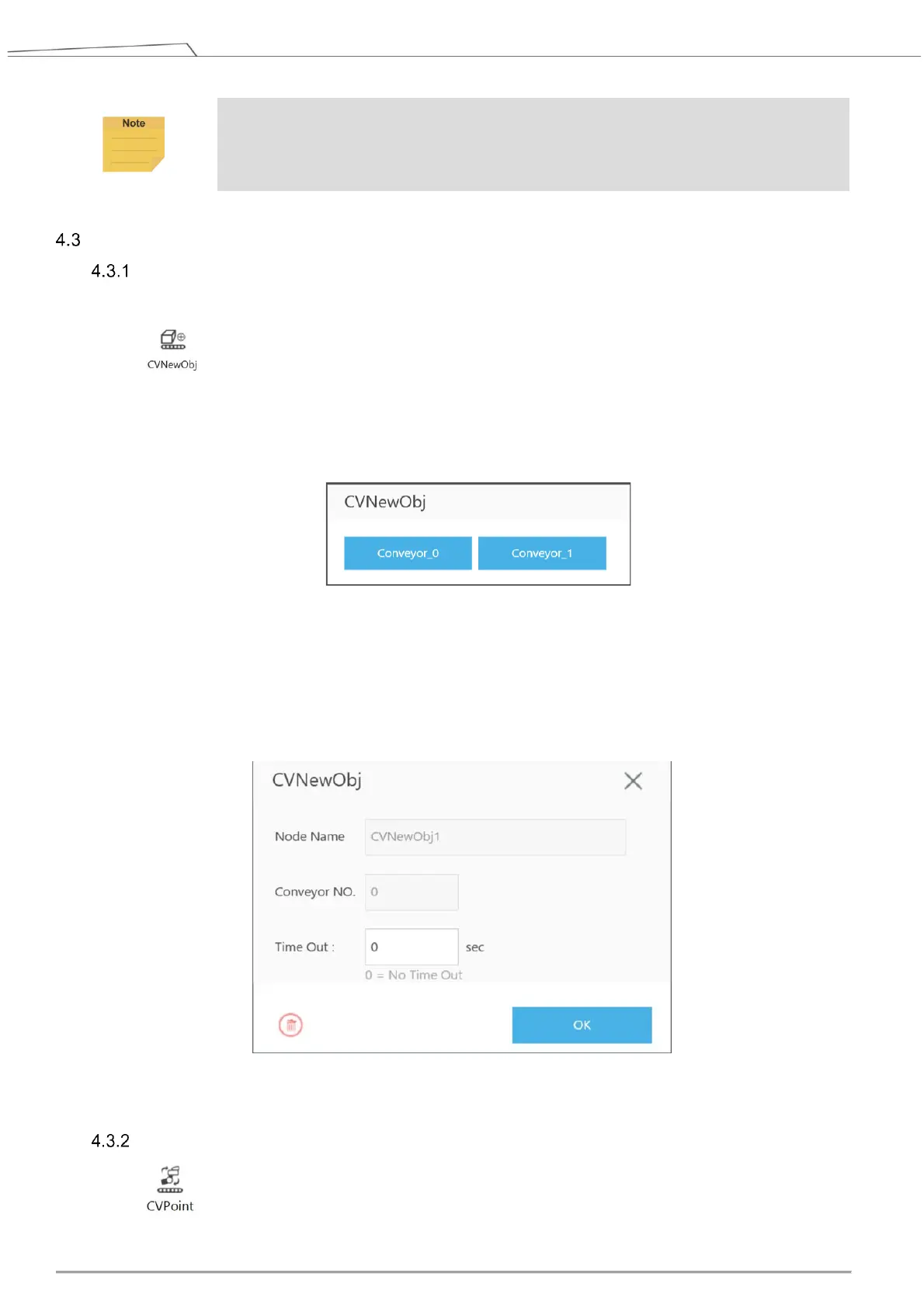
CVNewObj Node
Return to Conveyor main thread to select CVNewObj node.
This node indicates that the robot is waiting for valid objects that have been detected by the
sensor and will move to the robot’s New Object Range within the Working Area (refer to 4.1.2
for details about range and area).
When dragging this node, users are required to select Conveyor_0 or Conveyor_1.
Conveyor NO: Selected conveyor.
Time Out: Set the waiting time for a valid object, which is detected within New Object Range.
When Time Out = 0, it indicates no time out is set.
When a valid object enters the robot operating range, the thread will go to the next node.
Figure 12: CVNewObj
CVPoint Node
CVPoint Node sets the linear motion under Conveyor main thread. This node is mainly used
to track object motion through the conveyor in linear motion.
NOTE:
Users are not required to move the robot arm when clicking Next and Finish.









 To Next Page