80 The Information Company
Error retry defines the number of times TX1 will attempt to read sectors with errors
before skipping the sector. Be careful when selecting a value of 10 or 100 as it will
drastically increase the duplication time when imaging source drives with errors.
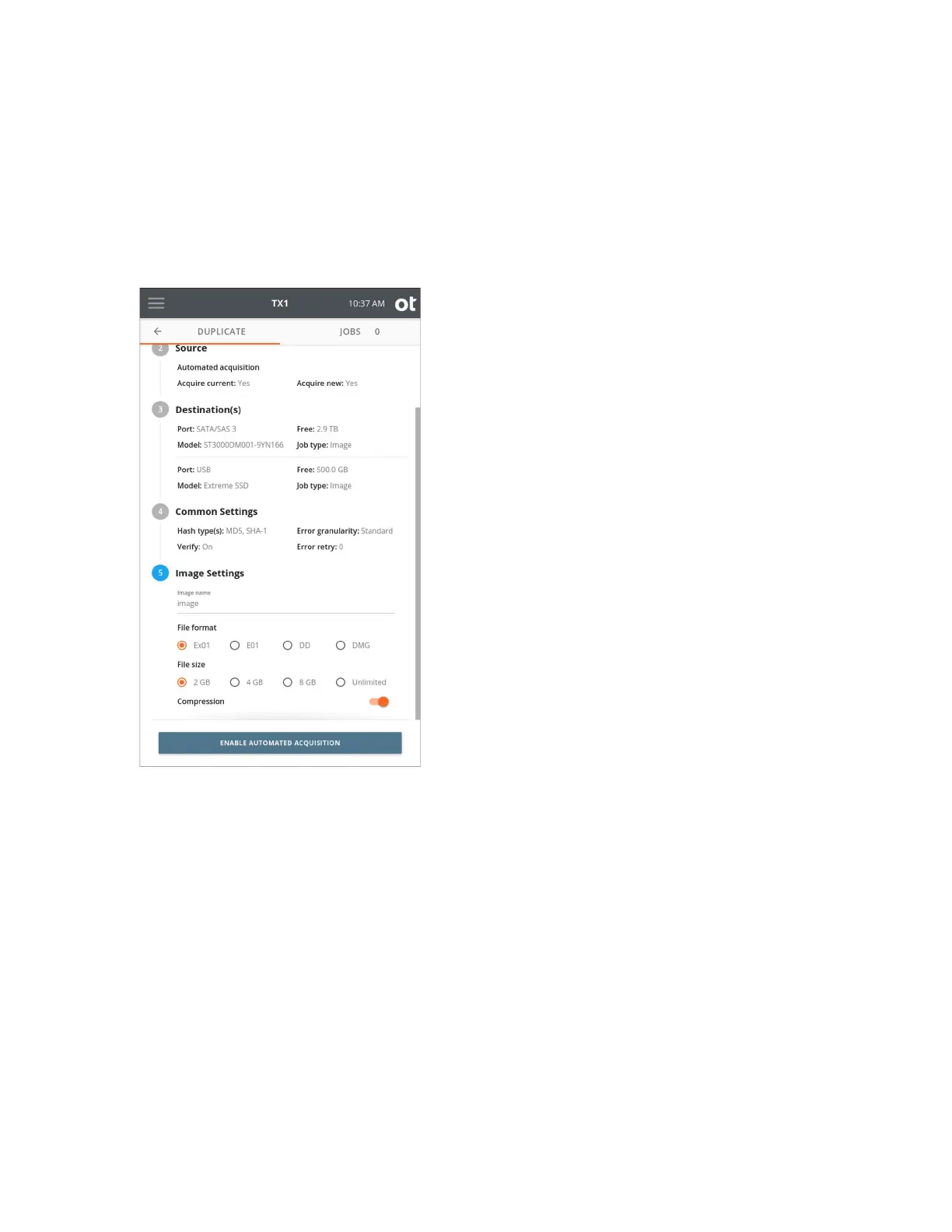
7. To change the image settings, tap the 5 or Image Settings heading.
Image n
ame defines the base filename for image segments. The default value is
image. Tap the Image name text area to change the filename, then select a File
format and File size.
Compression is enabled by default for ex01 and e01 file formats but can be
disabled if desired. Compression is not supported for dd and dmg file formats.
8. Once you are satisfied with your settings and drive selections, tap the ENABLE
AUTOMATED ACQUISITION button. The Jobs tab will be shown with information in
the top Automated Acquisition area indicating that mode is active – the file type
setting for all automated jobs and the number of automated jobs that have been
started during the active automated acquisition job. Note that the automated
acquisition indicator will be rotating in the Jobs tab header area next to the
active/queued job count. This allows for at-a-glance awareness that automated
acquisition mode is active, even when not looking at the Jobs tab.
Copyright © 2022 Open Text. All rights reserved. Trademarks owned by Open Text.



 To Next Page