Operator’s Manual - OPTI CCA-TS2 6-1
6 DATA MANAGEMENT
6 DATA MANAGEMENT
The <Data Manager> menu allows you to print out Measurement, Diagnostics and Statistics
Reports. It also provides you with the ability to import and export information to a connected
computer or by using a USB mass storage device.
6.1 Printing Measurement and Statistics Reports
6.1.1 Patient Measurement Reports
The <Data Manager> menu allows you to print
out patient measurement reports.
You can print out individual measurement results,
groups of measurement results, or all the results in
memory.
In the default setting, patient reports are set to print
automatically after each measurement.
Information on how to change these settings can be
found in Section 3.2.4.1.
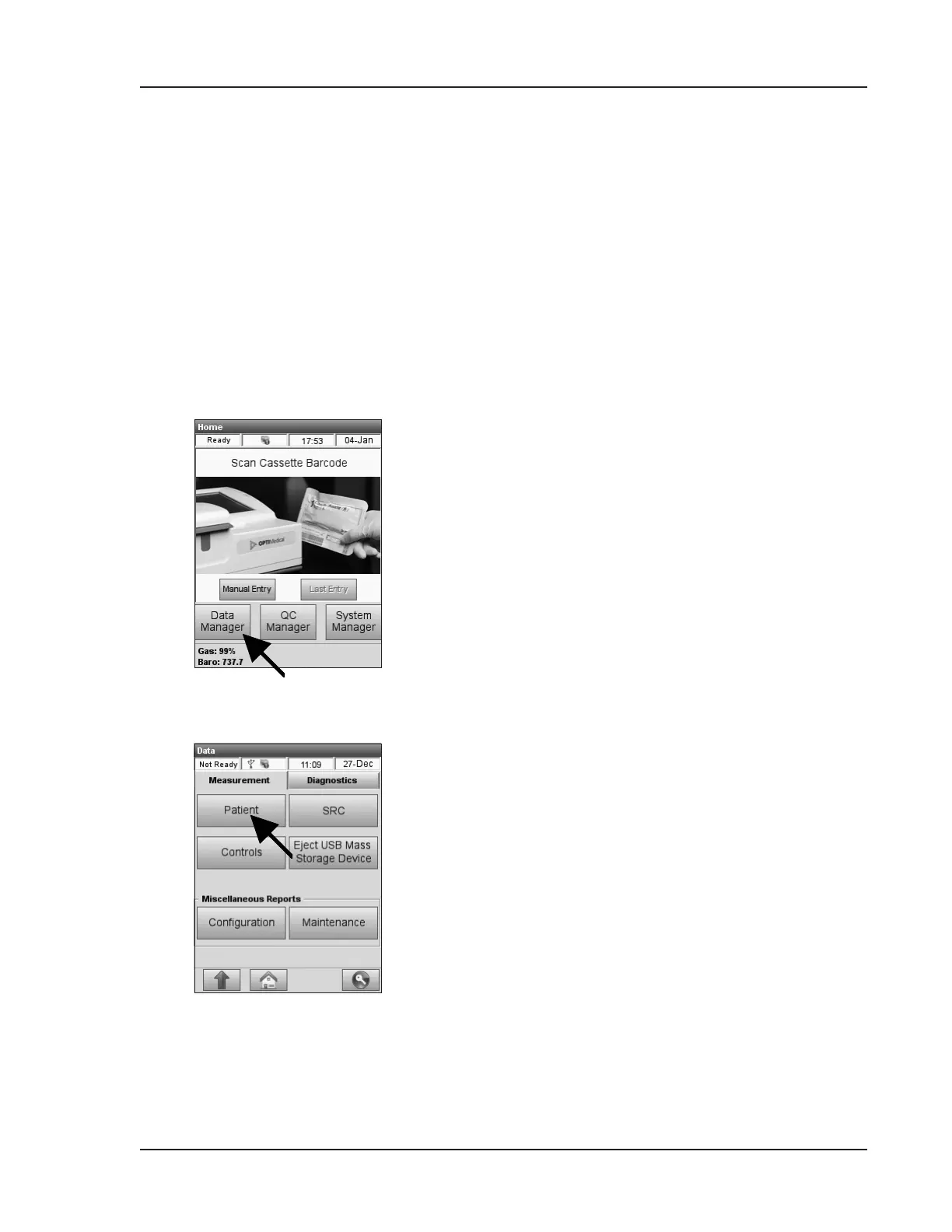
1. To print a patient report, select <Data
Manager> in the main menu (Fig. 6-1).
2. On the <Measurement> tab, select <Patient>
(Fig. 6-2).
Fig. 6-1 Data Manager
Fig. 6-2 Select Patient Report


 To Next Page