Operator’s Manual – OPTI CCA-TS2 8-21
8 DIAGNOSTICS AND TROUBLESHOOTING
8.2.7 Checking the Cooling Fan
The purpose of this test is to check for proper
functioning of the cooling fan.
In the main menu, press <System Manager ->
Diagnostics>.
• Select the <Hardware> tab.
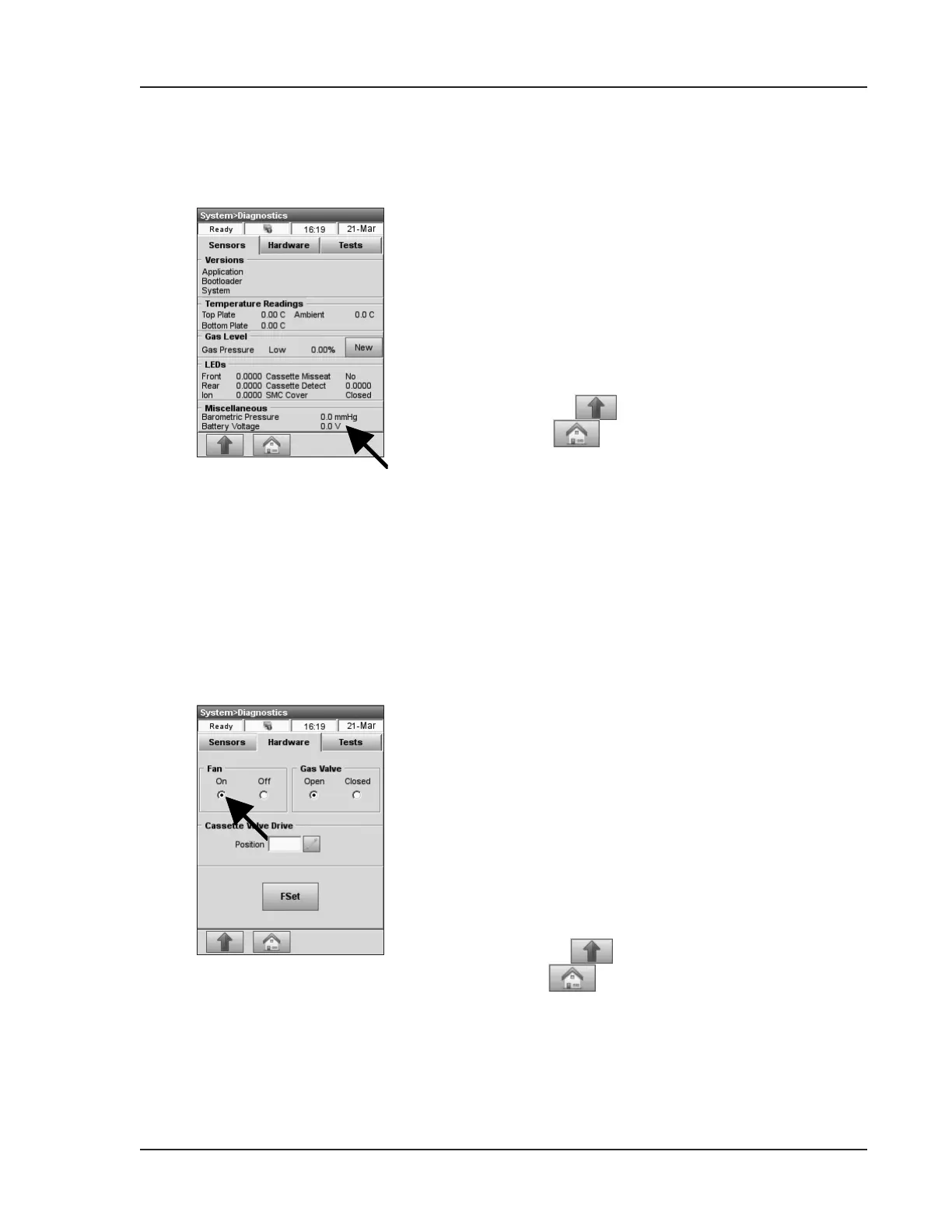
• Press the <On> button under <Fan> to start the
test (Fig. 8-8).
• You should feel the draft of the fan by placing
your hand over the fan at the back side of the
analyzer.
• Press
to return to the <System> screen
or
to return to the main menu.
Fig. 8-8 Cooling Fan
8.2.6 Checking the Battery Voltage
This selection lets you check the battery voltage.
In the main menu, press <System Manager ->
Diagnostics>.
• The second display in the <Miscellaneous>
section shows the battery voltage (Fig. 8-7).
•
If the voltage is below 9.0V, the battery needs to
be recharged or may need replacement.
• Press
to return to the <System> screen
or
to return to the main menu.
Fig. 8-7 Battery Voltage


 To Next Page